The 20-20-20 rule says that for every 20 minutes of screen work, you look at something at least 20 feet away for at least 20 seconds. The American Academy of Ophthalmology states it as "Every 20 minutes, shift your eyes to look at an object at least 20 feet away, for at least 20 seconds", and the American Optometric Association publishes the same rule in its computer vision syndrome guidance. The evidence for those exact numbers is split. A 2023 study of 29 symptomatic computer users (Talens-Estarelles et al., Contact Lens and Anterior Eye) found that automated 20-20-20 reminders cut digital eye strain and dry eye symptoms over two weeks, and that the improvement faded once the reminders stopped. A 2023 trial of 30 readers (Johnson and Rosenfield, Optometry and Vision Science) found no effect of scheduled 20 second breaks on symptoms, reading speed or accuracy. The practical read: breaks are worth taking, the exact numbers are a convenient default rather than a proven optimum, and the benefit only lasts as long as the habit does. CircadianShield's break timer is built for that last part. It fires the 20-20-20 prompt, pauses itself during video calls, full screen apps and screen recording, and records how many breaks you actually took so compliance is measured instead of guessed.
The 20-20-20 rule is the most repeated piece of advice in all of digital eye strain guidance. It costs nothing, needs no equipment, and fits in one sentence. It is also the advice people abandon fastest, usually inside two weeks, which is roughly the point at which the one study that showed a benefit stopped measuring.
This page covers the origin of the rule, the two 2023 studies that disagree about it, the parts of screen discomfort it provably does not touch, the related rules people confuse it with, and what a break system has to do to keep working after the novelty wears off.
What the 20-20-20 Rule Is
The 20-20-20 rule is a screen break schedule: every 20 minutes, shift your gaze to an object at least 20 feet (about 6 metres) away, and hold it there for at least 20 seconds. The American Academy of Ophthalmology publishes that wording on its eye strain page. The American Optometric Association publishes its own version: "To help alleviate digital eyestrain, follow the 20-20-20 rule; take a 20-second break to view something 20 feet away every 20 minutes."
Two things happen during those 20 seconds. The ciliary muscle, which has been holding your lens in a near focus contraction for however long you have been at the screen, relaxes toward its resting shape. And your blink rate, which drops sharply during concentrated screen work, returns toward baseline, which puts fresh tear film back over the cornea. Those are the two mechanisms the rule targets. Everything else about screen discomfort, including glare, backlight flicker and an uncorrected prescription, is outside what a 20 second gaze shift can reach.
Who Created the 20-20-20 Rule and Who Recommends It
The 20-20-20 rule was coined by Jeffrey Anshel, OD, FAAO, a California optometrist, around 1991. Anshel had started Corporate Vision Consulting after seeing patients turn up with late day headaches and new myopia in their late thirties, with heavy computer use as the only common thread. The three number phrasing came out of radio and television interviews, where he needed an answer to "what can people do about computer eyestrain" that a listener would still remember an hour later. In his own words to Optometry Times, "the tag came from TV and radio interviews that time. The interviewers asked what people can do about computer eyestrain, so I honed this into something easy to remember." He was writing Visual Ergonomics in the Workplace at the time, first published in 1998. The numbers were chosen to be memorable, which is worth holding in mind when you read the later attempts to validate them.
The institutional backing came afterward. Today both the American Academy of Ophthalmology and the American Optometric Association publish the 20-20-20 rule in their own patient guidance, which is why it reads as consensus. It is frequently credited online to the World Health Organization as well; the citations that actually hold up when you check them are the AAO and AOA pages quoted above. If you hand the rule to patients or staff, CircadianShield's 20-20-20 rule patient handout is a printable version of the same guidance.
Does the 20-20-20 Rule Actually Work? Two 2023 Studies Disagree
Ask whether the 20-20-20 rule works and you get a confident yes from most eye care sites. The honest answer is that the evidence for these particular numbers is thin and contradictory, and the two most cited recent studies landed on opposite sides.
Talens-Estarelles et al., 2023, Contact Lens and Anterior Eye. Researchers at the University of Valencia built webcam software that watched 29 symptomatic computer users, tracked their gaze and blinking, and pushed personalised 20-20-20 reminders. Participants were assessed across four visits over four weeks. After two weeks with the reminders running, total daily breaks went up, continuous screen time went down, and digital eye strain and dry eye symptom scores improved. Tear film and ocular surface signs did not improve, and most accommodative and vergence measures did not shift. The authors concluded that "the 20-20-20 rule is an effective strategy for reducing DES and dry eye symptoms, although 2 weeks was not enough to considerably improve binocular vision or dry eye signs." One week after the reminders were switched off, the symptom gains had faded.
Johnson and Rosenfield, 2023, Optometry and Vision Science. Thirty young subjects performed a 40 minute reading task on a tablet on four separate occasions, with 20 second breaks scheduled every 5, 10, 20 or 40 minutes (the last being no break at all). Symptoms rose significantly after the task in all four conditions, and the scheduled breaks made no significant difference to symptoms, reading speed or task accuracy. The paper is titled "20-20-20 Rule: Are These Numbers Justified?" and its answer is no, the numbers are not justified by this data.
Reading the two together: the 20 second break inside a single 40 minute task did not measurably help, but a persistent reminder system that changed how people worked across two weeks did shift symptoms. That is a meaningful distinction. The intervention that worked was not the 20 seconds. It was the system that kept interrupting the 90 minute uninterrupted stretch. That is the whole argument for using a break timer rather than relying on intent, and it is why CircadianShield tracks break compliance instead of just firing a reminder into the void.
| Study | Design | What improved | What did not |
|---|---|---|---|
| Talens-Estarelles et al. 2023, Contact Lens and Anterior Eye | 29 symptomatic computer users, webcam reminders, 2 weeks plus 1 week washout | Daily break count, continuous screen time, digital eye strain and dry eye symptom scores | Tear film and ocular surface signs, most accommodative and vergence measures, and the gains faded after the reminders stopped |
| Johnson and Rosenfield 2023, Optometry and Vision Science | 30 subjects, 40 minute tablet reading task, breaks every 5, 10, 20 or 40 minutes | Nothing significant attributable to the breaks | Symptoms, reading speed and task accuracy were all unchanged by break schedule |
What the 20-20-20 Rule Does Not Do
Three limits of the 20-20-20 rule are worth stating plainly, because most pages that recommend it skip all three.
It is not a myopia intervention. The Modern Optometry review "Myth-Busting the 20/20/20 Rule" makes the point directly: anti-myopic visual stimuli likely need to be present for at least five minutes every hour at roughly optical infinity to matter, and 20 seconds every 20 minutes does not reach that dose. If myopia progression in a child is the concern, outdoor time and clinical myopia management are the interventions with evidence behind them, not a 20 second glance.
It relieves dry eye symptoms without changing dry eye signs. That is the Talens-Estarelles result above: symptom scores improved, tear film and ocular surface measurements did not. Feeling better and being measurably better are not the same finding. If your eyes burn all day, the 20-20-20 rule is one input, and the fuller picture is in CircadianShield's guide to blue light and dry eyes.
It does nothing about the display itself. Backlight flicker, excessive brightness against a dark room, and glare all keep working on your eyes during the break and after it. If your headaches track with a specific monitor rather than with hours worked, the cause is more likely PWM flicker or brightness, and the fix is at the display, not the calendar. CircadianShield's page on monitor brightness and eye strain covers why turning brightness down can make flicker worse on some panels.
The Other 20: Screen Height and Gaze Angle
The 20-20-20 rule is the famous number set, but the AOA publishes a second one that matters just as much for dry eye and gets a fraction of the attention: "The computer screen should be 15 to 20 degrees below eye level (about 4 or 5 inches) as measured from the center of the screen and 20 to 28 inches from the eyes." The American Academy of Ophthalmology gives compatible advice, sitting about 25 inches from the screen and positioning it so your gaze angles slightly downward rather than straight ahead.
The mechanism is simple and it is mechanical, not optical. When you look straight ahead or upward at a monitor, your upper lid retracts and more of the ocular surface is exposed to the air. More exposed surface plus a reduced blink rate means faster tear evaporation. Angling the gaze down by 15 to 20 degrees narrows the palpebral aperture, exposes less cornea, and slows evaporation for free, all day, with no compliance required. That is the appeal: unlike the 20-20-20 rule, screen height is a one time change you cannot forget to do. If you are setting up a workstation from scratch, CircadianShield's guide to the best monitor settings for eye health covers height alongside brightness, contrast and colour temperature.
Why Near Work Tires the Eyes in the First Place
The 20-20-20 rule targets accommodation, so it helps to know what accommodation is doing. The crystalline lens changes shape to shift focus between near and far. The ciliary muscle surrounding it controls that: contraction increases lens curvature for near focus, relaxation lets the lens flatten for distance. At a typical monitor distance of 20 to 28 inches, that muscle is held in sustained near focus contraction for the whole working day.
Unlike the muscles in your arm, the ciliary muscle does not cycle between effort and rest during normal computer work. It stays contracted. Over hours, that sustained isometric effort produces accommodative fatigue, and the symptoms are the familiar ones: intermittent blurred vision, especially when you look up from the screen, tired eyes, and an ache across the forehead or temples. Accommodative recovery follows a curve rather than a switch, with most of the release happening in the first 15 to 20 seconds of distance viewing, which is where the 20 second figure came from. CircadianShield's guide to computer vision syndrome covers the full set of mechanisms, including the ones breaks cannot reach.
Why People Fail at the 20-20-20 Rule
The 20-20-20 rule has an adherence problem more than an efficacy problem. Nearly six out of ten American adults report digital eye strain symptoms, according to The Vision Council, and the rule is widely known, so knowledge is clearly not the binding constraint. The failure modes are consistent:
- Twenty minutes passes without registering. Deep work is exactly the state in which you stop tracking time. By the time the thought "I should look away" arrives, it has been 50 minutes. The rule asks you to interrupt yourself at precise intervals, which is the opposite of how concentration works.
- Reminders get dismissed. The perceived cost of breaking flow feels larger than the benefit of a 20 second gaze shift, so people snooze the prompt. Within a week or two the notification is background noise.
- There is no feedback loop. Without tracking, you have no idea whether you took four breaks today or fourteen, and self assessment runs optimistic. The Talens-Estarelles study needed webcam software to measure real break behaviour precisely because self report is not reliable.
- Badly timed prompts poison the system. One break overlay landing in the middle of a client video call or a live demo is enough to get the whole thing switched off permanently.
Ranked against everything else you could do about screen discomfort, breaks sit in the middle of the pack, above blue light glasses and below fixing the display and the prescription. CircadianShield ranks the full list in how to reduce eye strain from a computer.
Why Plain 20 Minute Timers Fail
The obvious answer to the 20-20-20 rule's compliance problem is a countdown timer that fires every 20 minutes. Most people try exactly that, through a phone timer, a menu bar app or a browser extension, and stop within a few weeks. The reason is that a fixed timer has no idea what you are doing.
A break overlay on top of an active Zoom call with a client is an embarrassment. A prompt during a full screen presentation leaves you choosing between dismissing it on camera or letting it sit there. A timer that fires in the three seconds you were holding a thought costs more recovery time than the eye break returns. Each of those builds the same association: break reminders create problems. The system gets disabled, and the user now has personal evidence that break software does not work for them, which is a harder position to reverse than never having tried.
What Works Better: Context Aware Break Reminders
A break system that survives past the novelty period has to know when to stay quiet. CircadianShield's break timer handles four cases automatically:
Video calls. When Zoom, Google Meet, Microsoft Teams, FaceTime or another detected video conferencing app is active, breaks pause and resume when the call ends. You cannot stare out of a window for 20 seconds mid meeting without it being noticed.
Full screen applications. Presentations, full screen video and full screen editors suppress the overlay. An overlay on a client facing demo does lasting damage to the habit.
Screen recording. When QuickTime, Loom, OBS or another capture tool is running, breaks pause so overlay artefacts do not land in the recording.
Active typing. If you are mid sentence, the reminder defers a couple of minutes and checks again, so the break lands in a natural pause rather than on top of a thought.
For the 20-20-20 rule, the best break schedule is the one you actually follow. A flexible 20 to 30 minute interval at 70 percent compliance delivers far more total eye relief than a rigid 20 minute interval at 25 percent. Design for adherence, not precision, especially given that neither 2023 study found the exact numbers to be magic.
What to Do During the 20 Seconds
Most 20-20-20 rule guidance ends at "look 20 feet away". The break is worth more with four small additions, and none of them add time:
- Pick a genuinely distant target. The ciliary muscle relaxes fully at optical infinity, roughly 20 feet or 6 metres and beyond. An interior wall at 15 feet still demands some accommodation. A window view of something 50 to 100 feet out is the better target, which is one reason the rule is harder to follow in a small room.
- Blink deliberately, five to ten times, with full closure. Blink rate falls during concentrated screen work and incomplete blinks become more common, both of which speed tear evaporation. Deliberate complete blinks spread the lipid layer that slows that evaporation, and they cost nothing on top of the 20 seconds you are already spending.
- Shift focus once mid break. After about 10 seconds of distance viewing, look at something at arm's length, then back out. Moving the muscle through its range beats parking it at one end.
- Unclench the brow and jaw. Squinting at a screen builds chronic tension in the forehead and around the eyes that shows up later as a headache. Two or three seconds of conscious release, every break, is disproportionately useful.
Longer Breaks the 20-20-20 Rule Does Not Cover
The 20 second break addresses accommodation and blinking. It does nothing for the neck, shoulders and lower back, which is the other half of what makes a long screen day feel bad. Layer these on top:
- Every one to two hours, take 5 to 10 minutes. Stand, walk, roll the neck and shoulders. Static seated posture compresses the cervical spine over hours in a way that no eye break touches.
- Step outside when you can. Even 30 seconds of daylight delivers an intensity indoor lighting cannot approach, and morning outdoor light is the strongest lever on circadian timing. CircadianShield's eye health guide for developers covers how to work that into a coding day.
- Use a warm compress if dry eye is significant. Five to ten minutes of warmth on closed lids softens the meibomian gland secretions that form the tear film's lipid layer. This is the sign level intervention that breaks alone did not deliver in the Talens-Estarelles data.
Rules People Confuse With the 20-20-20 Rule
Several similar sounding numbers circulate, and searchers regularly mix them up with the 20-20-20 rule. Here is what each one actually refers to.
The 30-30-30 rule
The 30-30-30 rule is the same idea with longer numbers: every 30 minutes, look at something about 30 feet away for 30 seconds. No trial has compared it head to head with the 20-20-20 rule, so there is no evidence that either interval is superior. A separate myopia management guideline for children uses 30 in a different sense, breaking near work every 30 minutes, keeping reading material no closer than 30 centimetres, and getting outdoors daily. Pick whichever interval you will actually keep. Given that both 2023 studies failed to validate the specific numbers, adherence is the variable that matters.
The 2-2-2 rule for dry eyes
There is no established eye care guideline called the 2-2-2 rule. People searching for it are almost always looking for the 20-20-20 rule, or occasionally for a clinic's own dry eye routine such as warm compresses twice a day for two minutes. If a clinician gave you a 2-2-2 instruction, ask them what the three numbers refer to, because it is a local convention rather than a published standard.
The 20-20-20 rule for phones and social media
The 20-20-20 rule was written for desktop computer work, but the accommodation load on a phone is higher, not lower, because people hold phones closer than 20 inches. The same interval applies, and the practical problem is that phone use rarely happens in a place with a 20 foot sightline. Scrolling on a couch facing a wall six feet away gives the ciliary muscle almost nothing.
20/20 vision is not the 20-20-20 rule
These share numbers and nothing else. 20/20 describes visual acuity: what a typical eye can resolve at 20 feet, you resolve at 20 feet. Smaller second numbers are sharper, so 20/13 vision is better than 20/20, and 20/30 is slightly worse, meaning you need to be 20 feet away to read what a typical eye reads at 30. The 20-20-20 rule is a break schedule and says nothing about how sharp your vision is.
Adapting the Interval to Your Work
The 20-20-20 rule's 20 minute interval was set for general office document work. Different tasks load the accommodation system differently, and the CircadianShield break timer allows anything from 15 to 60 minutes for that reason.
- Video editing, colour grading, CAD: 15 minute intervals suit sustained high precision near work.
- Meetings and video calls: gaze already shifts between windows, camera and notes, so 30 minutes is reasonable.
- Long document reading: 20 minutes or slightly less, since word level focus is demanding.
- Pomodoro users: the 25 and 5 pattern already delivers a break longer than any 20-20-20 rule prompt needs to be. Add one 20 second gaze shift at the midpoint of each work block and you are close to the 20-20-20 cadence without inventing new structure.
Measuring Whether You Actually Follow It
The single most useful number for the 20-20-20 rule is your own compliance ratio: breaks taken divided by breaks prompted. Below 40 percent the system is barely doing anything, and the fix is usually the interval or the prompt style rather than willpower. No study has published a compliance threshold, so treat those numbers as a working target rather than a clinical cutoff. What the research does show is that the direction matters: in the Talens-Estarelles study, symptom scores moved when total daily breaks went up and continuous screen time came down, and drifted back when the reminders stopped.
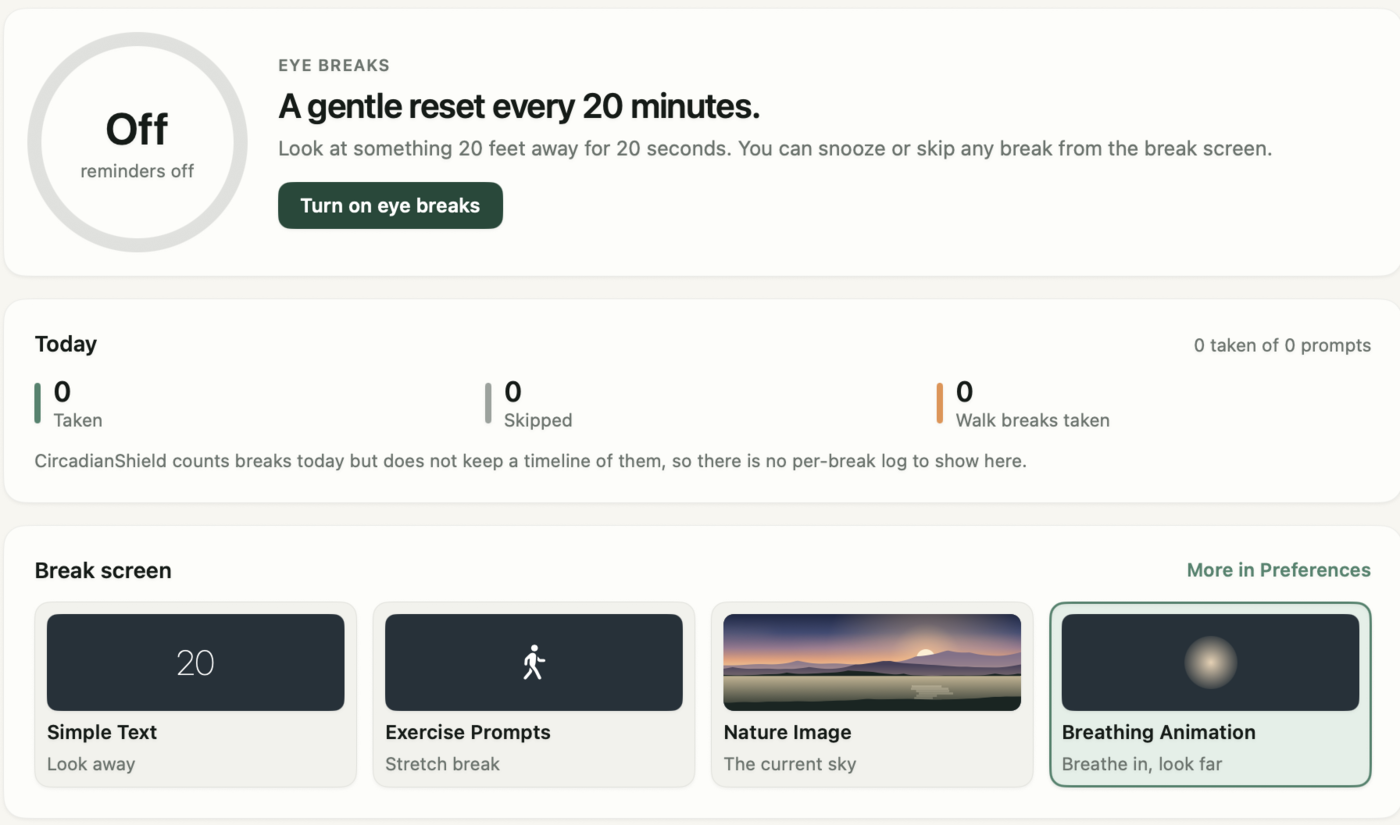
Weekly numbers beat daily ones, because any single day swings on meeting load and deadlines. A weekly compliance rate tracked across months is what tells you whether the habit is forming or quietly decaying. CircadianShield records completed, skipped and postponed breaks and folds them into the daily circadian health score alongside evening light exposure and morning light timing, so a bad break day sits next to the rest of the context instead of standing alone.
Why 20 Seconds Adds Up
An individual 20 second break feels too small to matter, which is exactly why people skip it. The arithmetic on the 20-20-20 rule is worth doing once: 20 seconds every 20 minutes across an eight hour day is 24 breaks and eight minutes total. Over a five day week that is 40 minutes. Across a working year it is roughly 35 hours of accommodative rest and tear film recovery that your eyes otherwise never get.
That is the honest case for the rule. Not that 20 seconds cures anything, because the Johnson and Rosenfield data says a single break inside one task does not. The case is that a system which reliably interrupts hour long unbroken stretches changes how the day feels by 4pm, and that was what actually moved symptom scores in the Valencia study.
How CircadianShield Enforces the 20-20-20 Rule
CircadianShield includes a 20-20-20 timer built around the compliance problem rather than the countdown. It pauses automatically for video calls, full screen apps and screen recording, offers a configurable 15 to 60 minute interval, rotates between several overlay styles so the prompt does not fade into background noise, and tracks completed, skipped and postponed breaks in the circadian health score. It runs alongside the solar based screen filtering that is the rest of the app, on macOS and Windows, with screen filtering and health scoring handled on your device.
For the product level detail, see CircadianShield's 20-20-20 rule app page and the break timer feature page. If you are comparing break reminder tools specifically, the break timer app guide covers what to look for.
Sources
| Claim | Source | Verified |
|---|---|---|
| "Every 20 minutes, shift your eyes to look at an object at least 20 feet away, for at least 20 seconds." | American Academy of Ophthalmology, Eye Strain and Sleepy Eyes | August 26, 2026 |
| 20-20-20 rule wording and the 15 to 20 degree screen height guidance | American Optometric Association, Computer Vision Syndrome | August 26, 2026 |
| 29 users, symptom improvement, no change in dry eye signs, gains faded after washout | Talens-Estarelles C, et al. Contact Lens and Anterior Eye. 2023;46(2):101744 | August 26, 2026 |
| 30 subjects, no effect of scheduled breaks on symptoms, reading speed or accuracy | Johnson S, Rosenfield M. 20-20-20 Rule: Are These Numbers Justified? Optometry and Vision Science. 2023 | August 26, 2026 |
| Anti-myopic stimuli likely need about five minutes every hour at optical infinity | Modern Optometry, Myth-Busting the 20/20/20 Rule | August 26, 2026 |
| Anshel coined the rule around 1991, started Corporate Vision Consulting in the early 1990s, and published Visual Ergonomics in the Workplace in 1998 | Brian Chou, Optometry Times, Deconstructing the 20-20-20 Rule for digital eye strain | August 26, 2026 |
| Nearly six out of ten American adults report digital eye strain symptoms | The Vision Council | August 26, 2026 |
Frequently Asked Questions About the 20-20-20 Rule
Does the 20-20-20 rule actually work?
Partly, and the evidence is split. Talens-Estarelles et al. (2023, Contact Lens and Anterior Eye) gave 29 symptomatic computer users automated 20-20-20 reminders for two weeks and found improved digital eye strain and dry eye symptom scores, more daily breaks and less continuous screen time, but no improvement in tear film or ocular surface signs, and the gains faded a week after the reminders stopped. Johnson and Rosenfield (2023, Optometry and Vision Science) tested 30 subjects on a 40 minute tablet reading task with breaks every 5, 10, 20 or 40 minutes and found no significant effect on symptoms, reading speed or accuracy. The reasonable conclusion is that breaks help when a system keeps you taking them over weeks, and that the specific numbers are a memorable default rather than a proven optimum.
How does the 20-20-20 rule work?
The 20-20-20 rule works on two mechanisms. Looking at something at least 20 feet away lets the ciliary muscle relax out of the sustained near focus contraction it holds while you read a screen, and most of that accommodative recovery happens in the first 15 to 20 seconds, which is where the 20 second figure comes from. Looking away also restores your blink rate, which drops during concentrated screen work, so tear film gets replenished over the cornea. It does not address glare, backlight flicker or an uncorrected prescription, which continue during and after the break.
Who invented the 20-20-20 rule?
Jeffrey Anshel, OD, FAAO, a California optometrist, coined the 20-20-20 rule around 1991. He had founded Corporate Vision Consulting after seeing patients with late day headaches and new myopia in their late thirties whose only shared factor was heavy computer use, and the three number phrasing came out of radio and television interviews where he needed an answer people would remember. He published Visual Ergonomics in the Workplace in 1998. Anshel has said the numbers were chosen for memorability rather than derived from a trial, which is consistent with how thin the later evidence for the exact figures turned out to be.
Is the 20-20-20 rule recommended by the American Academy of Ophthalmology or the AOA?
Both. The American Academy of Ophthalmology states it as "Every 20 minutes, shift your eyes to look at an object at least 20 feet away, for at least 20 seconds" in its eye strain guidance. The American Optometric Association publishes "To help alleviate digital eyestrain, follow the 20-20-20 rule; take a 20-second break to view something 20 feet away every 20 minutes" in its computer vision syndrome guidance. The rule is often credited online to the World Health Organization as well, but the citations that hold up when you check them are the AAO and AOA pages.
Does the 20-20-20 rule prevent myopia?
No, there is no good evidence that the 20-20-20 rule slows myopia progression. The Modern Optometry review of the rule notes that anti-myopic visual stimuli likely need to be present for at least five minutes every hour at roughly optical infinity to have an effect, and 20 seconds every 20 minutes falls well short of that dose. For a child whose prescription is changing, outdoor time and clinical myopia management are the interventions with actual support behind them. The 20-20-20 rule is a comfort measure for digital eye strain, not a myopia control strategy.
What is the 30-30-30 rule for eyesight?
The 30-30-30 rule is the same break concept with longer numbers: every 30 minutes, look at something roughly 30 feet away for 30 seconds. No study has compared it directly against the 20-20-20 rule, so there is no evidence that either interval outperforms the other. A separate myopia guideline for children also uses 30, meaning a break from near work every 30 minutes, a working distance no closer than 30 centimetres, and daily outdoor time. Since neither 2023 study validated the exact 20-20-20 figures, choose whichever interval you will actually sustain.
What is the 2-2-2 rule for dry eyes?
There is no established eye care guideline called the 2-2-2 rule. People searching for it are usually looking for the 20-20-20 rule, or for a specific clinic's dry eye routine such as warm compresses twice daily for two minutes. If a clinician gave you a 2-2-2 instruction, ask what the three numbers stand for, because it is a local convention rather than a published standard.
Can I look at my phone during a 20-20-20 break?
No. The point of the break is to relax the ciliary muscle by shifting focus to at least 20 feet away, and a phone is held closer than a monitor, so it maintains or increases near focus demand. The break target should be genuinely distant: a window view, the far end of a large room, or an outdoor scene. This is also why the 20-20-20 rule is harder to follow on a couch facing a wall six feet away than at a desk near a window.
Is 20 seconds long enough for an eye break?
Twenty seconds covers accommodative recovery, since roughly 15 to 20 seconds of distance viewing releases most of the near focus contraction. It does not cover tear film recovery or posture. Adding five to ten deliberate full blinks during the same 20 seconds costs nothing and does more for dry eye symptoms, and a longer 5 to 10 minute break every one to two hours is what handles neck and shoulder load. Johnson and Rosenfield found no measurable benefit from 20 second breaks inside a single 40 minute reading task, which is another reason to treat 20 seconds as a floor rather than a target.
Does the 20-20-20 rule have side effects?
The 20-20-20 rule has no known physical side effects, since it asks nothing more than looking at a distant object. The realistic cost is attentional: a prompt that fires during deep work, a video call or a presentation interrupts something valuable, and repeated badly timed interruptions are the most common reason people switch break software off entirely. That is a scheduling problem rather than a medical one, and it is why CircadianShield's break timer pauses itself during video calls, full screen apps and screen recording.
How do I remember to do the 20-20-20 rule?
Use an external system, because self reminders do not hold. The Talens-Estarelles study needed webcam software to deliver prompts and measure real break behaviour, and its symptom gains faded within a week of the prompts stopping, which tells you the reminder has to keep running. A useful system does three things: it is hard to ignore without being irritating, it stays silent during video calls, presentations and screen recording, and it tracks compliance so you can see whether the habit is forming. Plain countdown timers fail on the second point, which is what gets them uninstalled. CircadianShield's 20-20-20 rule app page covers the product side of this.
What is the 20-20-20 rule for kids?
The 20-20-20 rule applies to children on screens the same way it applies to adults, and paediatric optometrists commonly recommend it for tablet and computer use in schools. For younger children a 15 minute interval is often easier to enforce, and the break works better if it involves standing and moving rather than only looking away, since that also addresses posture and activity. Do not treat it as myopia control, though. For a child whose prescription is changing, outdoor time and clinical myopia management are the evidence backed options.
Does the 20-20-20 rule help with headaches from screens?
It helps with the accommodative and dry eye components of screen headaches, which are the ones tied to hours of sustained near focus. It does not help with headaches driven by the display itself. PWM backlight flicker, high brightness against a dark room and glare keep acting on your eyes during the break, and an uncorrected prescription is not something a gaze shift fixes. A useful test: if your headache tracks with hours worked, breaks are worth trying first. If it tracks with one particular monitor, look at flicker and brightness before blaming your break habit.
How often should I tell patients to use the 20-20-20 rule?
Once as instruction is rarely enough, because adherence decays. The Talens-Estarelles data showed symptom improvement while automated reminders were running and a return toward baseline within a week of stopping them, so the practical advice for a clinic is to pair the instruction with a reminder mechanism rather than relying on recall, and to revisit it at follow up. CircadianShield's 20-20-20 rule patient handout is a printable version patients can take home, and the digital eye strain comfort options page covers what to suggest alongside it.
A 20-20-20 timer that knows when to stay quiet
CircadianShield's break timer pauses automatically during video calls, full screen apps and screen recording, and records completed, skipped and postponed breaks in your circadian health score, so you can see whether the 20-20-20 rule is actually happening.
Get CircadianShield