How Much Blue Light Does the f.lux Blue Light Filter Remove?
Last updated: October 3, 2026. Every f.lux preset, platform and price on this page was fetched from justgetflux.com and fluxometer.com on September 16, 2026, and every Iris price from iristech.co on the same date.
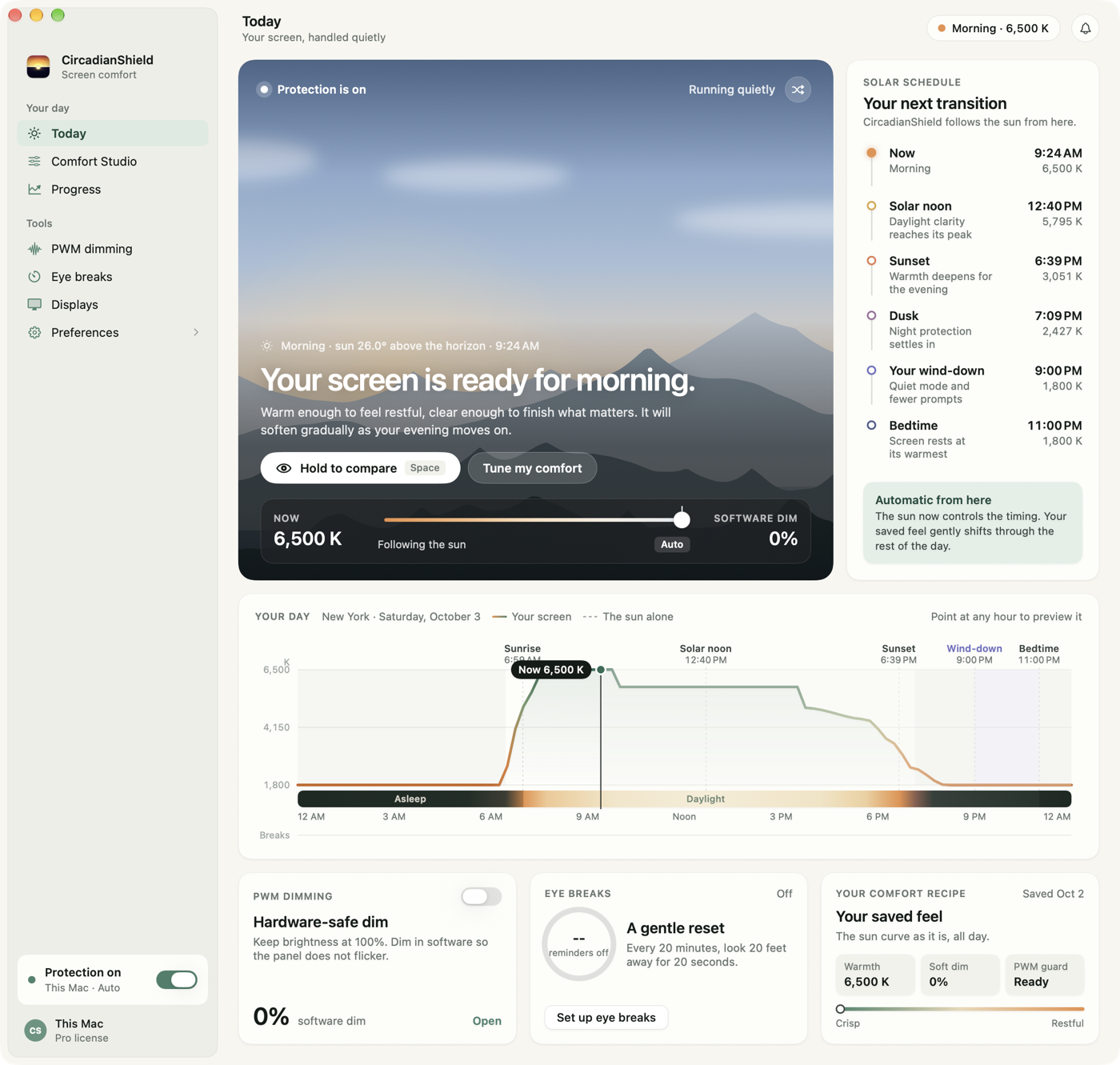
The f.lux blue light filter does remove blue light. That part is not in dispute, and this page is not going to pretend otherwise. The interesting question, and the one almost nobody answers with a number, is how much it removes and whether the amount left over still matters to your body clock. This page is written by CircadianShield, which sells a competing app, so read it as CircadianShield's own science-based argument rather than a neutral review. Everything about f.lux below is checkable on f.lux's own site.
Quick answer
- Yes, the f.lux blue light filter removes blue light. It rewrites the color ramp your GPU sends to the panel, and justgetflux.com lists seven presets: 1200K Ember, 1900K Candle, 2300K Warm Incandescent, 2700K Incandescent, 3400K Halogen, 4200K Fluorescent and 5500K Sunlight (checked September 8, 2026).
- How much it removes is not answerable from Kelvin alone. Melanopic stimulus is spectrum multiplied by intensity, so a 1200K screen at full brightness can deliver more circadian signal than a 2700K screen turned down.
- The f.lux app reports Kelvin and never melanopic EDI. f.lux's own separate web tool, f.luxometer.com, does report melanopic and circadian figures, but from lab spectra for a device model rather than from the screen in front of you.
- CircadianShield puts the melanopic EDI number in the menu bar in real time, runs an 11-phase solar schedule from 6500K down to 1800K instead of a sunset timer, and counts down to your DLMO window. CircadianShield Pro is $47 one-time for up to 2 computers on macOS 14+ and Windows 10+, with free updates and a 7-day free trial, card required.
- f.lux is free on macOS and Linux and free on Windows for personal use, with a separately licensed Corporate Edition (justgetflux.com, checked September 8, 2026). Nothing here says you should uninstall it. It says you should know what it is and is not measuring.
Does the f.lux blue light filter remove blue light? Yes, across seven Kelvin presets
The f.lux blue light filter works below the application layer. It loads a modified color lookup table into your GPU, so the red, green and blue channels driving your panel are rebalanced and less short-wavelength energy leaves the screen. That applies to every window at once, including video and games, with no hardware change and no per-app configuration. CircadianShield uses the same mechanism, and so does Iris, which is why the useful comparison between these apps is never whether they filter but how far they go and on what schedule.
Here is the full preset ladder, taken from the f.lux FAQ at justgetflux.com on September 8, 2026. This is the most concrete answer available to "how much blue light does f.lux remove", and it is a color target rather than a dose:
| f.lux preset | Colour temperature | Roughly equivalent to | Melanopic EDI reported by f.lux |
|---|---|---|---|
| Ember | 1200K | Warmer than a candle flame | No |
| Candle | 1900K | Candlelight, which f.lux puts near 1800K | No |
| Warm Incandescent | 2300K | A dimmed filament bulb | No |
| Incandescent | 2700K | A standard warm household bulb | No |
| Halogen | 3400K | Halogen task lighting | No |
| Fluorescent | 4200K | Office strip lighting | No |
| Sunlight | 5500K | Midday daylight | No |
| Unfiltered display | ~6500K | Most computer monitors, per the f.lux FAQ | No |
Read the right-hand column, because it is the whole argument of this page. Seven presets, seven Kelvin values, and not one of them tells you what dose of circadian signal reached your eye. CircadianShield covers the same ground from 6500K daylight down to 1800K candlelight, and reports the result in melanopic EDI while it does it.
How much blue light f.lux removes depends on your brightness, not just the preset
This is the step that gets skipped in most articles about the f.lux blue light filter, and it is the reason a Kelvin number cannot answer the question on its own. Melanopic stimulus is the product of two things: the spectrum of the light and how much of it there is. Change the color and hold the brightness at maximum, and you have changed one term of a multiplication. A MacBook at full brightness in a dark bedroom, set to Ember, can still push more melanopic signal at you than the same screen at 2700K with the brightness slider down near the bottom.
f.lux's own FAQ makes a related point that is worth quoting the sense of: dimming an incandescent bulb makes it redder, but dimming an LED backlight does not. Colour and intensity are separate controls on a modern display, and the f.lux blue light filter only holds one of them. If your screen still feels harsh at the lowest brightness your Mac or PC will allow, the problem is the brightness floor, and CircadianShield covers that separately in the guide to monitor dimmer and screen dimmer apps that go below minimum brightness.
That 10 lux ceiling is a target for your whole visual field, not only your monitor. Your ceiling light counts. Your phone counts. This is exactly why CircadianShield reports one number for the current state rather than a color label, and why the CircadianShield primer on melanopic EDI and why lux is the wrong metric spends its time on the unit rather than on apps.
f.lux's own f.luxometer measures what the f.lux app does not report
Here is the detail that makes this a fair fight rather than a hit piece. The people behind f.lux built and still publish f.luxometer.com, and the headline question printed at the top of it is, in their words, "How much blue light does f.lux remove?" The tool takes measured spectra for a device, lets you apply a filter, and reports circadian and melanopic figures along with an estimated phase shift. Checked September 8, 2026, it was live and working.
So f.lux's team clearly understands that Kelvin is not the endpoint. The gap is where that understanding lives. f.luxometer is a separate website working from lab spectra for a device model, at a chosen distance and dimming level, for an assumed viewer age. It is a research instrument, and a good one. It is not a readout of the actual screen on your actual desk, at your actual brightness, right now. That number never appears inside the f.lux app.
CircadianShield takes the opposite approach: the melanopic EDI figure lives in the menu bar popover on the machine you are using, updating as the sun moves and as you change brightness or presets. The three-way spec and price breakdown sits on the CircadianShield comparison of the f.lux blue light filter vs Iris vs CircadianShield.
The standard the f.lux blue light filter does not use: CIE S 026/E:2018
In 2018 the International Commission on Illumination published CIE S 026/E:2018, the first international standard defining how to measure light's effect on human circadian biology. Its core metric is melanopic equivalent daylight illuminance, or melanopic EDI. That is not lux and it is not color temperature. It weights the spectral power distribution of a light source against the sensitivity of ipRGCs, the retinal ganglion cells that drive melatonin suppression and circadian phase shifting. f.lux's own research page dates the discovery of the melanopsin photopigment behind those cells to 1998 and puts their peak sensitivity in the blue-green band around 480nm.
Colour temperature in Kelvin tells you how warm or cool a light source looks. Melanopic EDI tells you how much that light is likely to suppress melatonin. The two are related but not interchangeable. A 2700K LED and a 2700K incandescent at the same lux level can carry meaningfully different melanopic EDI values, because their spectra are shaped differently even though they land on the same point of the Kelvin scale.
Should you use a blue light filter?
On the balance of evidence and cost, yes, for evening screen use. The f.lux blue light filter is free on macOS and Linux and free on Windows for personal use, so the experiment costs you nothing but a download. Chang et al. (2014, PNAS) found that evening use of a light-emitting screen delayed melatonin onset by roughly 1.5 hours compared with reading print, which is the size of the effect any of these apps is trying to claw back. Tahkamo et al. (2019) reviewed the human literature and reported the circadian shift as dose dependent on intensity as well as wavelength, which is the same reason a preset alone cannot answer the question.
Two caveats that CircadianShield will state plainly despite selling a filter. First, no blue light filter, f.lux or Iris or CircadianShield, is a medical device, and none of them treats, prevents or cures any eye or sleep condition. Second, a color filter does nothing at all for PWM backlight flicker, which is a separate mechanism behind screen headaches and one that gets worse as you dim the screen. If that pattern sounds familiar, the CircadianShield guide to PWM flicker, how to test for it and how to fix it is the right page, not this one.
Is there a blue light filter on a Mac?
Yes. Every Mac has a blue light filter built in: Night Shift, at System Settings, then Displays, then Night Shift. It warms the display on a schedule you set, or automatically between sunset and sunrise. So if you are asking whether a Mac has a blue light filter before installing anything, the answer is that you already have one and it is free.
In practice Night Shift's warmest position lands somewhere around 3000K to 3500K depending on the panel. That is clearly warmer than an unfiltered 6500K screen and clearly short of the f.lux blue light filter's 1200K Ember. Night Shift also runs on clock time. It does not know where you are in your circadian cycle, it does not track melanopic EDI, and it does not respond to solar elevation. It turns on at sunset and off at sunrise. That is the whole feature. CircadianShield goes through what it does and does not cover in the breakdown of Night Shift on Mac, what it misses and what to use instead.
| Tool | Mechanism | Colour range | Melanopic EDI | Schedule | Price (checked September 8, 2026) |
|---|---|---|---|---|---|
| Night Shift | Built into macOS | ~3000K to 6500K | Not reported | Clock timer | Free with macOS |
| f.lux | Third-party app | 1200K to 5500K presets | Not reported | Sunrise and sunset timer | Free, Corporate Edition licensed separately |
| Iris | Third-party app | Adjustable, plus PWM modes | Not reported | Clock or manual | $1.99/mo, $14.99 one-time Iris Pro, $9.99 Iris mini Pro |
| CircadianShield | Third-party app | 6500K to 1800K | Live readout | 11-phase solar position | $47 one-time Pro, $27 one-time Core |
All four cut short-wavelength output. One of them reports the result in the unit that predicts circadian impact. Iris prices above were fetched from iristech.co on September 8, 2026, and each Iris lifelong tier covers one device at a time without future program updates. The full Mac field, including the free options, is ranked in the CircadianShield roundup of the best blue light filter apps for Mac in 2026.
The f.lux blue light filter on Windows, and what Night light does instead
The f.lux blue light filter is not a Mac-only story, and on Windows it is competing with a built-in that behaves differently. Windows 10 and 11 ship Night light under Settings, then System, then Display, with a slider rather than named presets. f.lux is free on Windows for personal use, with Corporate Edition and site licenses sold separately (justgetflux.com, checked September 8, 2026), and it gives you the 1200K Ember floor that Night light will not reach.
Two Windows-specific things worth knowing before you pick. Night light greys out on some machines running a Basic Display or DisplayLink driver, because it depends on the display driver exposing the color ramp. f.lux and CircadianShield drive the ramp themselves, which is why they often keep working where Night light will not turn on. And neither Night light nor f.lux reports melanopic EDI on Windows any more than on macOS. CircadianShield runs on Windows 10+ as well as macOS 14+ with the same melanopic readout. The full head-to-head lives on the CircadianShield page of f.lux alternatives for 2026, and the built-in setup walkthrough is on the Windows 11 blue light filter guide.
How circadian science has moved since 2018
The research landscape shifted once CIE S 026 gave researchers a shared way to describe light exposure. The f.lux blue light filter predates all of it, which explains a lot about why it reports what it reports.
The science did not stand still. The blue light filters mostly did.
Which blue light filter setting fits which kind of work
A single warm color applied to every task is the other place the f.lux blue light filter model shows its age. Here is how CircadianShield handles the cases where one preset does not fit:
Syntax highlighting stops being readable if you push the whole display to Ember. The CircadianShield Coding preset holds enough contrast to read a diff while still pulling melanopic EDI down, and pairs sensibly with macOS Dark Mode to cut total luminance.
Any software filter, f.lux included, changes the colors you are grading. CircadianShield per-display control (Pro) keeps the reference monitor unfiltered and filters the secondary screens you are not matching on, which f.lux does not offer per display.
The CircadianShield Reading preset drops blue load without the heavy orange cast of a full evening filter. Turn the brightness down at the same time, because the melanopic dose depends on both.
A straight Kelvin shift wrecks color fidelity in games, which is why people switch f.lux off to play and lose the protection entirely. CircadianShield Gaming mode (Pro) reduces melanopic EDI while preserving more perceptual color accuracy than a flat warm shift.
Blue light, eye strain and macular degeneration: what the evidence supports
Two claims travel with every blue light filter article, including the ones selling glasses, and both deserve accurate framing on a page about the f.lux blue light filter.
Eye strain. Screen work causes eye strain, and filtering blue light addresses one component of it. The larger drivers are reduced blink rate, sustained near focus, dry air and the brightness gap between a bright panel and a dark room. A filter helps with the last of those and does nothing for the first three. CircadianShield advanced break reminders (Pro) target the blink and focus side by detecting flow states and deferring the break to a natural stopping point instead of interrupting mid-task, and the broader ranking of what actually helps is on the CircadianShield guide to reducing eye strain from a computer, ranked by impact.
Age-related macular degeneration. Some observational work has linked chronic high-intensity blue light exposure to retinal stress. The evidence connecting ordinary screen use to clinical AMD is not established at anything like the same confidence, and CircadianShield does not claim it is. What is well supported is the circadian pathway: evening light delays DLMO, delayed DLMO fragments sleep, and disrupted sleep carries its own long-term costs. That is the stronger argument for filtering in the evening, and CircadianShield lays out the evidence on blue light and sleep, what the research actually says.
What a blue light filter knows about you, and what CircadianShield does with it
Every solar-scheduled filter needs to know roughly where you are, f.lux and Night Shift and CircadianShield alike, because sunset is a function of location. What differs is where that gets processed.
CircadianShield runs the solar position algorithm on your machine. Screen filtering and health scoring are 100% on-device, and no screen content or personal data leaves the machine. Manual location entry is available if you would rather not hand the app system location services at all. Separately from that, CircadianShield sends optional anonymous usage and technical diagnostics, covering things like app and OS version, hardware model family, display and permission state, and categorized errors, with an off switch in Settings. The full data handling detail is on the CircadianShield privacy policy, and the product facts behind every claim on this page are on brand facts.
What CircadianShield does that the f.lux blue light filter does not
CircadianShield is a native app on macOS 14+ and Windows 10+, built native rather than in Electron so it can reach the ambient light sensor, react to display changes and stay out of the way of your battery. Apple Silicon and Intel are both supported. The differences from the f.lux blue light filter are not cosmetic:
- Live melanopic EDI readout. The current melanopic EDI value in the menu bar popover, updating with the sun and with your brightness. f.lux, Night Shift and Iris all report Kelvin instead.
- DLMO countdown. Time remaining until your estimated Dim Light Melatonin Onset, derived from your wake and sleep schedule and the solar position, so you know which hours actually matter.
- 11-phase solar schedule. Not day and night, and not three steps. Eleven phases across the full arc of solar elevation, from 6500K daylight down to 1800K candlelight, against f.lux's fixed sunset and sunrise timer.
- Morning blue boost. The daytime half of the Brown et al. recommendation, which a night-only filter never addresses.
- Light Debt tracking (Pro). Accumulated circadian light exposure over days, so a run of late nights or a time zone change shows up as a number.
- PWM flicker protection (Pro). The headache mechanism that no color filter, f.lux included, can touch.
CircadianShield Pro is $47 one-time for up to 2 computers, including the Health Dashboard, Light Debt tracking, per-display control, advanced breaks and the Gaming, Biohacker and Custom modes, with free updates and a 7-day free trial on Mac and Windows, card required. CircadianShield Core is $27 one-time for warmth and PWM protection on up to 2 computers. The full list is at CircadianShield features and the research behind it at the CircadianShield science page.
The bottom line on the f.lux blue light filter
f.lux removes blue light, reliably, for free, on more platforms than anything else in this category. It popularized evening screen warming and it deserves the credit. What it cannot do is tell you whether the amount it removed was enough, because seven Kelvin presets are a color target and your body responds to a dose. CIE S 026/E:2018 defined the right unit in 2018 and Brown et al. put a number on the evening ceiling in 2022. The f.lux app reports neither, and f.lux's own f.luxometer reports them only for a device model in a lab rather than for the screen in front of you.
If a warm screen after sunset is all you wanted, f.lux is a good answer and you should keep it. If you want to know where you actually stand against the 10 lux evening ceiling, you need an app that measures it. Get CircadianShield for Mac or Windows, then buy Pro for $47.
f.lux blue light filter FAQ
Does the f.lux blue light filter remove blue light?
Yes. The f.lux blue light filter loads a modified color lookup table into your GPU, which reduces the short-wavelength energy your panel emits across every app at once. justgetflux.com lists seven presets, from 1200K Ember through 1900K Candle, 2300K Warm Incandescent, 2700K Incandescent, 3400K Halogen, 4200K Fluorescent and 5500K Sunlight, checked September 8, 2026. What f.lux does not do is tell you how much circadian signal is left, because it reports Kelvin rather than melanopic EDI.
How much blue light does f.lux remove at its warmest setting?
At Ember, the warmest f.lux preset, the display is driven to 1200K, which is warmer than a candle flame at roughly 1800K by f.lux's own reckoning. The honest answer to how much blue light that removes is that it depends on your screen brightness as well as the preset, because melanopic stimulus is spectrum multiplied by intensity. A 1200K screen at full brightness in a dark room can still deliver more circadian signal than a 2700K screen turned down. This is why CircadianShield reports a live melanopic EDI figure instead of a Kelvin number.
Should you use a blue light filter?
For evening screen use, yes, on the balance of evidence and cost. f.lux is free on macOS and Linux and free on Windows for personal use, so trying one costs nothing. Chang et al. (2014, PNAS) found evening use of a light-emitting screen delayed melatonin onset by around 1.5 hours against reading print, and a filter is designed to claw part of that back. Two caveats CircadianShield will state plainly even though it sells a filter: no blue light filter is a medical device, and a filter does nothing for PWM backlight flicker, which is a separate cause of screen headaches.
Does the f.lux blue light filter report melanopic EDI?
No. The f.lux app reports color temperature in Kelvin only. The same team does publish f.luxometer.com, a separate web tool whose own headline question is how much blue light f.lux removes and which reports melanopic and circadian figures for measured device and filter combinations, checked September 8, 2026. That is lab spectra for a device model, not a live reading of the screen in front of you. CircadianShield puts the current melanopic EDI number in the menu bar popover instead.
Does the f.lux blue light filter dim the screen as well?
Not in the way people expect. f.lux changes the color your display drives, and its own FAQ makes the point that dimming an LED backlight does not make it redder the way dimming an incandescent bulb does. Brightness and color are two separate controls, and both feed the melanopic dose. If your screen is still uncomfortable at the lowest brightness your Mac or PC allows, that is a dimming problem rather than a blue light problem.
Is a blue light filter enough on its own to protect sleep?
Usually not on its own. Brown et al. (2022, PLOS Biology), a consensus recommendation from 18 sleep and circadian researchers, puts the evening target at a maximum of 10 lux melanopic EDI at the eye in the 3 hours before bed, and that ceiling covers your room lighting as well as your screen. A warm screen in a brightly lit kitchen still misses it. CircadianShield treats the screen as one input among several, which is why it pairs the melanopic EDI readout with a DLMO countdown rather than a single warm color.
Key takeaways
- The f.lux blue light filter genuinely removes blue light, across seven presets from 1200K Ember to 5500K Sunlight (justgetflux.com, September 8, 2026). It reports every one of them in Kelvin and none in melanopic EDI.
- Kelvin cannot answer "how much", because melanopic stimulus is spectrum multiplied by intensity. Screen brightness is half the equation and the f.lux blue light filter does not control it.
- f.lux's own f.luxometer.com does report melanopic and circadian figures, from lab spectra for a device model rather than from your screen. That number never reaches the app.
- Brown et al. (2022, PLOS Biology) put the evening ceiling at 10 lux melanopic EDI at the eye in the 3 hours before bed. CircadianShield shows the live figure, runs an 11-phase solar schedule from 6500K to 1800K and counts down to DLMO.
- CircadianShield Pro is $47 one-time for up to 2 computers on macOS 14+ and Windows 10+, with free updates and a 7-day free trial, card required. Core is $27 one-time for up to 2.