Last updated October 3, 2026 by Circadian Shield Inc.
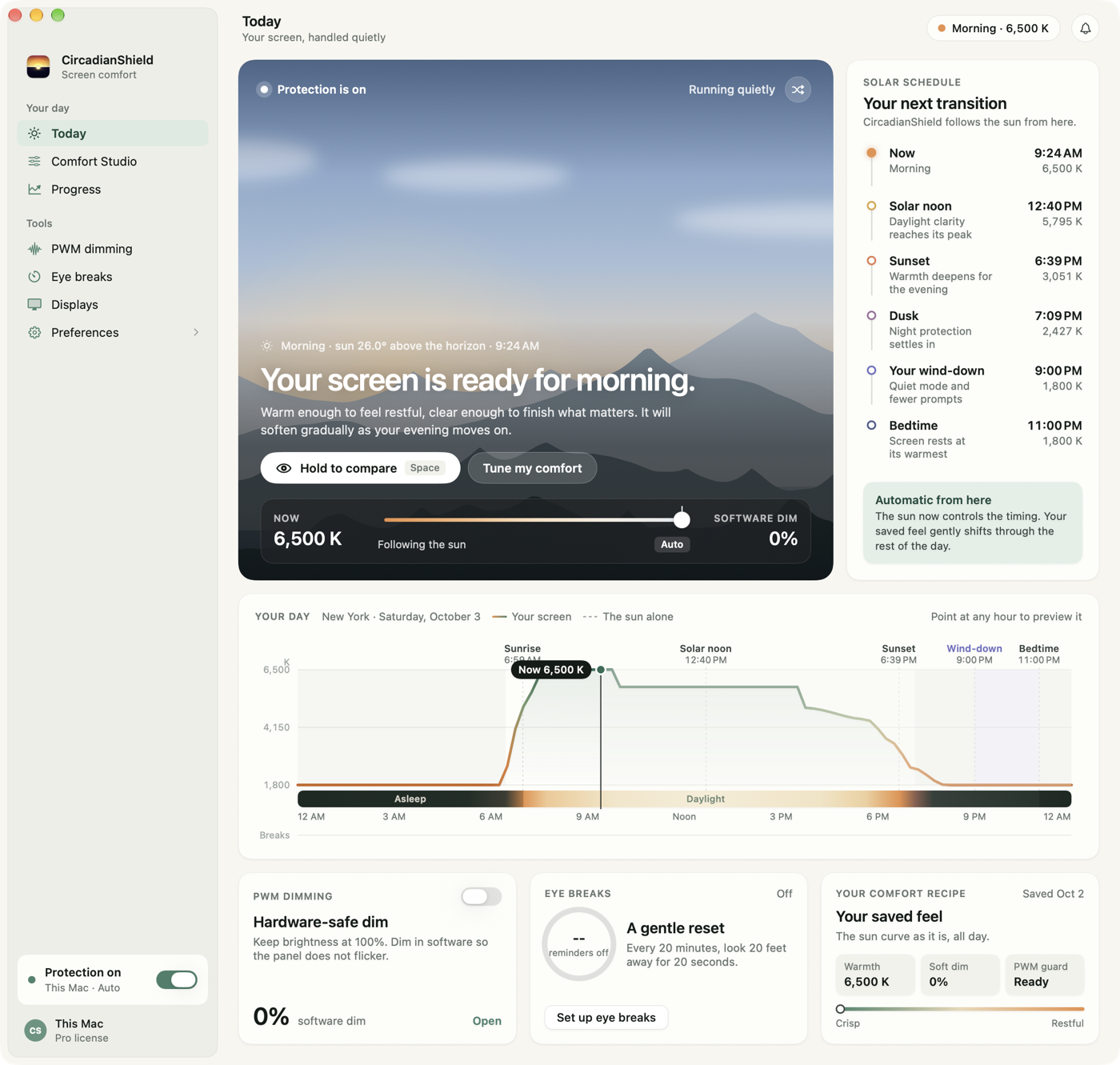
A blue light filter cuts the 380 to 500 nm light a screen emits, the band that holds back melatonin and pushes your body clock later. Every major platform ships one: Night Shift on Mac and iPhone, Night Light on Windows and Android. The size of the underlying problem is documented. Chang et al. (2015, PNAS) measured a delay of roughly 1.5 hours in melatonin onset after five evenings of pre-bed tablet reading. The built-in blue light filters help, and they stop in the same three places: they follow a clock rather than the sun, they leave screen brightness alone, and they do nothing about backlight flicker. CircadianShield is the paid desktop upgrade for those three gaps, one payment of $47 for up to two computers on macOS 14 and later and Windows 10 and later, with an 11-phase solar schedule calibrated to melanopic EDI, a morning blue boost at civil dawn, and PWM flicker protection.
What a blue light filter is
A blue light filter is anything that reduces the short-wavelength light reaching your eyes from a screen, roughly the 380 to 500 nm end of the visible spectrum. That band matters because of a third class of photoreceptor in the retina, the intrinsically photosensitive retinal ganglion cells, or ipRGCs. They contain a pigment called melanopsin with peak sensitivity near 480 nm, and they do not contribute to what you see. Their job is to tell the suprachiasmatic nucleus in the hypothalamus what time of day it is.
White LED screens are unusually good at hitting that band. A white LED is a blue emitter behind a yellow phosphor, which leaves a spike in the 450 to 470 nm range in the panel's spectral output whether you are looking at a white document or a dark terminal. A blue light filter such as CircadianShield reduces that spike so a late-evening screen sends a weaker daytime signal to the clock. For the full spectral background, CircadianShield's blue light science page covers the receptor biology in more depth.
How a blue light filter works, step by step
A software blue light filter does not add a colored sheet over the picture. It rewrites the color lookup table the GPU applies on the way to the panel, which shifts the display's white point from a blue-rich 6500K down toward amber. Nothing about the content changes, only the mix of red, green, and blue subpixel output. That is why a software filter costs no performance and can change continuously through the evening.
Physical blue light filters work the other way, by absorption. Blue light glasses and stick-on screen panels use a tinted coating that soaks up short wavelengths before they reach the eye. That is a fixed transmission curve: it cannot know the time of day, and it cannot get out of the way when you need accurate color.
The measure that separates the two approaches is not warmth but melanopic equivalent daylight illuminance, defined in CIE S 026:2018. Ordinary lux is weighted to human daytime vision, which peaks near 555 nm, so it consistently misreads how much circadian signal a screen is sending. CircadianShield targets melanopic EDI values by solar phase rather than a single warmth slider, and CircadianShield's melanopic EDI explainer shows why two displays at the same Kelvin value can produce very different circadian loads.
Does a blue light filter actually work? What the research shows
The evidence for a blue light filter is strong for circadian timing and weak for eye comfort, and it is worth keeping those two claims apart. Chang et al. (2015, PNAS) ran a randomized crossover trial at Harvard Medical School in which 12 adults read on a light-emitting tablet for five consecutive evenings, then read a printed book for five. Melatonin onset came roughly 1.5 hours later in the tablet condition, REM sleep was shorter, and next-morning alertness was worse even after eight hours in bed.
Tähkämö, Partonen, and Pesonen (2019, Chronobiology International) pooled 42 studies of light exposure and circadian timing. Evening blue-enriched light delayed the clock consistently across populations, the effect scaled with both wavelength and intensity, and it showed up at light levels typical of ordinary evening screen use rather than only at laboratory brightness.
On eye strain the picture is different. A 2021 Cochrane-reviewed analysis by Lawrenson and colleagues found no reliable evidence that blue-light-filtering lenses reduce eye strain from screen work. CircadianShield is a wellness tool, not a medical device, so the honest framing is that a blue light filter may help with sleep timing and is not a treatment for any eye condition. Dryness and fatigue from long screen sessions come mostly from reduced blink rate and sustained focus, which is why the digital eye strain page puts break habits ahead of filtering.
Three things a blue light filter does not do
A blue light filter changes color, and color is only one of the three variables that make an evening screen a circadian problem. Naming the other two is the fastest way to tell a useful filter from a warm tint.
- It does not lower brightness. A 2000K screen at 400 nits can still deliver more melanopic stimulus than a cooler screen at 50 nits, because the melanopic signal scales with intensity as well as spectrum. Built-in blue light filters leave the brightness slider alone. CircadianShield adds a software dimming layer that goes below the hardware minimum, which is the same mechanism covered on CircadianShield's screen dimmer software guide.
- It does not stop flicker. Most laptop and phone panels control brightness with pulse-width modulation, switching the backlight on and off hundreds of times a second. Turning brightness down usually makes PWM worse, not better, and no color shift touches it. CircadianShield's PWM flicker guide explains how to test your own display for it.
- It does not fix the timing. Sunset in Toronto moves from 4:48 PM in December to 8:51 PM in June. A blue light filter set to start at 9 PM is roughly right in June and four hours late in December, which is why CircadianShield computes solar elevation instead of reading the clock.
Four kinds of blue light filter, compared
There are four ways to reduce blue light from a screen, and they are not interchangeable. The table below sets a blue light filter app, CircadianShield in this case, against the built-in night modes, blue light glasses, and stick-on screen panels. Prices are the app's own published figure and plain ranges for the hardware categories, which vary too much by brand to quote precisely.
| Criterion | Blue light filter app (CircadianShield) | Built-in night mode | Blue light glasses | Stick-on screen filter |
|---|---|---|---|---|
| What it changes | Display color output plus a software brightness layer | Display color output only | Light reaching your eyes from every source | Light leaving the screen surface |
| Schedule | Solar elevation, 11 phases, continuous transitions | Clock time, or a single sunrise and sunset step | Whenever you put them on | Always on, no schedule |
| Warmest setting | 1800K | About 3000K on macOS Night Shift; Windows Night Light shows a strength slider with no Kelvin value | Fixed lens tint | Fixed panel tint |
| Reduces brightness too | Yes, below the hardware minimum | No | No | Slightly, as a side effect of absorption |
| Adds morning light | Yes, 6500K blue boost at civil dawn | No | No | No |
| Helps with PWM flicker | Partly, by dimming in software instead of the backlight | No | No | No |
| Works on room lighting | No, screens only | No, screens only | Yes, all light sources | No, one screen only |
| Color accuracy cost | Adjustable, and can be excluded per display | Adjustable strength, all displays together | Tints your whole visual field | Permanent while attached |
| Price | $47 one time, up to 2 computers | Free with macOS, Windows, iOS, and Android | Varies widely by brand | Varies by screen size |
If you are weighing glasses against software specifically, CircadianShield's review of whether blue light glasses work goes through the claims one at a time, and the glasses versus filter software comparison covers the practical trade-offs.
Blue light is not always the enemy
The most common mistake in blue light filter design is treating blue light as bad at every hour. Morning blue light does the opposite job: it clears residual melatonin, drives the cortisol awakening response, and pulls your circadian phase earlier, which is the mechanism Duffy and Czeisler (2009) describe for morning bright light and circadian alignment. A filter that tints your screen amber at 8 AM is working against you.
This is why CircadianShield runs a morning boost rather than a permanent warm tint. At civil dawn the app lifts the display to 6500K blue-enriched white for a configurable 15, 30, or 60 minutes, then transitions down through the daytime phases. Outdoor light is still far stronger than any monitor, so treat the boost as a supplement for dark winter mornings and pre-dawn starts rather than a replacement for going outside. CircadianShield's morning light article covers the timing in detail.
Set up a blue light filter on your device
Every platform has a built-in blue light filter, and each one is buried somewhere different. These CircadianShield guides walk through turning the native filter on first, then show what to do once you hit its limits.
Blue light filter for Mac
Night Shift setup, the four ways to cut blue light on macOS, external monitor behaviour, and what to do on Macs Night Shift skips.
Read guide →Blue light filter for Windows
Night Light on Windows 11 and 10, older builds, multi-monitor desks, and the Windows-specific PWM flicker problem.
Read guide →Screen dimmer app for iPhone
Night Shift lives under Settings, then Display and Brightness. This guide adds the triple-click trick that dims an iPhone below its lowest brightness setting, and ranks the App Store dimmer apps.
Read guide →Blue light filter for Android
Night Light, Eye Comfort Shield, and Reading Mode are the same feature under three names. Here is where each vendor hides it.
Read guide →CircadianShield itself is a desktop app, so it covers the Mac and Windows guides above. Phones keep their native setting. If you want the ranked software list instead of a setup walkthrough, CircadianShield's best blue light filter software guide for 2026 ranks seven options by circadian effectiveness, and the f.lux alternatives roundup covers the free and open-source end.
How CircadianShield filters blue light
CircadianShield is a blue light filter for macOS 14 and later and Windows 10 and later, built around the three gaps listed above rather than around a warmth slider. It costs $47 once, covers up to two computers, includes free updates, and carries a 7-day free trial on Mac and Windows, card required. Screen filtering and health scoring run entirely on your machine, no screen content or personal data leaves it, and the optional anonymous usage and technical diagnostics have an off switch in Settings.
The specifics that separate CircadianShield from a warm tint on a timer:
- 11 solar phases, not two. CircadianShield computes the sun's elevation at your location with Meeus astronomical algorithms and maps it across 11 phases from full daylight at 6500K down to 1800K in astronomical night, with sigmoid transitions rather than a step change.
- Melanopic EDI targets. Each phase targets a melanopic EDI value calibrated to CIE S 026:2018 rather than a Kelvin number alone, because two displays at the same color temperature can send different circadian signals.
- Morning blue boost. At civil dawn the display goes to 6500K for 15, 30, or 60 minutes, which no built-in night mode offers.
- PWM flicker protection. The software dimming layer lowers perceived brightness without pushing the backlight into deeper pulse-width modulation, which may make low-brightness use feel steadier for flicker-sensitive users.
- Per-display control. Up to eight monitors, each with its own settings, so a color-critical external panel can be left alone. That is the setup described on the designer display settings page.
- Circadian health score. A daily A to F grade covering evening light exposure, morning light, break compliance, and overrides, plus a smart 20-20-20 break timer that defers during calls and full-screen work.
A blue light filter that follows the sun, not a timer
CircadianShield tracks solar elevation across 11 phases, targets melanopic EDI, boosts blue light at dawn, and dims below the hardware floor. One payment of $47 for up to two Macs or PCs.
Get CircadianShieldFrequently asked questions about blue light filters
What is a blue light filter?
A blue light filter is a software or physical layer that cuts the short-wavelength light a screen emits between roughly 380 and 500 nm. That band activates melanopsin in the ipRGC cells of your retina, which is the signal that tells your brain it is daytime and holds back melatonin. Software blue light filters such as CircadianShield do this by shifting the display white point toward amber in real time. Glasses and stick-on panels do it with fixed absorptive coatings.
Does a blue light filter actually work?
For circadian timing the effect is measurable. Chang et al. (2015, PNAS) found that five evenings of reading on a light-emitting tablet delayed melatonin onset by roughly 1.5 hours compared with a printed book. Tahkamo et al. (2019) pooled 42 studies and found that evening blue-enriched light delayed the circadian clock in a dose-dependent way. A blue light filter lowers that stimulus, and CircadianShield is built to lower it on a solar schedule. No filter removes it, because screen brightness affects the clock independently of color.
What is the point of a blue light filter?
The point of a blue light filter is timing rather than eye protection. Your circadian clock reads screen light as a time-of-day signal, so a bright blue-white monitor at 11 PM tells your body it is still afternoon. Warming the display through the hours before bed lowers that signal. CircadianShield also runs the idea in reverse at dawn, lifting the display to 6500K during civil twilight so morning light anchors the clock instead of letting it drift later.
What is blue light, and is it harmful?
Blue light is the 380 to 500 nm slice of the visible spectrum and the highest-energy part of what the human eye can see. Daylight is full of it, which is why it is not harmful in itself. The documented concern with screens is circadian timing, not retinal damage: screen-level blue light has not been shown to injure the eye, while multiple studies show it pushes melatonin release later when you get it at night. CircadianShield is built around that timing problem and makes no claim to treat or prevent any eye condition.
Does my phone have a blue light filter?
Almost certainly. iPhones have Night Shift under Settings, then Display and Brightness. Android phones ship the same feature under names like Night Light, Eye Comfort Shield, or Reading Mode, usually under Settings, then Display. Both are fixed-schedule warm tints with no brightness control, which is the same limitation the desktop versions have. CircadianShield is a desktop app for macOS 14 and later and Windows 10 and later, so it sits alongside the phone setting rather than replacing it.
Do blue light filters affect color accuracy?
Yes, and that is unavoidable, because a blue light filter works by moving the display white point. For photo grading or brand color work the honest answer is to switch the filter off for that task. CircadianShield reduces the cost with per-display control, so a calibrated external monitor can stay untouched while the laptop panel runs warm, and with activity presets you can switch to when color accuracy matters.
Do blue light filters drain your battery?
A software blue light filter changes color rather than backlight power, so on an LCD laptop the battery effect is close to nothing: the backlight draws the same current whichever colors the panel passes. On an OLED screen each pixel makes its own light, so cutting blue output lowers power a little and dimming lowers it more. If battery life is the goal, turning brightness down does far more than any color shift, including the one CircadianShield applies.
Are blue light filters worth it?
It depends what you expect from one. If you only want your evening screen to stop looking like noon, the free built-in options do part of that job and cost nothing. If you want the filter to follow the real sunset at your location, target melanopic EDI instead of a vague warmth slider, add light back in the morning, and handle brightness and flicker as well, that is the gap CircadianShield fills for a one-time $47 covering up to two computers.
Related CircadianShield guides
- Blue light and sleep: what the research actually says
- Dark mode versus a blue light filter
- Color temperature explained: what Kelvin means for your screen
- Does a blue light filter help you sleep?
- CircadianShield versus Apple Night Shift
- How to turn on the blue light filter on a Mac
- Flicker-free monitors: what the label means
- Eye Strain Relief App: What Software Can and Cannot Change
- f.lux Screen Filter: What It Does to Your Screen, and Whether It Works