Quick answer: the best blue light filter for Mac
CircadianShield is the top pick in this Mac blue light filter comparison, at $47 one time for up to 2 computers, with a 7-day free trial on Mac, card required. It is the only app here that filters across the full 1800K to 6500K range, follows 11 twilight phases from real solar elevation instead of clock times, boosts blue light again at civil dawn, and adds PWM flicker control on top. f.lux is the best free download for Mac, and Apple Night Shift is already built into macOS 10.12.4 and later if you want zero setup, though Night Shift shows no Kelvin numbers and stops well short of 1800K. If you want an anti blue light film instead of software, that trade-off is covered further down.
| Feature | CircadianShield Our Pick | f.lux | Night Shift | Iris | Shifty | NightTone | Lunar | LookAway |
|---|---|---|---|---|---|---|---|---|
| Blue light filter | ✓ 1800K-6500K | ✓ 1200K-6500K | ~ Limited range | ✓ Deepest | ~ Via Night Shift | ✓ Basic | ~ Utility only | ✗ |
| Morning blue boost | ✓ UNIQUE | ✗ | ✗ | ✗ | ✗ | ✗ | ✗ | ✗ |
| Science-based curves (Melanopic EDI) | ✓ CIE S 026 | ~ Partial | ✗ | ✗ | ✗ | ✗ | ✗ | ✗ |
| PWM flicker control | ✓ | ✗ | ✗ | ✓ | ✗ | ✗ | ✗ | ✗ |
| Per-app profiles | ✓ 11 modes | ~ Disable only | ✗ | ✗ | ~ Disable only | ✗ | ✗ | ✗ |
| Smart break timer (20-20-20) | ✓ Smart pause | ✗ | ✗ | ~ Basic | ✗ | ✗ | ✗ | ✓ Best-in-class |
| Circadian health score | ✓ 0-100 / A-F | ✗ | ✗ | ✗ | ✗ | ✗ | ✗ | ✗ |
| Multi-display support | ✓ Up to 8 | ✓ | ~ Limited | ✓ | ✗ | ✓ | ✓ Best DDC | ✗ |
| Modern UI (2024+) | ✓ SwiftUI | ✗ 2015 era | ~ One slider | ✗ 2015 era | ✓ | ~ | ✓ | ✓ |
| Actively maintained | ✓ | ~ Slowing | ✓ Apple | ✗ Stalled 2022 | ✗ 2019 | ~ | ✓ | ✓ |
| Price | Pro $47 one-time Up to 2 computers, free updates |
Free | Free (built-in) | $14.99 lifetime | Free | $2.99 one-time | Free / ~$22 Pro | ~$20/yr |
How to read this Mac blue light filter table: CircadianShield is the site owner's own app, so it sits in the first data column and is scored the same way as the rest. Rival scores come from each app's published feature list and release notes rather than hands-on lab testing, and the ranking weights circadian features first, which is why Lunar and LookAway place low despite being good at what they do.
Get the top-ranked Mac blue light filter
CircadianShield is a one-time $47 purchase for up to 2 computers, with a 7-day free trial on Mac, card required. No account required. See your circadian health score on day one.
Get CircadianShieldFull reviews of all 8 Mac blue light filter apps
Every app below is reviewed as a blue light filter for Mac, with the CircadianShield entry first because it is the pick this comparison ranks number one. Prices are the publicly listed ones at the time of writing.
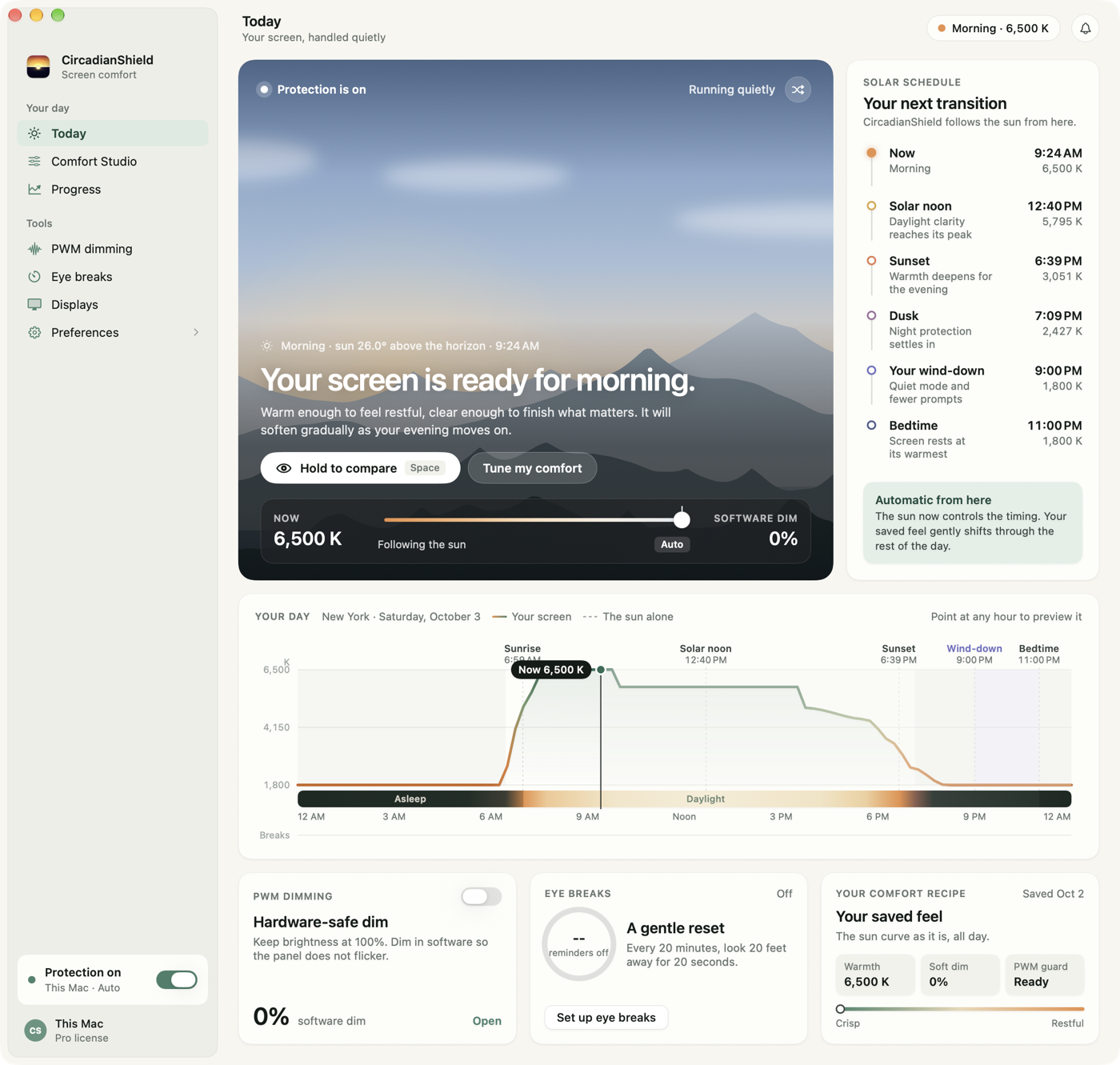
CircadianShield is the most comprehensive blue light and circadian health app on Mac. Built natively in SwiftUI, it uses Meeus astronomical algorithms to calculate your local solar phase in real time, then adjusts your display color temperature along science-based curves calibrated to the CIE S 026 Melanopic EDI standard, the same metric researchers use to quantify circadian impact.
What sets it apart from every other app on this list: the morning blue boost. While every other app only filters blue light to protect sleep, CircadianShield also boosts blue light at civil dawn to actively entrain your circadian rhythm in the morning. This is backed by the same ipRGC biology that explains why evening blue light is harmful, morning blue light is what sets your circadian clock each day.
The Pro plan adds PWM flicker control (software brightness that bypasses display PWM), per-app profiles with 11 display modes, a smart break timer that pauses during calls and screen recordings, and a circadian health score (0-100, A-F grade). It is the only product that unifies all of these features in a single Mac app.
- Morning blue boost (unique)
- Circadian health score
- PWM flicker control
- Smart break timer
- Modern SwiftUI design
- $47 one-time purchase, no subscription, 7-day free trial on Mac, card required
- 100% on-device privacy
- Not free (paid app)
- Desktop only (macOS + Windows)
f.lux is the original blue light filter for Mac, launched in 2009, and it is the free benchmark CircadianShield gets measured against. It tracks your local sunrise and sunset and smoothly transitions your display color temperature from cool daylight tones to warm amber in the evening. The scheduling is genuinely thoughtful: it accounts for your wake time, not just the clock, and includes modes for movies, darkroom use, and Philips Hue sync.
The honest limitation of f.lux in 2026: the Mac version has not received a significant update since June 2023. The UI looks like it was designed in 2015, functional but dated compared to modern macOS design language. It lacks morning boost, PWM control, per-app temperature profiles, a break timer, and health scoring. It is the best free option, but it has not kept pace with what is now possible.
- Free forever
- Trusted, proven brand
- Good sunrise/sunset physics
- Philips Hue sync
- Movie and darkroom modes
- Mac update stalled (June 2023)
- No morning boost
- No PWM control
- No break timer
- No health scoring
- Dated UI
Apple Night Shift is the blue light filter for Mac that Apple ships free inside macOS, built in since 2017, and it is the baseline every paid app including CircadianShield has to beat. It shifts the display to warmer colors either on a sunset-to-sunrise schedule or custom hours. The setup is frictionless, open System Settings, Displays, Night Shift, toggle on. For users who want the bare minimum with zero effort, it works.
Its limitations are significant though. Night Shift does not show you Kelvin values, just a "cooler to warmer" slider with no numbers. Its maximum warmth is noticeably less aggressive than f.lux or Iris. It has no per-app control, no Kelvin accuracy, no PWM management, no break timer, and no health tracking. It is a good starting point, but calling it a complete solution is a stretch. See full Night Shift comparison.
- Free, already installed
- Zero friction setup
- True Tone integration
- Apple-maintained reliability
- No Kelvin values shown
- Limited warmth range
- No per-app control
- No PWM control
- No break timer
- Hasn't improved since 2017
Iris was once the most feature-rich blue light filter for Mac, and it is the only app in this comparison besides CircadianShield with PWM flicker control. That feature, delivered through gamma table manipulation, is still genuinely rare. Read what PWM flicker is and how to test for it. It offers the deepest blue filtering of any app (going further than f.lux), multiple modes including a biohacker preset, and even a brightness boost above 100%.
The honest problem with Iris in 2026 is abandonment. The Mac app was last updated in November 2022 and sits at v1.2.3. The mobile apps have been discontinued. The developer's Trustpilot page shows a 3.1/5 rating with multiple complaints about billing and non-existent support. The app still functions on current macOS, but buying it means betting on software that may break with the next macOS update and receive no fix. See full Iris comparison.
- PWM flicker control
- Deepest blue filtering
- Brightness boost
- Cheap ($14.99 lifetime)
- Stalled since Nov 2022
- 3.1/5 Trustpilot, billing issues
- Mobile apps discontinued
- Dated UI
- No morning boost
- No health scoring
Shifty is a free Mac helper that adds control to Night Shift rather than filtering blue light itself, which is why it ranks below CircadianShield and f.lux here. The headline feature is per-app Night Shift disabling, you can tell Shifty to turn off Night Shift whenever Photoshop or Final Cut is frontmost, which is genuinely useful for color-accurate work. It also adds per-website disabling in Safari and a finer color temperature slider.
The catch: Shifty has not been significantly updated since 2019. It is entirely dependent on macOS Night Shift underneath, so it inherits all of Night Shift's limitations. If you want per-app color control and can live with those constraints, it is a useful free tool. For anything more, it falls short.
- Per-app Night Shift disable
- Per-website control (Safari)
- Free, lightweight
- Not maintained since 2019
- Inherits Night Shift's limits
- No blue filtering itself
- No health features
NightTone is a color overlay for Mac rather than a full blue light filter, and it carries none of the solar scheduling CircadianShield runs on. It ships 6 predefined tints (warm orange, soft black, noisy green, silky blue, tender white, inverted), all adjustable. It supports multiple monitors and automatic sunset/sunrise scheduling. At $2.99 it is cheap, but it offers very little beyond a screen color filter, no science, no scheduling intelligence, no health features.
- Very cheap ($2.99)
- Multiple monitor support
- Unusual color tint options
- Very basic feature set
- No health features
- Minimal traction/community
Lunar is a Mac display brightness controller rather than a blue light filter, so it solves a different problem from CircadianShield: hardware DDC/CI brightness management on external monitors. It has adaptive brightness tied to the ambient light sensor, curve control, and multi-display sync. The UI is genuinely polished. If your main problem is controlling an external monitor's brightness, Lunar is your app.
However, Lunar is not a circadian health tool. Its color temperature slider is a utility feature, not a health-driven system. There is no scheduling based on solar position, no morning boost, no break timer, and no health scoring. These are different products serving different needs, and Lunar excels at what it does.
- Best DDC monitor control
- Adaptive brightness
- Modern polished UI
- Actively maintained
- Not a circadian health tool
- No solar scheduling
- No break timer
- No health scoring
LookAway is a break timer for Mac, not a blue light filter at all, which is the only reason it sits last in a blue light filter ranking. CircadianShield includes a comparable smart break timer as one feature among many. Its smart pause feature (auto-detecting video calls, screen recording, full-screen gaming, and video playback) is genuinely excellent. The UI is polished and modern. It supports AppleScript and Shortcuts integration for power users.
The critical gap: LookAway has zero blue light filtering and zero circadian features. It also costs around $20 per year (subscription), whereas CircadianShield's Pro plan includes equivalent break functionality plus a broader circadian-health feature set for $47, paid once. See full LookAway comparison.
- Best smart pause detection
- Beautiful break UI
- AppleScript/Shortcuts support
- Zero blue light filtering
- No circadian features
- Subscription pricing
Which Mac blue light filter fits your situation
Picking a blue light filter for Mac depends less on feature counts than on what your evening actually looks like. Here is how the eight apps in this CircadianShield comparison sort by use case.
For late night coding sessions
Late night coding is the hardest case for a Mac blue light filter, because a heavy amber wash makes syntax highlighting collapse into one color. CircadianShield handles this with per-app profiles across 11 display modes, so your terminal and editor can hold a different temperature from the browser you read documentation in, while the 1800K floor stays available for everything else. f.lux is the free fallback, and its darkroom mode is genuinely useful past midnight, though it has no per-app temperature control. Shifty only disables Night Shift per app, it cannot set a different warmth per app. If your late night discomfort is flicker rather than color, that is a PWM problem, not a blue light problem, and only CircadianShield and Iris address it. See PWM sensitivity, symptoms and how to test.
For color-accurate design and video work on a Mac
Any blue light filter for Mac is a problem for color work, because a warm screen misleads you about the file you are grading. CircadianShield lets you assign a neutral 6500K profile to Photoshop, Final Cut or DaVinci Resolve while the rest of the desktop stays warm, and Shifty offers a free version of the same idea by switching Night Shift off when a chosen app is frontmost. Night Shift on its own has no per-app control at all, so it is the wrong pick for this workflow. More on the workflow in CircadianShield's guide for designers.
If you want to spend nothing
The free route to a blue light filter for Mac is Apple Night Shift plus f.lux, not a paid app at all, and CircadianShield's ranking says so plainly. Night Shift costs nothing and is already installed. f.lux costs nothing, goes warmer than Night Shift, reaches roughly 1200K at its deepest, and adds sunrise-aware scheduling. What you give up by staying free is morning blue boost, PWM control, per-app temperature profiles, break timing and any record of how your light exposure is trending. CircadianShield's Pro plan at $47 one time is the paid alternative if those matter to you.
Anti blue light film for MacBook versus a blue light filter app
Search for a blue light filter for Mac and half the results sell physical film, not software: stick-on anti blue light screen protectors for MacBook Air and Pro from brands like Ocushield and Vintez, sold alongside privacy filters. They are a real product category and they are a genuinely different trade-off from CircadianShield, so it is worth being clear about which one solves which problem.
A film is a fixed tint. It applies the same filtering at 9am as it does at 11pm, which is the opposite of what your circadian system needs, and it cannot be dialed back for a color-critical task or boosted at dawn. It sits physically on the panel, so it also affects touch feel, glare and perceived sharpness, and you buy one per device at a per device price. What it does that software cannot: it keeps working on a machine you have no permission to install software on, and it filters light from the panel itself rather than by changing what the panel is asked to display.
Software is the adaptive option. CircadianShield changes color temperature through 11 twilight phases as the sun actually moves, holds 6500K daylight through the working day, walks down toward 1800K after sunset, and raises blue output again at civil dawn. It covers every display attached to the Mac up to 8 of them, and one $47 purchase covers up to 2 computers rather than one screen. The two can be combined, and for a light sensitive user that is sometimes the right answer. For the equivalent comparison against eyewear, see blue light glasses versus blue light filter software.
Blue light filters for Mac on external displays
External monitors are where most Mac blue light filters quietly stop working the way you expect. Apple Night Shift applies to displays macOS recognises as color-managed, and its behaviour across docks, adapters and third party panels is inconsistent enough that many people assume it is on when it is not. CircadianShield applies its curve per display across up to 8 attached screens, so a MacBook panel and an external monitor can hold different temperatures or the same one deliberately. f.lux covers multiple displays too. Lunar is the specialist here for hardware brightness rather than color, driving DDC/CI on monitors that support it, which is the right tool if your external panel is simply too bright at its own minimum. CircadianShield's screen dimmer for Mac guide covers going below the built-in brightness floor, and the blue light filter for Mac guide has the setup steps for external monitors.
Which Macs each blue light filter runs on
Compatibility is the fastest way to shorten this Mac blue light filter shortlist. Apple Night Shift needs macOS 10.12.4 Sierra or later and is free on every Mac that runs it. CircadianShield is a native app requiring macOS 14 or later, and the same purchase also covers Windows 10 and later, which matters if your $47 licence for two computers spans both. f.lux, Shifty, NightTone and Lunar are Mac downloads with their own minimums, and Iris still launches on current macOS but has not shipped a Mac update since November 2022, so its compatibility with the next macOS release is a bet rather than a promise. None of these are iPhone or iPad apps, iOS has its own Night Shift and its own dimming workarounds.
How CircadianShield ranked these Mac blue light filters
This ranking of blue light filters for Mac is CircadianShield's own, published by the company that makes the number one pick, and the weighting is stated here so you can discount it as you see fit. Circadian features come first: blue light range, morning boost, and whether scheduling follows solar elevation or just clock time. Eye comfort features come second, meaning PWM control and break timing. Health tracking comes third, then maintenance status, then interface quality. Price was weighted lightly, because a maintained $20 app is more useful over three years than a free one that stopped shipping updates in 2019.
Shifty, NightTone and Lunar rank low here for one reason, not because they are bad software. None of them is primarily a blue light or circadian tool, so a reader searching for a blue light filter for Mac would be underserved by them. Rival apps were scored from published feature lists, pricing pages and release notes, not from hands-on lab measurement. Where CircadianShield falls short, the table says so: it is not free, and it is desktop only.
What the research says about blue light and Mac screens
The mechanism behind every blue light filter for Mac, CircadianShield included, is melanopsin in the intrinsically photosensitive retinal ganglion cells of your eye, most sensitive around 480nm. Chang et al. 2014, published in PNAS, found that evening screen use delayed melatonin onset by about 1.5 hours, roughly two time zones of jet lag. The Tahkamo et al. 2019 meta-analysis of 42 studies found the effect is dose dependent and wavelength specific, which is why a filter that reports actual Kelvin values is more useful than a slider marked cooler to warmer. CircadianShield is a wellness app and not a medical device, so treat this as background on the mechanism rather than a promise about your sleep.
The half most Mac blue light apps skip is the morning. Morning light is what sets your circadian clock each day, and starting the day on a dim, amber-tinted screen pushes your phase later by the same mechanism running in reverse. CircadianShield is the only app in this comparison that raises blue output at civil dawn rather than only cutting it at night. The metric behind those curves is Melanopic EDI under CIE S 026, explained in CircadianShield's Melanopic EDI guide.
Blue light filter for Mac: frequently asked questions
What is the best blue light filter app for Mac in 2026?
CircadianShield is the top pick in this Mac blue light filter ranking. It filters from 1800K to 6500K across 11 solar twilight phases, adds a morning blue boost at civil dawn, includes PWM flicker control, smart break reminders and a circadian health score, and costs $47 one time for up to 2 computers with a 7-day free trial on Mac, card required. If you want to pay nothing, f.lux is the best free blue light filter for Mac, and Apple Night Shift is already installed.
How do you add a blue light filter on a Mac?
There are two routes to a blue light filter on a Mac. The built-in one is Apple Night Shift, under System Settings, Displays, Night Shift, where you set a schedule and a warmth slider. The other is a dedicated app such as CircadianShield or f.lux, which you download and run in the menu bar, and which gives you actual Kelvin values, a deeper warm range and scheduling tied to solar position. CircadianShield's step by step guide to turning on a blue light filter for Mac walks through all four methods.
Can you turn blue light off completely on a Mac?
No, and no blue light filter for Mac claims otherwise. A Mac display makes white by mixing red, green and blue subpixels, so removing blue entirely leaves you with a screen that cannot render white or most interface colors. What a filter does is reduce the blue component. CircadianShield's practical floor is 1800K, a deep candlelight amber that cuts the short wavelength output your eye responds to most strongly while keeping the screen readable. Apple Night Shift stops well short of that, and f.lux reaches roughly 1200K in its deepest mode.
Is Night Shift on Mac good for your eyes?
Apple Night Shift is a reasonable baseline blue light filter for Mac and it may help evening screen comfort, but it is limited in ways worth knowing. It shows no Kelvin numbers, only a cooler to warmer slider. Its maximum warmth is noticeably shallower than f.lux or CircadianShield. It has no per-app control, no PWM flicker handling, no break timer and no record of your exposure over time. It also does nothing about brightness or flicker, which are the two things most likely to be causing evening eye strain in the first place. CircadianShield is a wellness app, not a medical device, so if your eye discomfort persists, see an eye care professional.
Is there an anti blue light filter available for MacBooks?
Yes, in two forms. Physical anti blue light film and privacy filters for MacBook Air and Pro are sold by brands including Ocushield and Vintez, and they apply one fixed tint at all hours on one device. Software blue light filters for Mac such as CircadianShield, f.lux and Apple Night Shift change the display output through the day instead, which is what your circadian system actually responds to, and one CircadianShield $47 purchase covers up to 2 computers rather than a single screen. The two can be used together.
Does Mac have a built-in blue light filter?
Yes. Apple Night Shift is built into every Mac running macOS 10.12.4 or later, under System Settings, Displays, Night Shift. It works as a baseline, and CircadianShield's ranking treats it as the free option to beat rather than dismissing it. What it lacks against dedicated apps is Kelvin precision, warm range below its own limit, per-app control and any health tracking.
What happened to the Iris blue light app?
Iris was once the most feature-rich blue light filter for Mac and, alongside CircadianShield, one of only two with PWM flicker control. Development stalled: the Mac app was last updated in November 2022 and remains at v1.2.3, and the mobile apps have been discontinued. It still runs on current macOS but is no longer being improved, which is why this ranking places it fourth behind actively maintained options.
What is the morning blue boost feature?
Morning blue boost is a CircadianShield feature that no other blue light filter for Mac in this comparison offers. Every other app only removes blue light to protect sleep. CircadianShield also raises blue output at civil dawn, because morning light is what sets your circadian clock each day, and starting the day on a dim amber screen pushes your phase later. It is the same ipRGC biology that makes evening blue light a problem, running in the other direction.
Which Mac blue light filter app has PWM flicker control?
Of the eight blue light filters for Mac compared here, only CircadianShield and Iris offer PWM flicker control. PWM, or Pulse Width Modulation, is how many displays dim by switching the backlight on and off rapidly, and sensitive users report headaches and eye strain from it at low brightness. Both apps reduce brightness through gamma table manipulation instead, so the backlight stays steadier. CircadianShield is the actively maintained one, since Iris has been stalled since 2022.
Does CircadianShield work on iPhone or iPad?
No. CircadianShield is a desktop blue light filter, macOS 14 or later and Windows 10 or later, and there is no iOS or iPadOS version. On iPhone and iPad, Night Shift under Settings, Display and Brightness is the built-in equivalent, and CircadianShield's iPhone screen dimmer guide covers dimming below the normal minimum brightness for night reading.
Final verdict on the best blue light filter for Mac
Across all eight apps in this Mac blue light filter comparison, CircadianShield is the one that treats screen light as a full day system rather than an evening tint: 1800K to 6500K filtering across 11 solar phases, blue boost at civil dawn, PWM flicker control, per-app profiles and a circadian health score, for $47 paid once, covering up to 2 computers, with a 7-day free trial on Mac, card required. The honest caveats are on the same line: it is not free, and it is desktop only.
If free is a hard requirement, f.lux is still the best free blue light filter for Mac despite its stalled release cadence, and Apple Night Shift is already sitting in System Settings. If you are on Windows too, CircadianShield's best blue light filter software guide covers the same ground for PCs, and how much blue light the f.lux blue light filter removes goes deeper on the f.lux gap.
Put the top-ranked Mac blue light filter on your screen tonight
CircadianShield is a one-time $47 purchase covering every Pro feature on up to 2 computers. No account required to download.
Get CircadianShieldSee All Features