f.lux Blue Light Filter vs Iris vs CircadianShield (2026)
Last updated: October 3, 2026. Competitor prices and platform lists on this page were fetched from justgetflux.com on September 16, 2026, and Iris prices were rechecked on iristech.co on October 1, 2026.
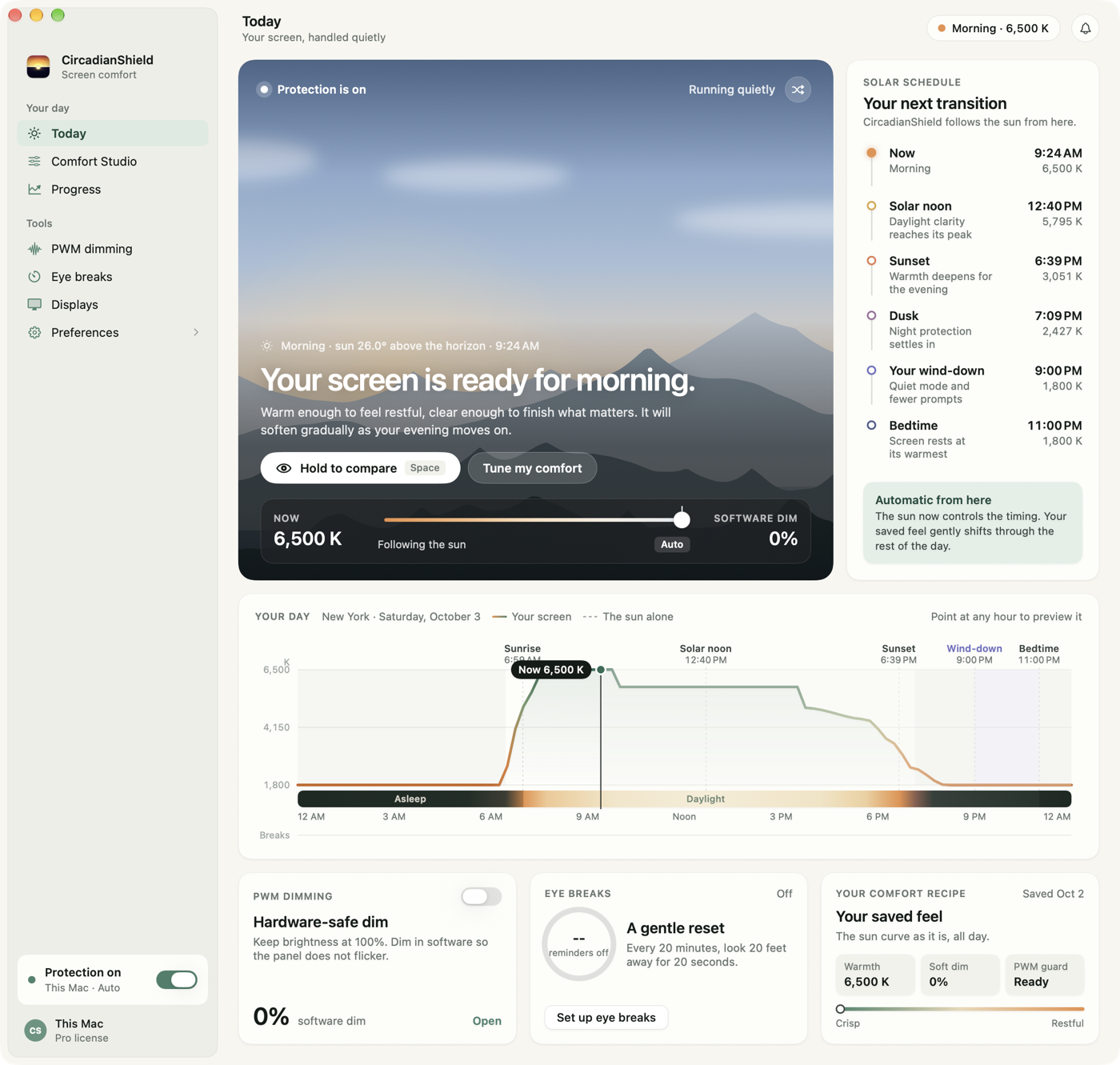
The f.lux blue light filter has been the default answer to evening screen glare for well over a decade, and most articles about it are written by companies selling glasses. This one is written by CircadianShield, which makes one of the three apps compared here, so read the table as CircadianShield's own science-based comparison rather than a neutral review. Every competitor price and platform list below was fetched live on September 7, 2026, and every claim about what an app does or does not report is checkable in the app itself.
Quick answer
- Yes, the f.lux blue light filter really does filter blue light. It rewrites your GPU's color output so the display sends less short-wavelength light after sunset, and it is free on macOS, free on Linux, and free on Windows for personal use, with a separately licensed Corporate Edition (justgetflux.com, fetched September 7, 2026).
- What f.lux does not do: it reports color temperature in Kelvin only, never in melanopic EDI, it schedules on clock time rather than solar position, and it has no PWM flicker mode.
- Iris adds PWM flicker protection and per-display control. Iris Pro costs $14.99 one-time without future updates or $49.99 one-time with future updates. Subscriptions cost $1.99 a month or $11.99 a year for one PC. Each of these plans covers one device at a time (iristech.co, fetched October 1, 2026). Iris mini is free.
- CircadianShield Pro is $47 one-time for up to 2 computers on macOS 14+ and Windows 10+, and it is the only app of the three that shows a live melanopic EDI number, runs an 11-phase solar schedule from 6500K to 1800K, and gives you a DLMO countdown. CircadianShield Core is $27 one-time for warmth and PWM protection on up to 2 computers.
Does the f.lux blue light filter actually filter blue light?
Yes. The f.lux blue light filter works at the graphics level: it loads a modified color lookup table into your GPU, which shifts the red, green and blue channels your display drives so that less short-wavelength energy leaves the panel. That happens across every application at once, including games and video, without any hardware change. This is the same mechanism Iris and CircadianShield use, so the honest version of the question is not whether f.lux filters blue light, but how much and on what schedule.
Here is the part that decides the answer. A color filter changes spectrum, not intensity. Push f.lux to a warm evening setting and leave your MacBook at full brightness and the panel can still be throwing a large melanopic dose at your eyes, because melanopic stimulus is the product of spectrum and luminance together. f.lux reports its state in Kelvin. Kelvin describes the color of the light. It does not tell you how much circadian signal that light is delivering, which is why CircadianShield puts a live melanopic EDI figure in the menu bar popover instead: melanopic EDI is spectrum and intensity combined into one number you can act on.
So: f.lux filters blue light, and it does that job reliably. It just cannot tell you whether the filtering was enough, because it does not measure the thing that matters. For the measured version of that argument, preset by preset, see the CircadianShield article on how much blue light the f.lux blue light filter removes.
Is f.lux good for your eyes?
f.lux is likely to make late-night screen work more comfortable, and the reason is mundane rather than medical. A warm, lower-contrast screen in a dark room reduces the brightness gap between your display and the wall behind it, and that gap is a large part of what people describe as eye strain. f.lux costs nothing to try on macOS, Windows and Linux, so the downside is close to zero.
Two honest caveats, because CircadianShield sells a competing app and should say this plainly. First, no blue light filter, f.lux, Iris or CircadianShield, is a medical device, and none of them treats or prevents any eye condition. Screen discomfort is usually driven by brightness mismatch, reduced blink rate, dry air and PWM backlight flicker as much as by color. Second, f.lux cannot help with flicker at all. If your headaches get worse as you turn the brightness down, that pattern points at PWM rather than blue light, and a color filter will not touch it. CircadianShield covers that separately in the guide to PWM flicker, how to test for it and how to fix it.
How effective are blue light filters really?
Blue light filters like f.lux, Iris and CircadianShield have real but bounded effects, and the size depends entirely on how far you push them and when. Chang et al. (2014, PNAS) found that evening use of a light-emitting screen delayed melatonin onset by roughly 1.5 hours compared with reading print, which is the effect size these apps are trying to claw back. Tahkamo et al. (2019) reviewed the human literature and reported that the circadian shift is dose dependent on both wavelength and intensity, not on wavelength alone.
That dose dependence is why a target number is more useful than a Kelvin setting. Brown et al. (2022, PLOS Biology), a consensus recommendation from 18 sleep and circadian researchers, put the evening ceiling at a maximum of 10 lux melanopic EDI measured at the eye, starting at least 3 hours before bedtime, against a daytime minimum of 250 lux melanopic EDI. Neither f.lux nor Iris reports melanopic EDI, so with either app you are aiming at that ceiling blind. CircadianShield displays the current figure live, which is the difference between following the recommendation and hoping you are near it. The unit itself is explained in the CircadianShield primer on melanopic EDI and why lux is the wrong metric.
f.lux vs Iris vs CircadianShield: full feature and price comparison
This table compares the f.lux blue light filter, Iris and CircadianShield Pro on the specifications that change what reaches your eye. Prices and platform lists for f.lux and Iris were fetched from their own sites on September 7, 2026.
| Feature | f.lux | Iris | CircadianShield Pro |
|---|---|---|---|
| Price | Free on macOS and Linux, free on Windows for personal use | $1.99 a month or $11.99 a year with updates, $14.99 one-time without updates, or $49.99 one-time with future updates | $47 one-time, free updates |
| Devices per licence | Not licensed per device for personal use | 1 device at a time, movable | Up to 2 computers |
| Platforms | macOS, Windows, Linux, plus iOS and Android links | Windows, macOS, Linux, Android, iOS, Chrome and Firefox extensions | macOS 14+ and Windows 10+, native apps |
| Scheduling method | Clock time against a sunset and sunrise lookup | Clock time and manual modes | 11-phase solar elevation algorithm at your coordinates |
| Color range reported as | Kelvin presets | Kelvin and manual sliders | 6500K to 1800K across 11 named twilight phases |
| Live melanopic EDI readout | No | No | Yes, live in the popover |
| DLMO countdown | No | No | Yes |
| Morning blue boost | No | No | Yes, at civil dawn |
| PWM flicker protection | No | Yes | Yes |
| Per-display control | No | Yes | Yes |
| Health dashboard and light debt tracking | No | No | Yes |
| Free tier or trial | Free, no expiry | Iris mini is free | 7-day free trial on Mac and Windows, card required |
What f.lux, Iris and CircadianShield cost in 2026
Pricing is where the three blue light filters separate most sharply, and all of these numbers were read off the vendors' own pages on September 7, 2026.
- f.lux is free. justgetflux.com states free for macOS, free for Linux, and free on Windows for personal use, with Corporate Edition and site licences sold separately. A work-managed deployment is not automatically covered by the free download.
- Iris offers subscriptions and one-time licences. iristech.co lists subscriptions at $1.99 a month or $11.99 a year for one PC, or $3.99 a month for up to 5 PCs, each activating both Iris and Iris mini with program updates included. Iris Pro costs $14.99 one-time without new versions or $49.99 one-time with future updates (rechecked October 1, 2026). Apart from the 5 PC plan, each is valid on one device at a time and can be moved to a new machine. Iris mini is the free tier. The CircadianShield Iris vs CircadianShield pricing comparison runs every Iris plan against CircadianShield Core and Pro over four years.
- CircadianShield Pro is $47 one-time covering up to 2 computers across macOS 14+ and Windows 10+, with free updates and a 7-day free trial, card required. Pro includes the health dashboard, light debt tracking, per-display control, PWM flicker protection, advanced breaks and profiles. CircadianShield Core is $27 one-time for warmth and PWM protection on up to 2 computers. Full details sit on the CircadianShield features page.
Run the arithmetic before you assume the subscription is cheaper. Iris at $1.99 a month passes CircadianShield Pro's $47 one-time price in month 24, and the $11.99 yearly Iris plan passes it in year 4, while every single-PC Iris plan covers one device at a time against two computers for CircadianShield Pro. If you only ever want a warmer screen after dark and nothing else, f.lux at zero is genuinely hard to beat, and CircadianShield will say so.
Does a Mac already have a blue light filter?
Yes. Every Mac has a built-in blue light filter called Night Shift, which is why CircadianShield, f.lux and Iris all position themselves as replacements for it rather than as first filters. So the answer to "is there a blue light filter on a Mac" and "does Mac have a blue light filter" is the same: you already have one, at System Settings, then Displays, then Night Shift. Apple shipped Night Shift in macOS 10.12.4 in 2017, and it runs on a sunset-to-sunrise schedule or a custom time range you set yourself. It costs nothing and needs no download.
The limit is what Night Shift leaves out. Night Shift is effectively a two-state warm-or-cool toggle with a slider, and it has no gradual phase transitions, no melanopic EDI figure, no per-display exemption, and no awareness of when you actually sleep. f.lux gives you more presets on top of that. CircadianShield replaces the toggle with 11 solar phases computed from your coordinates and reports the resulting melanopic EDI, which is the number Brown et al. (2022) wrote the 10 lux evening ceiling in. If all you need is the built-in route, the CircadianShield walkthrough of every way to cut blue light on a Mac covers Night Shift, accessibility filters and third-party apps side by side.
Blue light filters on Windows: f.lux, Iris, Night light and CircadianShield
Windows users have four realistic options for a blue light filter, and f.lux is only one of them. Windows 10 and Windows 11 both ship Night light, found at Settings, then System, then Display, then Night light, with a strength slider and a schedule. f.lux runs on Windows free for personal use and adds presets plus Alt-PgDn and Alt-PgUp brightness hotkeys. Iris runs on Windows with PWM flicker modes at the prices listed above. CircadianShield runs natively on Windows 10 and later, which matters because the melanopic EDI readout, the solar schedule and per-display control are the same on Windows as on Mac rather than a cut-down port.
One genuine Windows-only wrinkle: Night light can be unavailable with Basic Display or DisplayLink drivers. A Basic Display driver can also prevent f.lux from working, according to the f.lux FAQ. If either filter fails, update the display driver before trying another app. CircadianShield's Windows 11 blue light filter guide has the full setup and troubleshooting path, and the head-to-head against the built-in tool lives on the comparison of f.lux and Windows Night light. Every other CircadianShield head-to-head sits on the CircadianShield comparisons hub.
Melanopic EDI is the right metric for a blue light filter, not Kelvin

Most comparisons of f.lux, Iris and CircadianShield rank the apps by their lowest Kelvin setting. That is a proxy, and a weak one. Two apps that both reach 2700K can deliver very different circadian stimulation, because stimulation scales with panel luminance as well as spectrum. A 2700K screen at 300 nits and a 2700K screen at 40 nits are not the same exposure.
Melanopic EDI, Equivalent Daylight Illuminance, is the unit that folds both together. It measures how strongly light stimulates the intrinsically photosensitive retinal ganglion cells, the ipRGCs, whose melanopsin peaks near 480nm and which drive circadian timing rather than vision. The CIE S 026:2018 standard defines it, and Brown et al. (2022) wrote their thresholds in it for exactly that reason. Of the three apps here, CircadianShield is the only one that computes and displays it, using the CIE S 026 curve against your actual panel output. f.lux and Iris both leave you converting Kelvin to guesswork.
Scheduling: f.lux and Iris use clock time, CircadianShield uses solar position
The scheduling difference between f.lux, Iris and CircadianShield is the most consequential technical gap on this page, and review sites almost never mention it. f.lux and Iris both shift color temperature according to clock time, checked against a stored sunrise and sunset for your location. The transition lands at roughly the same hour each day, loosely adjusted through the year.
CircadianShield instead computes solar elevation at your coordinates using Meeus astronomical algorithms and maps it onto 11 twilight phases. The practical difference shows up at the extremes of the year: in New York the sun peaks near 23 degrees on December 21 and near 73 degrees on June 21, and the light your body is calibrated against differs accordingly. Your ipRGCs integrate light across the whole day, so the morning phase matters as much as the evening one, and that is why CircadianShield adds a morning blue boost at civil dawn while f.lux and Iris have no morning mode at all.
PWM flicker: the one thing a blue light filter cannot fix

Neither the f.lux blue light filter nor any color filter can help with PWM, and this is the single biggest reason people conclude that "blue light filters do not work" for them. PWM, pulse width modulation, is how many LED and OLED panels dim: instead of lowering backlight current, the panel switches the light fully on and off hundreds or thousands of times a second and relies on your eye to average it. Turning the brightness down increases the off time, which is why some people feel worse the darker they set the screen.
Of the three apps compared here, f.lux has no PWM feature. Iris offers PWM flicker modes. CircadianShield Pro includes PWM protection, and CircadianShield Core at $27 includes it too. If dimming your screen makes the headache worse rather than better, start with the CircadianShield write-up on PWM sensitivity, symptoms and a 2-minute test before you spend anything on a color filter.
How to install, schedule and turn off the f.lux blue light filter
Installing the f.lux blue light filter takes about two minutes on Mac or Windows, and turning it off again is just as quick.
- Go to justgetflux.com and choose the download for your operating system. You have to accept the f.lux EULA before the download starts.
- Open the downloaded file and install it. On macOS, drag f.lux into Applications. On Windows, run the installer.
- Enter your location, or let f.lux use your approximate position, so it can look up your sunset and sunrise times.
- Set your daytime and bedtime color temperatures from the presets, and set your wake time so f.lux knows when to return to daylight.
- To turn f.lux off temporarily, use the "Disable" menu from the f.lux icon and pick a duration or the current app. To turn it off permanently, quit f.lux and remove it from your login items, then uninstall it like any other app.
CircadianShield installs the same way and then asks for your typical wake and sleep times instead of two Kelvin values, because the 11-phase schedule and the DLMO countdown are both computed from your sleep window. You can download CircadianShield for macOS 14+ or Windows 10+ and run it beside your existing setup while you decide.
Which blue light filter should you use
| Your situation | Best choice | Why |
|---|---|---|
| You want a warmer evening screen and nothing else | f.lux | Free, installs in two minutes, does the core job well |
| You are on Linux, Android or iOS | Iris | The only one of the three covering all of those platforms |
| You want the smallest possible one-time price with flicker help | Iris at $14.99, or CircadianShield Core at $27 | Iris $14.99 covers one device without updates, CircadianShield Core covers two with updates |
| You want to hit the 10 lux evening target on purpose | CircadianShield Pro | Live melanopic EDI readout and DLMO countdown, which neither f.lux nor Iris reports |
| You run multiple monitors and do color-critical work | CircadianShield Pro or Iris | Per-display control lets you exempt a calibrated display while filtering the rest |
| You want your mornings handled as well as your evenings | CircadianShield Pro | Morning blue boost at civil dawn, which neither f.lux nor Iris offers |
Designers and photographers are the clearest case for per-display control. CircadianShield Pro can apply full filtering to the secondary monitor you keep Slack and email on while leaving your calibrated display untouched. f.lux and Night Shift both apply uniformly across every attached display. Iris also offers per-display control, so on that specific feature Iris and CircadianShield Pro are the two realistic picks. There is a fuller head-to-head on the CircadianShield vs Iris comparison, and a wider field on the best blue light filter apps for Mac in 2026.
On privacy, CircadianShield runs screen filtering and health scoring entirely on your machine, and no screen content or personal data ever leaves it. The app does send optional anonymous usage and technical diagnostics, which you can switch off in Settings.
f.lux blue light filter FAQ
Is the f.lux blue light filter free?
Yes, for personal use. justgetflux.com states that f.lux is free for macOS, free for Linux, and free on Windows for personal use, with Corporate Edition and site licences sold separately, checked September 7, 2026. Iris mini is also free, while paid Iris starts at $1.99 a month or $14.99 one-time. CircadianShield Pro is $47 one-time for up to 2 computers with a 7-day free trial on Mac and Windows, card required.
Is f.lux or Iris better as a blue light filter?
Iris is better if you need PWM flicker modes, per-display control, or Linux, Android and iOS coverage, and it costs $1.99 a month or $14.99 one-time. f.lux is better if you want a free, quiet app that warms the screen after sunset and asks nothing else of you. Neither one reports melanopic EDI, so neither can tell you whether you actually reached the 10 lux evening ceiling that Brown et al. (2022) recommend, which is the gap CircadianShield fills.
Does the f.lux blue light filter work on Windows 11?
Yes, with a compatible display driver. f.lux runs on Windows 11 and is free there for personal use. Switch the built-in Night light off before running f.lux. A Basic Display driver can prevent f.lux from working, according to the f.lux FAQ. If Night light is greyed out or f.lux does not change the screen, update the display driver and try again.
Can you run f.lux and CircadianShield at the same time?
You can install both, but you should only run one at a time. f.lux, Iris and CircadianShield all write to the same GPU color ramp, so running two together means each app overwrites the other and your screen color ends up unpredictable. Quit f.lux, or disable it from its menu, before judging what CircadianShield is doing to your display.
Does any blue light filter show melanopic EDI?
Of the three apps compared here, only CircadianShield reports melanopic EDI, live in its popover, computed against the CIE S 026:2018 standard. f.lux and Iris both report color temperature in Kelvin only. That matters because Kelvin describes color while melanopic EDI folds in intensity, and the published evening target of 10 lux melanopic EDI is written in the second unit rather than the first.
How do you turn off the f.lux blue light filter?
Click the f.lux icon in the menu bar or system tray and use the Disable option, which lets you pause f.lux for an hour, until sunrise, or for the app you are currently in. To remove it completely, quit f.lux, take it out of your login or startup items, then uninstall it like any other application. macOS Night Shift is separate and stays on until you switch it off in System Settings, then Displays.
Do blue light filters help with eye strain or only with sleep?
Both effects exist, and they work through different routes. The sleep effect is the better evidenced one: Chang et al. (2014, PNAS) measured a melatonin delay of roughly 1.5 hours from evening screen use, and reducing melanopic EDI in the hours before bed is what f.lux, Iris and CircadianShield are all trying to do. The comfort effect is mostly about brightness mismatch in a dark room rather than color, which is why CircadianShield pairs filtering with dimming and break reminders. None of these apps treats or prevents any eye condition.
Does a blue light filter ruin colors for design work?
It does if you apply it everywhere, which is why per-display control matters. f.lux applies its filter across every attached display with no exemption, so a calibrated monitor gets warmed along with everything else. Iris and CircadianShield Pro both let you exempt one display and filter the others, so you can keep a color-critical screen at native output while your email and chat monitor goes warm.
Key takeaways
- The f.lux blue light filter does filter blue light, by rewriting the GPU color ramp across every app, and it is free on macOS and Linux and free on Windows for personal use.
- f.lux reports Kelvin, never melanopic EDI, and schedules on clock time, so it cannot tell you whether you hit the 10 lux evening ceiling recommended by Brown et al. (2022, PLOS Biology).
- Iris costs $1.99 a month or $11.99 a year with updates, $14.99 one-time without updates, or $49.99 one-time with future updates. Each covers one device at a time and adds PWM flicker modes and per-display control that f.lux lacks.
- CircadianShield Pro is $47 one-time for up to 2 computers on macOS 14+ and Windows 10+, and is the only app here with a live melanopic EDI readout, an 11-phase solar schedule, a DLMO countdown and a morning blue boost.
- No color filter of any kind fixes PWM flicker. Iris and CircadianShield both offer flicker modes, f.lux does not, and if dimming your screen makes symptoms worse then flicker is the thing to chase first.