How to Turn On Blue Light Filter on Mac: Built-in Night Shift vs. App-Based Solutions
Last updated: October 21, 2026
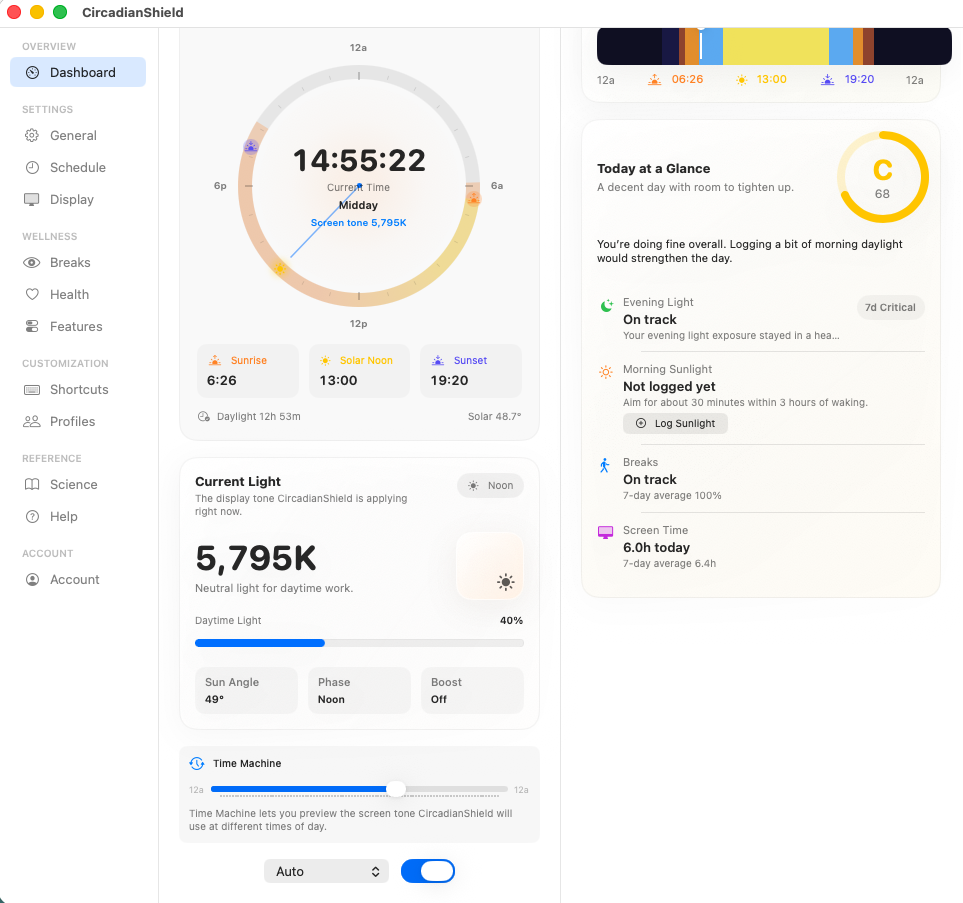
CircadianShield on a Mac: the screen color follows the sun, from 6,500 K in the morning down to 1,800 K at bedtime.
It's 10 PM. You've been working since morning, and your MacBook screen is still pumping out the same bright, bluish-white light it was at 9 AM. You know you should wind down, but the screen doesn't know that. Knowing how to turn on blue light filter on Mac is the first step. Understanding what that filter is actually doing to your melatonin is the part most guides skip entirely.
This guide covers both: the quick path through System Settings, and the measurable difference between what Night Shift actually delivers versus what your circadian biology actually needs.
TL;DR
- Night Shift is built into macOS and easy to enable via System Settings > Displays > Night Shift.
- Night Shift uses fixed clock-based scheduling and reduces color temperature, but does not calculate melanopic EDI, the biologically relevant metric for circadian impact.
- CircadianShield's 11-phase solar algorithm tracks your actual sun position and calculates melanopic EDI in real time, which is a measurably different approach to evening light management.
- Both options are covered step by step below, with a direct comparison of their outputs.
Does Mac Have a Built-in Blue Light Filter?
Yes. Apple introduced Night Shift with macOS Sierra 10.12.4 in 2017, and it's available on any Mac introduced in 2012 or later. It shifts your display toward warmer color temperatures, more yellow, less blue, either on a fixed schedule or timed to local sunset.
Works on every Mac running Sierra or later, across both built-in displays and most external monitors. If your Mac predates 2012 or is still on a pre-Sierra macOS, Night Shift won't appear in your settings at all. Skip ahead to the app-based section if that's you.
How to Turn On Blue Light Filter on Mac Using Night Shift
This is the fastest path. Every guide covers it, so we'll be brief.
Click the Apple menu in the top-left corner and select System Settings (macOS Ventura 13+ and macOS Sonoma 14+). On older versions, this is called System Preferences.
Select Displays from the sidebar. On macOS Sequoia 15, Displays is listed near the bottom of the sidebar under hardware.
You'll see a Night Shift tab at the top of the Displays pane. Click it.
Use the Schedule dropdown to choose Sunset to Sunrise, Custom (set your own times), or Off. To turn Night Shift on immediately regardless of schedule, check the box labeled "Manually enable until tomorrow."
Drag the slider between "Less Warm" and "More Warm." There is no numeric readout, it's a relative scale only. More on why this matters below.
Can I Schedule Night Shift to Turn On Automatically?
Yes. "Sunset to Sunrise" uses macOS's geolocation to calculate your local sunset and sunrise times, then activates Night Shift automatically, no manual input needed after initial setup. You can also pick Custom if your sleep schedule runs well outside natural sunset hours.
Does Night Shift Work on External Displays?
Night Shift applies to all connected displays simultaneously. There's no way to set different color temperatures for different monitors using Night Shift alone. If you need per-display control, a calibrated monitor for photo editing next to a standard display, for instance, you'll need a third-party app.

Photo by Christian Naccarato on Unsplash
Is Night Shift on Mac Good for Your Eyes?
Night Shift reduces short-wavelength (blue) light, which is a step in the right direction. But "good for your eyes" is doing a lot of work in that question, and Night Shift only partially answers it.
The retinal cells most responsible for circadian signaling are the intrinsically photosensitive retinal ganglion cells (ipRGCs). They're most sensitive to light around 480 nm, the melanopsin peak. The correct measure of how much a light source stimulates those cells is melanopic equivalent daylight illuminance, or melanopic EDI, in lux.
Night Shift's slider has no melanopic EDI readout. Apple doesn't publish the melanopic EDI output at any slider position. Independent measurements place Night Shift at maximum warmth around 2700 to 3000 K, meaningfully warmer than a default 6500 K display, but the actual melanopic EDI reduction varies with your display's backlight and ambient brightness.
A 2021 study in PNAS (Mouland et al.) found that it's melanopic illuminance, not just color temperature, that drives ipRGC-mediated melatonin suppression. Reducing Kelvin without pushing melanopic EDI below roughly 10 lux in the two hours before sleep still produces measurable melatonin suppression. Night Shift at typical brightness settings doesn't reliably get there.
The takeaway: Night Shift is better than nothing. It's not a complete circadian solution.
How to Enable Blue Light Filter on Apple: The App-Based Approach
Knowing how to turn on blue light filter on Mac goes further than System Settings once you factor in the science. This is where dedicated apps differ in a concrete, measurable way.
f.lux was the first widely used Mac blue light filter app, free, cross-platform, and responsible for introducing sunset-synced color temperature to a huge audience. It adjusts Kelvin based on time of day, with evening targets around 3400 K at "recommended" and 1900 K at "Ember." That's a real improvement over Night Shift's fixed sunset trigger.
That worked well for 2009. The science has moved.
CircadianShield is a native Swift app built for macOS 14+, supporting both Apple Silicon and Intel. Rather than a two-state Kelvin schedule, it runs an 11-phase solar position algorithm that tracks the actual angle of the sun at your location throughout the day. Color temperature shifts continuously across all 11 phases, not just at sunrise and sunset.
The Pro plan includes the full solar-synced algorithm, Morning Boost mode, adjustable Kelvin ranges, the Health Dashboard, PWM flicker protection, per-display control, and the melanopic EDI popover, a live readout showing your current melanopic EDI value as you adjust settings. Pro is $47, a one-time payment that covers up to 2 computers on Mac and Windows, with free updates and a 30-day money-back guarantee.
| Feature | Night Shift (macOS built-in) | f.lux (free) | CircadianShield Pro |
|---|---|---|---|
| Scheduling method | Fixed clock/sunset | Fixed sunset + manual | 11-phase solar position |
| Melanopic EDI readout | No | No | Yes (live popover) |
| Kelvin range (approx.) | ~6500 K to ~2700 K | ~6500 K to ~1200 K | Adjustable by user |
| Per-display control | No | No | Yes |
| PWM flicker protection | No | No | Yes |
| DLMO countdown | No | No | Yes |
| Platform | macOS + Windows | macOS, Windows, Linux, iOS | macOS 14+ |
| Price | Free (built-in) | Free | $47 one-time, 30-day money-back guarantee |
The Melanopic EDI Gap: What Night Shift Leaves Behind
Most guides stop at the settings menu. That's the wrong place to stop.
The number that actually matters isn't Kelvin, it's melanopic EDI. Melanopic EDI measures the circadian stimulus of a light source in terms biologically equivalent to daylight. Clear afternoon outdoor light runs roughly 1000 melanopic EDI lux. A typical office at 500 lux incandescent is around 200 melanopic EDI lux. Research published in LEUKOS (Rea & Figueiro, 2018) established that even modest indoor light exposure in the evening can delay DLMO (Dim Light Melatonin Onset) when melanopic EDI stays consistently above 10 lux.
A MacBook Pro display at full brightness with Night Shift at maximum warmth produces somewhere in the range of 30 to 80 melanopic EDI lux depending on the panel and ambient brightness. The Kelvin has shifted, but the melanopic dose is still biologically active.
CircadianShield's Pro plan shows your current melanopic EDI in real time via the live popover. When the number drops below your target, ideally under 10 melanopic EDI lux in the 90 minutes before sleep, you know your display is actually circadian-safe. Not just visually warm. Actually safe. Night Shift gives you a warmer-looking screen. CircadianShield gives you a number.
How to Activate a Blue Light Filter for Specific Workflows
Not every hour at your Mac calls for the same filter level. Most guides ignore this entirely.
Photo editing and color-critical design work: Turn Night Shift off completely, or pause CircadianShield using its inactivity pause. Any color shift contaminates your white balance reference. CircadianShield Pro includes a Presentation mode and Custom mode for exactly this reason.
Programming and terminal work: Warmer color temperatures are generally fine here. CircadianShield's Pro plan includes a Coding preset that balances readability with evening-appropriate color temperature.
Gaming: Night Shift can introduce input lag perception on some displays, a reported user complaint, though not universally verified across hardware. CircadianShield Pro includes a dedicated Gaming mode that manages flicker and color without affecting display response characteristics.
Late-night reading: CircadianShield Pro has a Reading preset built in. Night Shift at maximum warmth is a reasonable fallback if you're not running an app.
Troubleshooting Night Shift When It's Not Working
A few common issues and their actual fixes:
- Night Shift is grayed out: Your Mac is likely pre-Sierra 10.12.4, or a pre-2012 model. Neither is compatible. Use f.lux or CircadianShield instead.
- Night Shift doesn't turn on at sunset: Check that Location Services is enabled for System Services. Go to System Settings > Privacy & Security > Location Services, scroll to System Services, and toggle it on. Without that, Night Shift can't calculate your local sunset.
- Settings not saving after restart: Occasionally surfaces after macOS updates. Deleting the Displays preference file (com.apple.displays.plist) in ~/Library/Preferences usually resolves it.
- Night Shift not applying to an external display: Some third-party monitors don't respond to Night Shift's color profile changes. A third-party app using ICC profiles or hardware-level adjustments, like CircadianShield, can work around this.
Does a Blue Light Filter Affect Mac Performance or Battery Life?
Night Shift has no measurable impact on either. It's a color profile adjustment handled by the GPU, no additional processing load.
Third-party apps vary. CircadianShield is native Swift on macOS 14+, and it uses Apple Silicon's efficiency cores appropriately. No background processes dragging on performance. The Pro plan's PWM flicker protection is a display-level adjustment, not a render pipeline effect.
The one scenario where a blue light filter might affect battery: if you crank brightness up to compensate for the perceived dimming from a warm color shift. That's a user behavior issue, not a software one.
What About Red Light Therapy and Low-Blue Lighting?
Some users combine screen filters with environmental lighting changes. In the evening context, red light therapy typically means replacing overhead lights with bulbs below 2700 K or using dedicated red/amber lamps (590 nm and above) that produce very low melanopic EDI. This is a research-supported strategy, not fringe advice.
CircadianShield's DLMO countdown shows how much time remains before your estimated Dim Light Melatonin Onset, so you can time both your screen filter and your room lighting to your actual circadian phase, not a generic "9 PM" recommendation.
The Complete Picture on How to Turn On Blue Light Filter on Mac
Back to that 10 PM scenario. Two paths forward.
Path one: open System Settings, go to Displays > Night Shift, set it to Sunset to Sunrise, drag the slider to "More Warm." Done in 30 seconds. Your screen looks warmer. Your melanopic EDI is still probably 40 to 60 lux. Better than before. Not all the way there.
Path two: install CircadianShield, enter your location, and let the 11-phase solar algorithm manage color temperature continuously from sunrise through your DLMO window. Open the melanopic EDI popover in the Pro plan and watch the number until you're below 10 lux before bed. Use the DLMO countdown to know exactly when your melatonin window opens.
Knowing how to turn on blue light filter on Mac is the easy part. Knowing whether the filter you turned on is actually doing the biological job, that's the harder part. That's the gap Night Shift doesn't close, and the reason the melanopic EDI metric exists.
For a broader comparison of apps in this space, see our Best Blue Light Filter Apps for Mac 2026. If you want to dig into the underlying science, the CircadianShield science page covers the ipRGC research and how the 11-phase algorithm was built. If you are weighing the app instead of the built-in option, see Blue Light Filter for Mac, the side by side breakdown at Night Shift on Mac vs CircadianShield, and the broader blue light filter guide. You can also review the full feature list or download it for Mac or Windows to test it against Night Shift on your own display.
Key Takeaways
- Night Shift is available on any Mac from 2012 or later running macOS 10.12.4+. Enable it via System Settings > Displays > Night Shift.
- Night Shift reduces Kelvin but has no melanopic EDI readout. At typical brightness, it likely stays well above the 10 melanopic EDI lux threshold that research associates with minimal circadian impact.
- CircadianShield uses an 11-phase solar position algorithm and (in Pro) a live melanopic EDI popover, the only Mac app that shows you the biologically relevant number in real time.
- Disable all color filters during color-critical work like photo editing or video grading.
- For per-display control, PWM flicker protection, and DLMO tracking, CircadianShield Pro is a one-time $47 purchase that covers up to 2 computers, backed by a 30-day money-back guarantee.