DimScreen in short
DimScreen is a free, portable Windows utility by the developer Skrommel, built with AutoHotkey and published on Skrommel's One Hour Software site. It lays a black, click-through, always-on-top window over your main screen and lets you set that layer from 0% to 90% darkness in ten steps, from the tray icon or with the Ctrl++ and Ctrl+- hotkeys. The current version is 1.1, whose only listed change is "Added hotkeys" on 19 March 2008. It does not lower the backlight, does not warm the color, and covers only the primary monitor. CircadianShield dims with the same kind of overlay on Windows 10+ and macOS 14+, but covers every connected screen, adds screen warmth and solar timing, and costs $27 one-time for Core or $47 one-time for Pro, each with a 7-day free trial, card required.
What Is DimScreen?
DimScreen is a Windows screen dimmer written by Skrommel and distributed free from Skrommel's One Hour Software page on dcmembers.com, the DonationCoder member site. The official description is five lines long: "Dim the whole screen", pick a percentage in the tray menu, or use the hotkeys Ctrl++ and Ctrl+-, change the hotkeys in Settings, and a warning that it "doesn't work properly with video windows." Skrommel suggests it "could be used for nighttime map reading if your laptop is missing dimming controls."
The listing, checked on 6 October 2026, shows version 1.1, a 254.15 KB download, and a listing date of 12 December 2017, the same date most of Skrommel's catalogue shows on that site. The change log has one entry, "20080319, v1.1: Added hotkeys", so the program itself has not changed since March 2008. Skrommel's script header carries a 2007 date. DimScreen is not installed in the usual sense. You unzip it and run the .exe from any folder.
How DimScreen Dims Your Screen
DimScreen dims by drawing a black window on top of everything else, and the source code makes that plain. The DimScreen.ahk script, which a user reposted on the AutoHotkey community forum in July 2022, creates a borderless window colored 000000 with the AlwaysOnTop flag and the extended style E0x20, which lets mouse clicks fall through to the windows underneath. It then sets that window's transparency to the chosen level divided by ten, times 255.
- Ten levels, 0% to 90%. The tray menu lists 0%, 10%, 20% and so on up to 90%, and the hotkeys step one level at a time. There is no 95% and no in-between value.
- 50% on first launch. With no settings file, the script starts at level 5. You can change the startup level in Settings, and DimScreen saves it, with your hotkeys, to a DimScreen.ini file.
- Main screen only. The window is sized to A_ScreenWidth by A_ScreenHeight at position 0,0, which in AutoHotkey is the primary monitor. A second or third monitor stays at full brightness.
- A loop keeps it on top. Every time the active window changes, the script sets AlwaysOnTop again so new windows cannot cover the dark layer.
Because DimScreen only darkens the picture, the backlight keeps running at whatever level your brightness slider sets. One commenter on the official page put it bluntly in 2018: "Dimscreen does not actually dim the screen, it only changes the color of windows", and pointed people who want a lower backlight to a DDC/CI tool instead. Both views are true. Your eyes get less light, the panel's backlight does not change.
How to Use DimScreen on Windows
Setting up DimScreen takes about a minute, and the steps below follow the official description and the published script.
- Download DimScreen from the developer's page on dcmembers.com and unzip it into any folder you like.
- Run DimScreen.exe. The screen drops to 50% straight away and a DimScreen icon appears in the system tray.
- Right-click the tray icon and pick a level from 0% to 90%. Choosing 0% leaves the program running with no dimming.
- Press Ctrl++ to make the screen darker and Ctrl+- to make it lighter, one 10% step per press. Plus means more dimming here, not more brightness.
- Open Settings from the tray menu to change the startup level or either hotkey.
- To turn DimScreen off completely, right-click the tray icon and choose Exit. The dark layer closes with the program.
To start DimScreen with Windows, put a shortcut to DimScreen.exe in your Startup folder. Ctrl+plus and Ctrl+minus are also the zoom keys in most browsers and many editors, and DimScreen claims them globally, so if page zoom stops responding while it runs, remap DimScreen's hotkeys in Settings.
Does DimScreen Work on Windows 11 and Windows 10?
DimScreen's official page lists no supported Windows versions at all, and Skrommel has not published a build since 2008. The evidence you have is user reports in the 46 comments on that page. In August 2019 one user wrote "Works fine under Win10", and other commenters describe running it on Windows 10 and Windows 7. We did not find any statement from the developer about Windows 11. Softonic's listing labels it Windows 7.
In practice DimScreen is a plain window with a transparency value, which is a very old and stable part of Windows, so most people simply try it. If something looks wrong on a newer machine, the most likely cause is display scaling. A commenter on a 2560 by 1600 laptop at 160% scaling reported a thin column of undimmed pixels along the right edge, which fits the script sizing its window without DPI awareness. CircadianShield's Windows app sizes its dimming layer to the full virtual screen that Windows reports, which spans every connected monitor.
DimScreen Problems Users Report
The comment thread on DimScreen's official page, running from January 2018 to January 2020, is the best record of where DimScreen falls short. Each point below is a user report on that page, not a test by CircadianShield.
- No second monitor. The most common request, from eight different commenters, is multi-monitor support. DimScreen dims one display. The AutoHotkey forum thread from 2022 exists because a user wanted to stretch the script across all screens.
- Video and context menus. The developer warns it does not work properly with video windows, and a 2019 commenter found right-click menus in Chrome and Explorer were not dimmed.
- Taskbar trouble. Two users report that with a full-screen window open, an auto-hidden taskbar becomes unusable, on Windows 7 and Windows 10.
- Anti-cheat. A 2018 commenter says PunkBuster flagged DimScreen as a disallowed program and kicked them from an online game, so close it before you play. The CircadianShield guide to dimming your screen for gaming covers this risk for overlay dimmers in general.
- Stuck dark screen. One user reports a frozen session that left the screen dark, and another that it occasionally went fully black at any level. If the dark layer stays after you lose the tray icon, end DimScreen.exe in Task Manager.
Is DimScreen Safe to Download?
DimScreen is safe when you take it from the developer, and the safest source is Skrommel's own page on dcmembers.com, which lists the 254.15 KB file. Softonic also hosts DimScreen and reports that its copy passed a VirusTotal scan on 30 April 2024, but it lists the file at 431.40 KB, so the mirror is not byte-for-byte the developer's download. Prefer the original. The published script contains no network code: it reads and writes a local .ini file, and the only web address in it is a link to autohotkey.com in the About box.
CircadianShield takes a different approach to privacy. Screen filtering and health scoring run 100% on-device and no screen content or personal data leaves your machine, while the app sends optional anonymous usage and technical diagnostics that you can switch off in Settings. The full list is on the CircadianShield brand facts page.
DimScreen vs CircadianShield, Side by Side
DimScreen and CircadianShield both dim with a dark overlay window, so the useful comparison is everything around that layer. DimScreen facts come from its official page and source code. CircadianShield facts come from the shipping Windows and Mac apps.
| Feature | CircadianShield | DimScreen |
|---|---|---|
| Platforms | Windows 10+ and macOS 14+ | Windows only |
| How it dims | Click-through dark overlay, backlight left alone | Click-through black window, backlight left alone |
| Dimming range | Windows slider 5% to 85% in 1% steps. Mac slider 5% to 65%, Dark preset 85% | 0% to 90% in ten 10% steps |
| Multiple monitors | ✓ Every connected screen. Per-display settings in Pro | ✗ Primary screen only |
| Screen warmth at night | ✓ Core warmth. Pro: 11 solar phases, 6500K to 1800K | ✗ |
| Schedule | ✓ Pro: sun position plus wake and sleep times | ✗ Manual only |
| Hotkeys | ✓ Keyboard shortcuts in Pro | ✓ Ctrl++ and Ctrl+-, remappable |
| Install | Installer | Portable .exe, 254.15 KB |
| Last update | Updated through 2026 | v1.1, March 2008 |
| Price | Core $27 or Pro $47 one-time, up to 2 computers, 7-day free trial | Free |
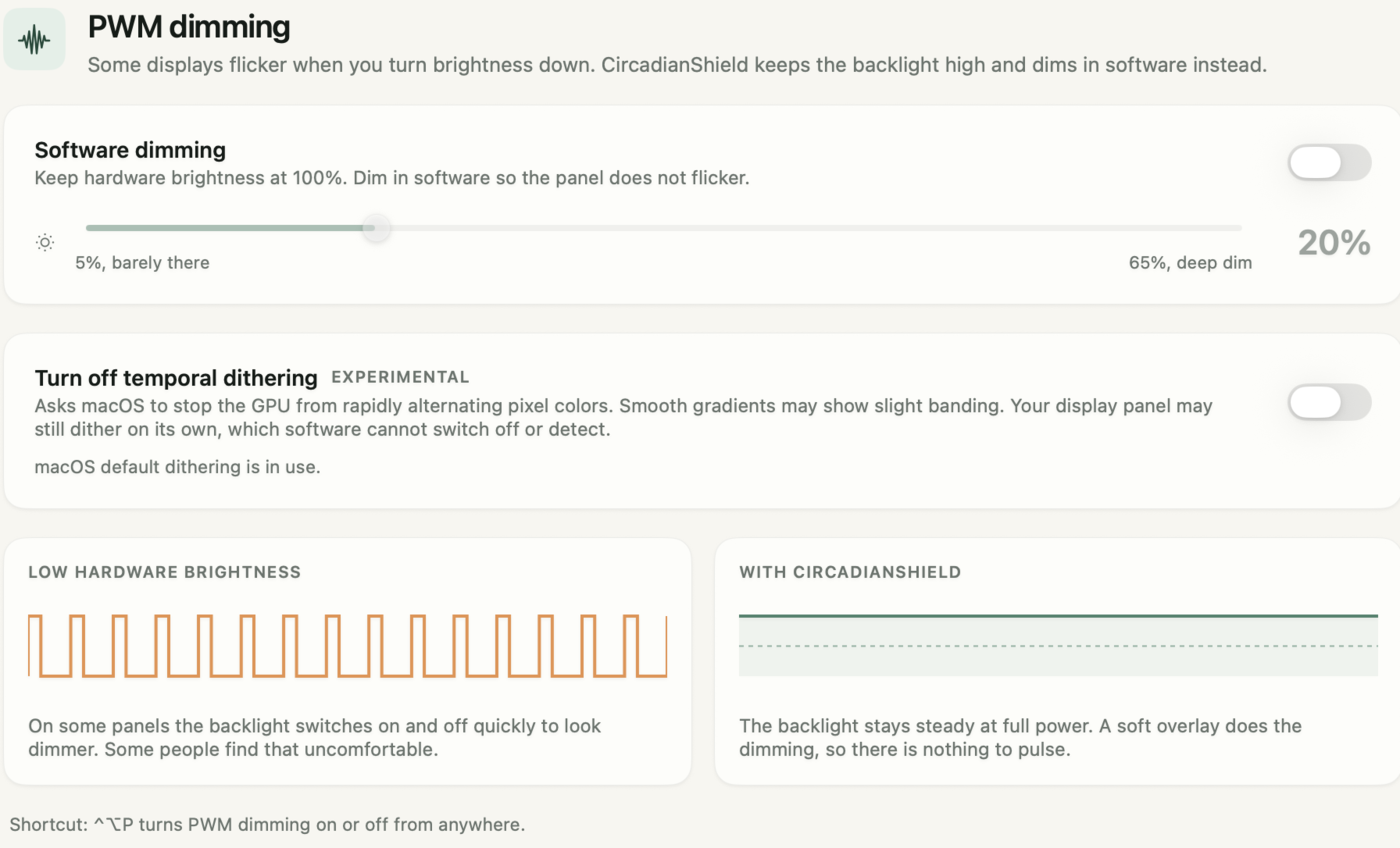
DimScreen, CircadianShield and PWM Flicker
DimScreen and CircadianShield share one real advantage over the brightness slider: neither touches the backlight, which matters on screens that flicker. Many LED and OLED panels dim by switching their light source on and off rapidly, a technique called pulse-width modulation, and the lower the hardware brightness, the longer the dark gaps in each cycle. The CircadianShield PWM flicker guide explains the mechanism and why some people get headaches from it.
The workaround is the same with either tool. Turn hardware brightness up to a level where your panel flickers less or not at all, then take the picture down with an overlay. DimScreen can do this in 10% jumps on one screen. CircadianShield Core includes PWM protection that does it on every screen with a 1% slider on Windows. If you are not sure whether your display uses PWM, the CircadianShield screen flicker test shows five ways to check with a phone camera and other tools.
DimScreen Alternatives for Windows
If DimScreen's single screen and ten steps are not enough, these are the alternatives worth a look, with CircadianShield first because it is our own app. Facts for the free tools were checked against each vendor's page or store listing for the CircadianShield screen dimmer software comparison on 24 September 2026.
- CircadianShield, for a dimmer that also warms the screen at night. Overlay dimming on every monitor, PWM protection and screen warmth in Core at $27 one-time, and solar-timed color, per-display settings and keyboard shortcuts in Pro at $47 one-time. Windows and Mac. The CircadianShield screen dimmer for Windows page covers the Windows setup.
- Dimmer by Nelson Pires, the closest free replacement. A slider for each connected screen, version 2.0.1 from 1 December 2022, a 56 KB download. Its developer warns against running it during multiplayer or first-person shooter games because of anti-cheat alerts.
- ScreenDimmer, a free GPL overlay on GitHub that dims each screen separately, with global hotkeys and a tint option. Its last commit is from November 2017.
- Twinkle Tray, free and MIT licensed, for desktop monitors with no brightness slider in Windows. It lowers the monitor's real backlight over DDC/CI, so it cannot go below the monitor's own minimum.
- Windows Night Light, which is not a dimmer. It warms the color and leaves brightness alone, and the CircadianShield Windows 11 Night Light guide covers setup and fixes.
Looking for a "Dim Screen" App on Android or Mac?
The name DimScreen also belongs to Android apps, and one of them is Dim Screen: Night and Blue Light by Droid Ninja Studio, which has nothing to do with Skrommel's Windows tool. On 6 October 2026 its listing showed a free app with ads and in-app purchases, a 3.6 star rating from 65 reviews, a last update on 23 August 2026, and a Data safety section stating no data collected or shared. It needs the "Display over other apps" permission to draw its overlay. The CircadianShield guide to the best screen dimmer app for Android compares Android overlay dimmers with the built-in Extra dim.
DimScreen has no Mac version, since it is a Windows .exe. On a Mac, CircadianShield runs on macOS 14 and later and dims every connected display with the same backlight-friendly overlay, and the CircadianShield Mac screen dimmer guide walks through it. Neither DimScreen nor CircadianShield runs on Linux.
Is CircadianShield Worth Paying for Over DimScreen?
CircadianShield is worth it over DimScreen if you use more than one monitor, want the screen to warm up automatically after sunset, or need finer control than 10% steps. If you have one laptop screen, only need it darker for an hour at night, and are happy pressing a hotkey, DimScreen is free and does that job, and you should keep using it.
The case for CircadianShield gets stronger at night because brightness is only half of what reaches your body clock. Short-wavelength light near 480nm drives the melanopsin cells that signal daytime, and in a study by Chang and colleagues (2014, PNAS), reading on a light-emitting screen in the evening delayed melatonin by about 1.5 hours compared with a printed book. DimScreen makes the screen dimmer but leaves it just as blue. CircadianShield Pro shifts color from 6500K to 1800K along 11 solar phases calibrated to the CIE S 026 Melanopic EDI standard. CircadianShield is a wellness app, not a medical device, and it is designed to support more comfortable evening screen use rather than treat any condition.
Try CircadianShield as your DimScreen replacement
Core is $27 one-time for overlay dimming, PWM protection and screen warmth. Pro is $47 one-time and adds solar timing and per-display settings. Both include a 7-day free trial on Mac and Windows, card required, $0 for 7 days. Cancel before day 8 and you are not charged.
Start the CircadianShield trialDimScreen Questions
Is DimScreen free?
Yes. DimScreen is free to download from Skrommel's One Hour Software page on dcmembers.com, with no paid tier and no trial. CircadianShield is the paid alternative, at $27 one-time for Core or $47 one-time for Pro with a 7-day free trial.
Does DimScreen work on Windows 11?
The developer has never stated a supported Windows version, and the last release, version 1.1, dates from March 2008. Users on the official page report it working on Windows 10. It is a simple transparent window, so it usually runs on newer Windows, but at high display scaling a strip of the screen can stay undimmed.
How do I turn off DimScreen?
Right-click the DimScreen icon in the system tray and choose Exit. To keep it running with no dimming, choose 0% instead. If the tray icon is gone and the screen is still dark, end DimScreen.exe in Task Manager.
Can DimScreen dim two monitors?
No. DimScreen sizes its dark window to the primary screen, so a second or third monitor stays at full brightness. CircadianShield covers every connected screen, and CircadianShield Pro adds settings for each display.
Is there a DimScreen for Mac?
No. DimScreen is a Windows program. On a Mac, CircadianShield dims every display with an overlay on macOS 14 and later, and the Android apps called Dim Screen are unrelated phone apps.
Does DimScreen lower the backlight or save battery?
No. DimScreen draws a black window over the screen and leaves the backlight where your brightness slider put it, so the backlight draws the same power. That is also why it can help on screens with PWM flicker: keep hardware brightness high and let the overlay do the dimming.
What is the best DimScreen alternative?
For a free swap, Dimmer by Nelson Pires adds a slider for each screen. For dimming plus warmer color at night on Windows and Mac, CircadianShield Core costs $27 one-time and Pro costs $47 one-time. For a desktop monitor with no brightness control in Windows, Twinkle Tray is free.