Quick answer: do MacBooks have PWM?
Some do. The 14-inch and 16-inch MacBook Pro models with mini-LED displays (2021 onward) are reported by Notebookcheck to dim with PWM at a very high frequency, around 15 kHz. Notebookcheck's MacBook Air reviews generally report no PWM detected. Apple does not publish these numbers, and many Mac users who react to their screen are reacting to temporal dithering or to brightness and colour settings rather than PWM. You can test your own Mac in a few minutes.
Why Mac owners report eye strain from new MacBooks
Threads on Reddit's r/PWM_Sensitive, ledstrain.org, MacRumors and Apple's own support forums follow a familiar pattern: a new MacBook Pro or Air, symptoms that did not happen on the old machine, and no clear answer from Apple. The causes people end up identifying usually fall into three groups:
- PWM backlight dimming, where the backlight pulses to lower brightness.
- Temporal dithering, where the GPU alternates pixel colours frame to frame to fake extra colour depth.
- Brightness, contrast and colour settings: a bright white screen in a dark room, True Tone or Night Shift changes, or a jump in panel brightness compared with the old laptop.
These overlap, which is why one person's fix does not always work for the next.
MacBook Pro mini-LED: high-frequency PWM
The mini-LED Liquid Retina XDR panels in the 14-inch and 16-inch MacBook Pro use thousands of small backlight zones. Notebookcheck's reviews report PWM on these panels at roughly 15 kHz. That is far above the 3000 Hz point where IEEE Std 1789-2015 expects no observable effect from flicker, so on paper it is one of the gentler PWM implementations in a laptop. Some users still report discomfort on these machines, and some of those reports point to dithering or the local dimming zones rather than the PWM rate. See the frequency section of our PWM sensitivity guide for how to read these numbers.
MacBook Air: usually no PWM, but dithering still applies
Notebookcheck's reviews of recent MacBook Air models generally report no PWM detected. If you feel strain on an Air, PWM is a less likely cause than brightness, contrast, or temporal dithering, which macOS uses on many internal and external displays. If the test below shows no bands, look at the other causes first.
Apple Studio Display and external monitors
Apple does not publish PWM data for the Studio Display or the Pro Display XDR, and published measurements are sparse. With third-party monitors the answer depends entirely on the panel: some are flicker-free, some use low-frequency PWM. macOS brightness keys do not control most third-party monitors, so people often turn brightness down in the monitor's own menu, which on a PWM panel pushes it into its flicker range. Our flicker-free monitor guide lists what to look for.
How to test your MacBook for PWM
- Set brightness lowTurn the MacBook to about 25 percent brightness and open a plain white window.
- Use a phone cameraPoint the camera at the screen. Dark horizontal bands rolling across the image suggest PWM. Slow-motion video makes them easier to see. Very high frequency PWM, like the mini-LED panels, may not show bands on every phone camera.
- Repeat at full brightnessIf bands fade or vanish at 100 percent, keeping hardware brightness high will help.
- Check the measured reviewNotebookcheck lists PWM frequency and the brightness level where it starts for each model it tests.
Our full PWM flicker test includes the pencil test and the pixel inversion pattern too.
What helps on macOS
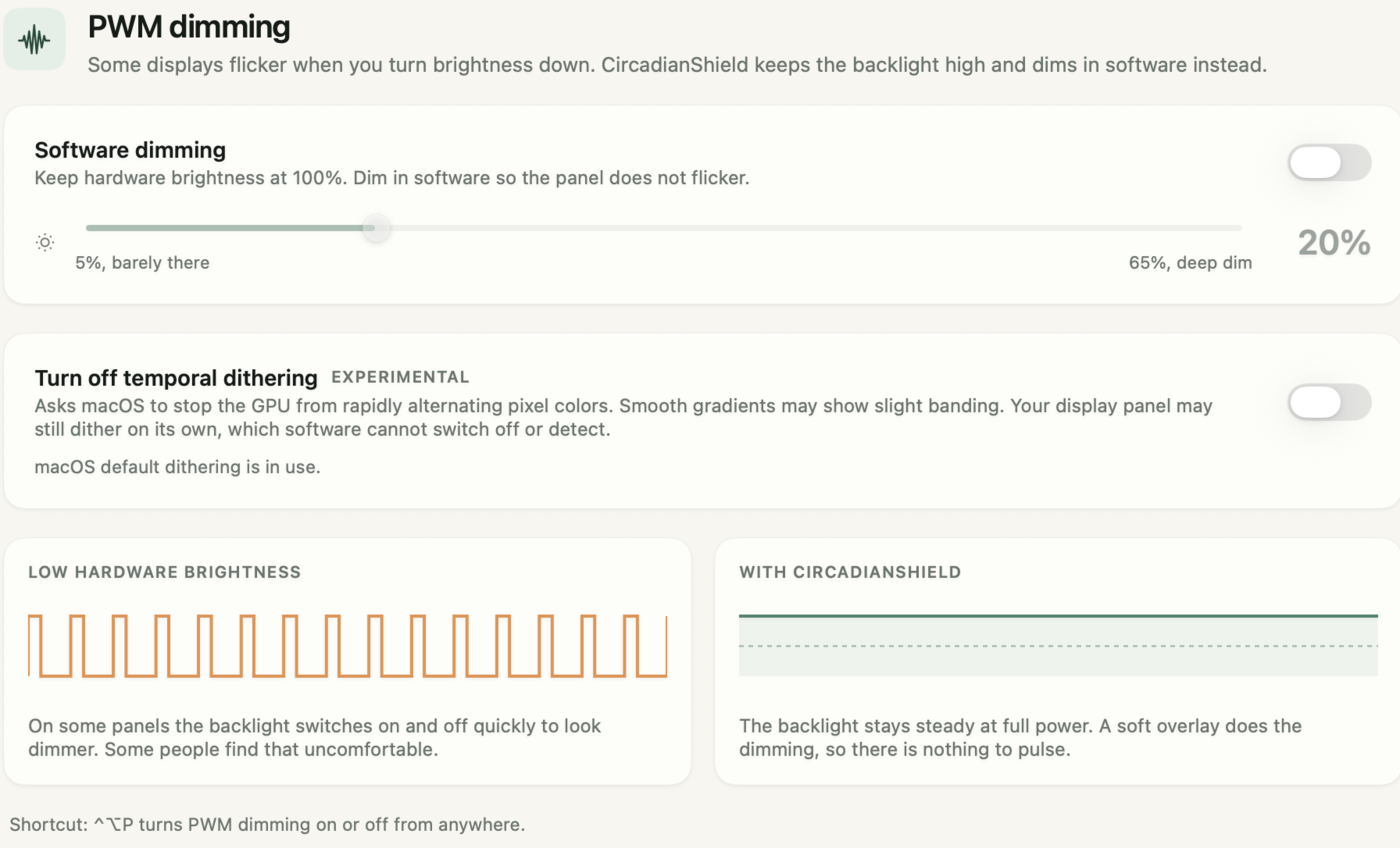
- Keep hardware brightness high and dim in software. This keeps any PWM in its shallowest range. Turn the MacBook's own brightness up to 100 percent yourself, then use CircadianShield Core's software dimming slider (5 to 65 percent) to bring the picture back down. The app dims the image; it does not move the hardware brightness for you.
- Turn off temporal dithering where you can. CircadianShield Pro on Mac includes an experimental switch to turn off temporal dithering, for people who suspect dithering rather than PWM. This switch is Pro only; Core does not include it.
- Warm the screen at night. A warm screen at lower contrast is easier in a dark room than bright white. Our Mac blue light filter guide compares Night Shift with CircadianShield's solar schedule.
- Light the room. A lamp near the screen narrows the brightness gap your eyes have to bridge.
- Take real breaks. The 20-20-20 rule helps with focusing fatigue that has nothing to do with flicker.
CircadianShield runs on Apple silicon Macs from M1 through M4 Max. M5 Macs have not been tested yet.
Dim your MacBook without dimming the backlight
Set your MacBook to full brightness, then let CircadianShield Core dim the picture in software, with screen warmth in the same app. Pro adds the dithering switch.
Buy CoreCore is $27 one-time, Pro is $47 one-time, up to 2 computers, 30-day money-back guarantee.
MacBook PWM: frequently asked questions
Does the MacBook Pro use PWM?
The 14-inch and 16-inch MacBook Pro models with mini-LED displays are reported by Notebookcheck to use PWM at around 15 kHz, a very high frequency that sits above the IEEE 1789 no-observable-effect threshold. Apple does not publish PWM data.
Does the MacBook Air have PWM?
Notebookcheck's reviews of recent MacBook Air models generally report no PWM detected. If your Air bothers your eyes, check brightness, contrast and temporal dithering as well.
Why does my new MacBook hurt my eyes?
Common causes are PWM backlight dimming on some models, temporal dithering, a brighter or higher contrast panel than your old laptop, and using the screen bright in a dark room. Test for PWM with a phone camera, keep hardware brightness high and dim in software, and warm the screen at night.
Can I turn off PWM on a MacBook?
No. PWM is built into the display hardware and macOS has no setting for it. You can keep hardware brightness at the top of its range, where PWM dips are shallowest, and dim the picture in software, which CircadianShield Core does for $27 one time.
Does CircadianShield work on M4 and M5 Macs?
CircadianShield supports Apple silicon Macs from M1 through M4 Max. M5 Macs have not been tested yet.