Quick answer: can you adjust PWM dimming frequency to reduce eye strain?
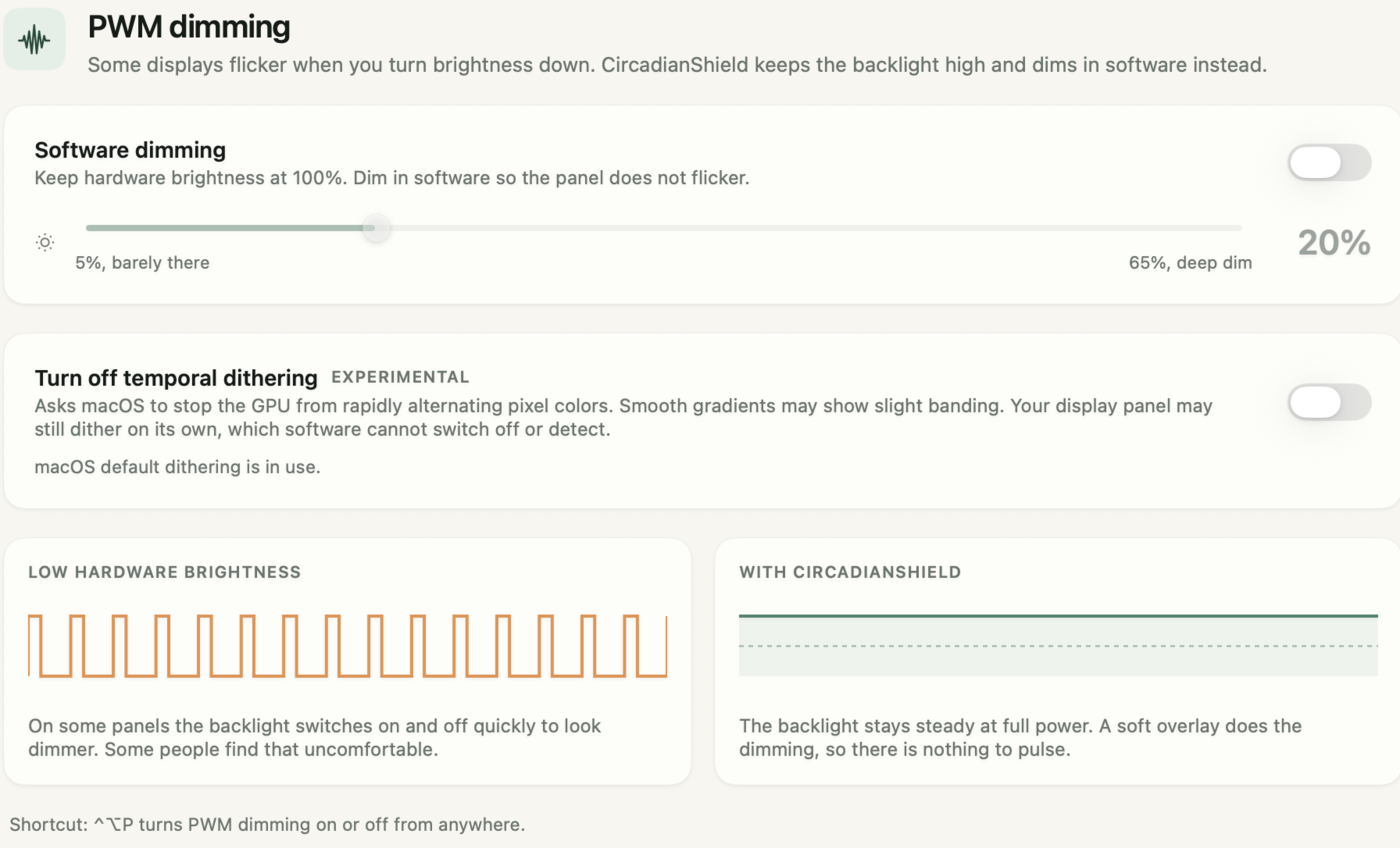
On almost every Mac, Windows laptop and external monitor, no. The PWM dimming frequency is set by the panel and its firmware, and no setting in macOS or Windows changes it. The exceptions are narrow: on Linux with an Intel i915 GPU, the Arch Wiki documents rewriting the PWM period register (0xC8254) with intel-gpu-tools; Iris ships a hidden PWM control for some laptops with old Intel HD Graphics and warns it can damage the screen if set too high; and phone makers change it in firmware, as when Android Central reported the Pixel 8 Pro dropping from about 485 Hz to 240 Hz after its October 2023 update. What you can tune is luminance. Keep the hardware brightness high, where each PWM cycle is mostly on, and take the image down in software instead. CircadianShield Core does that on Mac and Windows with a software dimming slider from 5 to 65 percent while hardware brightness stays at 100 percent, plus screen warmth, for $27 one time (Pro $47), with a 7-day free trial, card required.
What "display panel luminance tuning" changes on a PWM-dimmed screen
Display panel luminance tuning on a PWM-dimmed screen comes down to three numbers, and CircadianShield, like any software, can only touch one of them. A PWM panel dims by switching its backlight, or its OLED pixels, fully on and off many times a second. The brightness you see is the share of each cycle the light spends on, which is the duty cycle. Set a typical PWM laptop to 25 percent and the light is on for roughly a quarter of every cycle and off for the rest.
- Frequency. How many on and off cycles happen per second, measured in hertz. Fixed by the panel and its firmware on nearly every device you can buy.
- Duty cycle. How much of each cycle is lit. This is what your brightness slider changes, so this is the number you control every evening.
- Modulation depth. How far the light falls during the off phase. Classic PWM falls all the way to zero, which is 100 percent modulation.
Frequency and depth decide how risky the flicker is. IEEE Std 1789-2015, the IEEE recommended practice for LED flicker, sets a low-risk limit of 0.08 times the frequency for modulation depth between 90 Hz and 1250 Hz, and applies no practical limit above about 1250 Hz. At 240 Hz that limit is about 19 percent depth. A 240 Hz panel that switches fully off on every cycle sits at 100 percent, roughly five times past the line. That is the arithmetic behind the advice in CircadianShield's complete guide to PWM flicker and eye strain, and it is why the brightness slider matters so much at night: the dimmer you set it, the longer the dark gap in each cycle.
Can you change the PWM frequency? Platform by platform
The PWM frequency question gets a different answer on each platform, and CircadianShield cannot change it on any of them, so this table shows what the owner of each device can actually reach. Every row comes from the source named in it.
| Device or OS | Can you change PWM frequency? | What you can change instead |
|---|---|---|
| macOS (MacBook, iMac, external displays) | No user setting. System Settings controls brightness, not the dimming method. | Hardware brightness level, software dimming layer, screen warmth. |
| Windows 10 and 11 laptops | No user setting in Windows itself. | Hardware brightness, the "Change brightness based on content" control in Settings, software dimming. |
| Older laptops with Intel HD Graphics | Sometimes. Iris says its hidden PWM control can raise the backlight frequency on some of these, and warns that setting it too high can damage the monitor. | Leave the frequency alone unless you accept that risk. |
| Linux with an Intel i915 GPU | Sometimes. The Arch Wiki documents halving the PWM period in register 0xC8254 to double the frequency. | The same register shows whether the panel uses PWM at all. |
| External monitors | Not a standard on-screen menu option; the panel sets it. Some models are sold flicker-free and use DC dimming. | Monitor brightness, the flicker-free label when you buy. |
| Android phones | Only through firmware. Some brands add a DC dimming toggle; Pixel High Brightness Mode needs root. | Brightness, Extra dim, light theme. |
Linux and Intel i915: the one documented frequency change
Linux on an Intel i915 GPU is the one desktop platform where changing PWM frequency is publicly documented, and CircadianShield does not ship a Linux build, so treat this section as a reference rather than a product feature. The Arch Wiki Backlight page explains that the PWM period sits in the two higher bytes of register 0xC8254 (0x61254 on the Intel GM45 chipset), and that you raise the frequency by shrinking the period. Its worked example reads the register with intel_reg read 0xC8254, gets 0x12281228, and writes 0x09141228 to double the frequency while keeping the lower bytes unchanged. The wiki adds two caveats worth reading before you try it: to apply the new frequency automatically it suggests a udev rule or the intelpwm-udev package, and many modern IPS laptop panels already use DC dimming, which the register shows as an upper value of 0x0001. No laptop maker supports writing GPU registers by hand, so do it on a machine you can recover.
Iris and old Intel HD Graphics laptops
Iris, a paid blue light app, advertises a PWM frequency control, and the vendor's own article on PWM flicker frames it carefully. It says that on some laptops with old Intel HD Graphics and drivers you can raise the backlight's PWM frequency, and that the feature is integrated but hidden by default because setting the frequency too high can damage the monitor. On any current machine, CircadianShield's view is the same as Iris's own first recommendation in that article: set the hardware brightness to 100 percent and reduce brightness in software.
Phones: the frequency lives in firmware
Phone PWM frequency shows the number is software controlled, and also that you are not the one holding the control, which is the gap CircadianShield works around on the desktop. Android Central reported that the Pixel 8 Pro shipped at about 485 Hz, then dropped to 240 Hz with the October 2023 security patch, and that Google said it had nothing to share about why. In the GrapheneOS forum, users point to DC dimming toggles on Xiaomi, realme and the Fairphone 5, and to a Pixel High Brightness Mode that reduced visible PWM in their photos but needs root. On the Planet Computers Astro Slide, an owner documented on GitHub that writing to the backlight's brightness file capped out at 255 and the max_brightness file could not be changed. The pattern across all three: the frequency is a firmware decision, and the panel maker rarely exposes it.
The late-night coding setup that works on any PWM panel
A late-night coding setup on a PWM-dimmed panel works by moving the dimming out of the backlight, and CircadianShield is one way to do the software half. You cannot change the frequency, but you can keep the duty cycle high, so the dark gap in each PWM cycle stays short, and still get a screen dim enough for a dark room. Run it in this order.
- 1. Confirm the panel actually uses PWM Record the screen with a phone camera at low brightness and look for rolling dark bands, or look your exact model up on RTINGS or the NotebookCheck PWM database. CircadianShield's five-method monitor flicker test covers each check. If the panel is DC dimmed, frequency is not your problem, and the rest of this list is mostly about light and color.
- 2. Raise hardware brightness to the top of its range Iris's PWM article states that at maximum hardware brightness from the monitor buttons there is no PWM. That is true of many panels and not all of them: Notebookcheck measured HP's 1000-nit Sure View panel in the EliteBook 865 G9 pulsing at 56.7 Hz even at maximum brightness, which CircadianShield's EliteBook 830 G9 display breakdown covers. Re-run the camera test at 100 percent to see which kind you own.
- 3. Stop Windows from changing the backlight behind your back Windows can change brightness and contrast based on what is on screen. Microsoft's own example is a dark video scene followed by a bright one. A dark IDE theme with a bright browser next to it is the same pattern. In Settings, System, Display, Brightness, set "Change brightness based on content" to Off so the panel holds the level you chose.
- 4. Dim the image in software, not the backlight With hardware brightness held high, bring perceived brightness down with a software layer. CircadianShield's PWM dimming page does this with a slider from 5 to 65 percent while the hardware stays at 100 percent, on Mac and Windows. On Mac there is also an experimental switch to turn off temporal dithering, a separate flicker source some panels use to fake color depth. The CircadianShield guides to a Mac screen dimmer that goes below the slider and a Windows screen dimmer cover each platform.
- 5. Warm the screen as the evening goes on Brightness and color are separate problems. CircadianShield Core adds screen warmth in the same app. Pro follows the sun's real position from 6500K in daylight to 1800K through 11 twilight phases, and adds per-app profiles so a Coding profile for Xcode, VS Code or Terminal keeps reduced blue with high text contrast while that app is in front.
- 6. Light the room, not just the screen A bright screen in a black room is a large brightness jump every time your eyes move. A lamp behind or beside the monitor narrows that gap, which is the first fix in CircadianShield's eye health guide for developers who code late.
Dark theme or light theme for coding on a PWM screen?
Dark versus light theme on a PWM screen is a brightness question first, and CircadianShield treats it that way: theme does not change the PWM frequency, but it changes which brightness setting you end up choosing. A dark theme at a high backlight level is often comfortable, because the panel is running near the top of its duty cycle and the dark background keeps total light low. The trouble starts when a dark theme still feels too bright in a dark room and you pull the slider down, which is exactly the move that lengthens the off phase on a PWM panel. One Pixel 6a owner in the GrapheneOS forum described the opposite route working for them: brightness fixed at 75 percent, light mode, a larger font, and Android's extra dimming on top. That is one person's report, not a rule, but it shows the logic. CircadianShield's page on whether dark mode is better for your eyes covers the research side.
When software dimming is not enough
Software dimming on a PWM panel has a hard limit, and CircadianShield cannot get past it: if the panel pulses at full brightness, no layer above it changes what the backlight does. The HP Sure View panel measured at 56.7 Hz at maximum is that case. So is any panel where your camera test still shows bands at 100 percent. For those, the answer is hardware: a monitor sold as flicker-free, verified against a measured frequency at the brightness you use. CircadianShield's guide to what the flicker-free label means and how to verify one walks through that check, and the laptop PWM flicker guide covers the laptop side. If symptoms persist on a flicker-free display, the cause is probably not PWM, and a clinician is the right next stop. CircadianShield is a wellness app, not a medical device.
Keep the backlight steady while you code
CircadianShield Core holds hardware brightness at 100 percent and dims the picture in software, with screen warmth in the same app, on Mac and Windows.
Start the 7-day Core trialCore is $27 one-time, Pro is $47 one-time, up to 2 computers, 7-day free trial on Mac and Windows, card required.
PWM dimming and late-night coding: frequently asked questions
Can you change the PWM frequency of a laptop or monitor?
Usually not. The PWM frequency is set by the panel and its firmware, and neither macOS nor Windows has a setting for it. The documented exceptions are Linux on an Intel i915 GPU, where the Arch Wiki shows how to shorten the PWM period in register 0xC8254, and some older laptops with Intel HD Graphics, where Iris offers a hidden PWM control and warns that too high a setting can damage the screen. On everything else, the practical move is to keep hardware brightness high and dim the image in software with an app such as CircadianShield.
Is PWM dimming good for eyes?
PWM dimming is not good for eyes that are sensitive to flicker, especially at low frequency and low brightness. IEEE Std 1789-2015 sets a low-risk limit of 0.08 times the frequency for modulation depth between 90 Hz and 1250 Hz, so a 240 Hz panel that switches fully off each cycle is about five times past that line. Many people never notice it. People who do often report eye strain or headaches that get worse as they dim the screen, which is why CircadianShield recommends dimming in software while the backlight stays bright.
Which is better, DC dimming or PWM dimming?
DC dimming is better for flicker-sensitive people, because it lowers the light output smoothly instead of switching it on and off. PWM dimming survives because it is cheap, efficient and keeps colors stable at low brightness. High-frequency PWM, above roughly 1250 Hz, falls outside the IEEE Std 1789-2015 modulation limits and is a reasonable second choice. If your current screen uses low-frequency PWM, CircadianShield can keep the backlight near full brightness so the panel spends less of each cycle switched off.
How do I get rid of PWM sensitivity?
You cannot switch off a sensitivity, but you can remove most of the PWM exposure that sets it off. Check whether your screen uses PWM with a camera test, raise hardware brightness to the top of its range, turn off content adaptive brightness on Windows, and dim the image in software with a tool like CircadianShield. If the panel still flickers at full brightness, move to a display measured flicker-free. If symptoms continue on a flicker-free screen, talk to an eye care professional, because PWM may not be the cause.
Does 240Hz reduce eye strain?
A 240Hz refresh rate is not the same thing as 240 Hz PWM, and it does not change how the backlight dims. Refresh rate is how often the picture updates. PWM frequency is how often the light switches on and off, and a high refresh rate panel can still dim with low-frequency PWM. A post in the GrapheneOS forum notes a 120Hz Samsung phone display dimming at 240 Hz PWM. Smoother scrolling may feel easier to track, but for PWM-related strain the numbers to check are the measured PWM frequency and depth. CircadianShield helps with the dimming side, not the refresh side.
Is CircadianShield worth it for late-night coding?
CircadianShield is worth trying if your eyes feel worse after you dim the screen, because Core keeps hardware brightness at 100 percent and dims the image with a software slider from 5 to 65 percent on Mac and Windows. Core costs $27 one time and adds screen warmth. Pro costs $47 one time and adds per-app profiles, such as a Coding profile for Xcode, VS Code and Terminal, plus 11-phase solar color temperature. Both have a 7-day free trial with a card required. It will not help a panel that flickers at full brightness.