f.lux Brightness: How to Dim Your Screen With f.lux, and Its Limits
You installed f.lux, the screen turned orange, and it still feels too bright. That is because f.lux is built to change the color of your screen, not how much light it puts out. This CircadianShield page explains the one brightness control f.lux does have, why it only exists on Windows, what it is actually doing to the picture, and what to reach for when it is not enough.
Last updated: October 8, 2026
Does f.lux change screen brightness?
f.lux does not change your backlight brightness, and CircadianShield found nothing in f.lux's documentation that dims the screen on a schedule. f.lux is a color temperature app. Its FAQ answers the question "Plenty of things already change the brightness of my screen. Why is this different?" with "f.lux changes the color temperature of your display." Through the evening it moves your screen from daylight white toward warmer presets: Sunlight at 5500K, Fluorescent at 4200K, Halogen at 3400K, Incandescent at 2700K, Warm Incandescent at 2300K, Candle at 1900K and Ember at 1200K.
The same FAQ draws the line with your laptop's light sensor. The ambient light sensor "measures the brightness of the light in your room and adjusts the brightness of your screen," while f.lux "changes the color of your screen." f.lux adds that "f.lux doesn't use ambient brightness to adjust colors." So the two run side by side: macOS or Windows handles brightness, f.lux handles color.
There is one quiet exception. In June 2023 the f.lux developer who posts as herf on the official f.lux forum wrote that "f.lux does make some adjustments to brightness at the lowest color temperatures already." In December 2023 the same account added that "right now we only support 'temporary' adjustments via Alt+PgDn & Alt+PgUp." The f.lux release notes through version 4.141 in April 2026 list no scheduled dimming feature since then. CircadianShield checked the notes on October 8, 2026.
Why your screen looks darker with f.lux running
If f.lux seems to make your screen dimmer, you are not imagining it, and CircadianShield sees the same effect with its own warm settings. To warm the screen, f.lux lowers blue light the most and, at the warmest presets, green light as well. Green carries most of what your eye reads as brightness, so a screen at Candle or Ember looks noticeably darker even though your brightness slider has not moved.
That perceived dimming is a side effect of the color change, not a brightness setting you can tune. If you set f.lux to a milder preset such as Halogen, most of the darkening goes away. The f.lux FAQ also suggests starting at Fluorescent or Halogen if the default looks "too pink/orange," then moving warmer once your eyes adjust.
How to dim your screen with f.lux on Windows: Alt+PgDn and Alt+PgUp
f.lux for Windows is the only f.lux version with a brightness control, and CircadianShield sourced every hotkey below from f.lux itself. The f.lux FAQ answers "How do I dim my desktop monitor?" with: "In Windows f.lux, use the hotkeys Alt-PgDn and Alt-PgUp." The checkbox that turns them on sits in the f.lux Options menu, and on the f.lux forum it is quoted as reading "Use these hotkeys to control f.lux: Alt+End: Disable, Alt+PgDn an Alt+PgUp: Change Brightness, Alt+Shift+PgUp and Alt+Shift+PgDn: Change Color."
| f.lux hotkey on Windows | What it does | Source |
|---|---|---|
| Alt+PgDn | Darkens the image one step | f.lux FAQ |
| Alt+PgUp | Brightens the image back up one step | f.lux FAQ |
| Alt+Shift+PgDn or PgUp | Changes color temperature warmer or cooler | f.lux v4 release notes |
| Alt+End | Disables f.lux | f.lux Options checkbox |
| Alt+Shift+End | Toggles Darkroom mode | f.lux v4 release notes |
| Win+End | Toggles grayscale mode | f.lux v4 release notes |
Three things about the f.lux dimming hotkeys catch people out, each in f.lux's own words:
- They are meant for desktop monitors. herf wrote on the f.lux forum in June 2023 that "since many laptops have dedicated keys for it, this is mainly for desktop machines." The FAQ goes further for laptops: "you should mostly dim your backlight to keep contrast."
- They are manual and temporary. There is no setting to make f.lux dim at sunset. You press the keys when you want a darker screen and press them again to undo it.
- They are not an overlay. Asked in March 2024 whether Alt+PgDn worked by white point reduction or an overlay, herf answered "it is not an overlay, only our vignette mode does that." The image itself is darkened through the color pipeline, which is why contrast drops.
If the hotkeys clash with another program, the f.lux FAQ says to "Find the Options menu, and turn them off there." That checkbox turns off the whole set, so you lose Alt+End as well.
f.lux brightness on Mac: no dimming hotkey
f.lux on Mac warms the screen exactly like the Windows version, but CircadianShield could not find a brightness control for it anywhere in f.lux's documentation. The FAQ documents the dimming hotkeys for "Windows f.lux" only. A user who runs f.lux on both systems asked the f.lux forum in August 2022 why Alt+PgDn worked on Windows but not on the Mac, writing "there doesn't seem to be that functionality on Macs," and got no answer from f.lux.
On a Mac, then, brightness stays with macOS. Use the brightness keys on the keyboard or the brightness slider in Control Center or System Settings, then Displays. For an external monitor, use its own buttons or on-screen menu. If you want the screen darker than the lowest step macOS allows, you need a separate screen dimmer, which CircadianShield covers in the screen dimmer for Mac guide.
f.lux Darkroom mode and grayscale: not brightness, but they cut light
Darkroom mode is the f.lux setting people often find while looking for a brightness control, and CircadianShield wants to be clear that it is not dimming. It turns the screen deep red, an extreme color filter for working in a dark room. The f.lux v4 release notes added the Alt+Shift+End hotkey for it in January 2018, and the f.lux FAQ confirms Darkroom exists on Mac too, with a note about bad looking text on macOS 10.12.4 that you fix by unchecking "Use LCD font smoothing when available."
On Windows, Darkroom and the warmest colors need an extra step. The f.lux FAQ says to open the "Lighting at Night" menu and choose "Expand Color Range," which asks for Administrator access and a reboot. The release notes for version 4.124 in June 2023 also carry a warning that Darkroom is not compatible with Intel Iris Xe graphics.
Grayscale mode, added in version 4.84 in November 2018 with the Win+End hotkey, removes color rather than light. If your screen suddenly went red or gray and you do not remember choosing it, an accidental press of one of these hotkeys is the usual reason.
Brightness matters as much as color for sleep, which f.lux only half covers
f.lux's own FAQ makes the point that matters here, and it is the reason CircadianShield exists: incandescent bulbs "become more red in tone when you dim them. But newer LEDs and CFLs don't, this includes the backlight on your monitor." On a modern screen, color and brightness are two separate controls, and f.lux's automatic schedule only moves one of them.
The research CircadianShield relies on treats both as inputs. Wikipedia's summary of the f.lux research cites a 2018 study finding that changing the spectral composition of self-luminous displays without changing their brightness settings may be insufficient for preventing impacts on melatonin suppression, and it notes that f.lux itself has not been scientifically tested for efficacy. Brown et al. (2022, PLOS Biology), a consensus recommendation from 18 sleep and circadian researchers, puts the evening target at a maximum of 10 lux melanopic EDI at the eye in the 3 hours before bed. Melanopic EDI rises with both how blue the light is and how much of it there is, so a warm screen at full brightness in a dark bedroom can still send a strong signal.
That is the reason CircadianShield calibrates to Melanopic EDI under CIE S 026 rather than to a Kelvin number. CircadianShield walks through the arithmetic preset by preset in its page on how much blue light f.lux removes at each brightness. None of this makes a warm or dim screen a medical treatment. It is a way to keep evening light lower, which may help support your natural sleep timing.
Dim the backlight or dim the image? The PWM trade-off f.lux does not mention
The f.lux FAQ tells laptop users to dim the backlight to keep contrast, and CircadianShield agrees that for most screens that is good advice, with one exception. Many laptop and monitor backlights get dimmer by switching on and off very fast, called pulse width modulation or PWM, and the pulsing gets deeper as you turn brightness down. A minority of people get headaches or eye strain from it, even though they cannot see it.
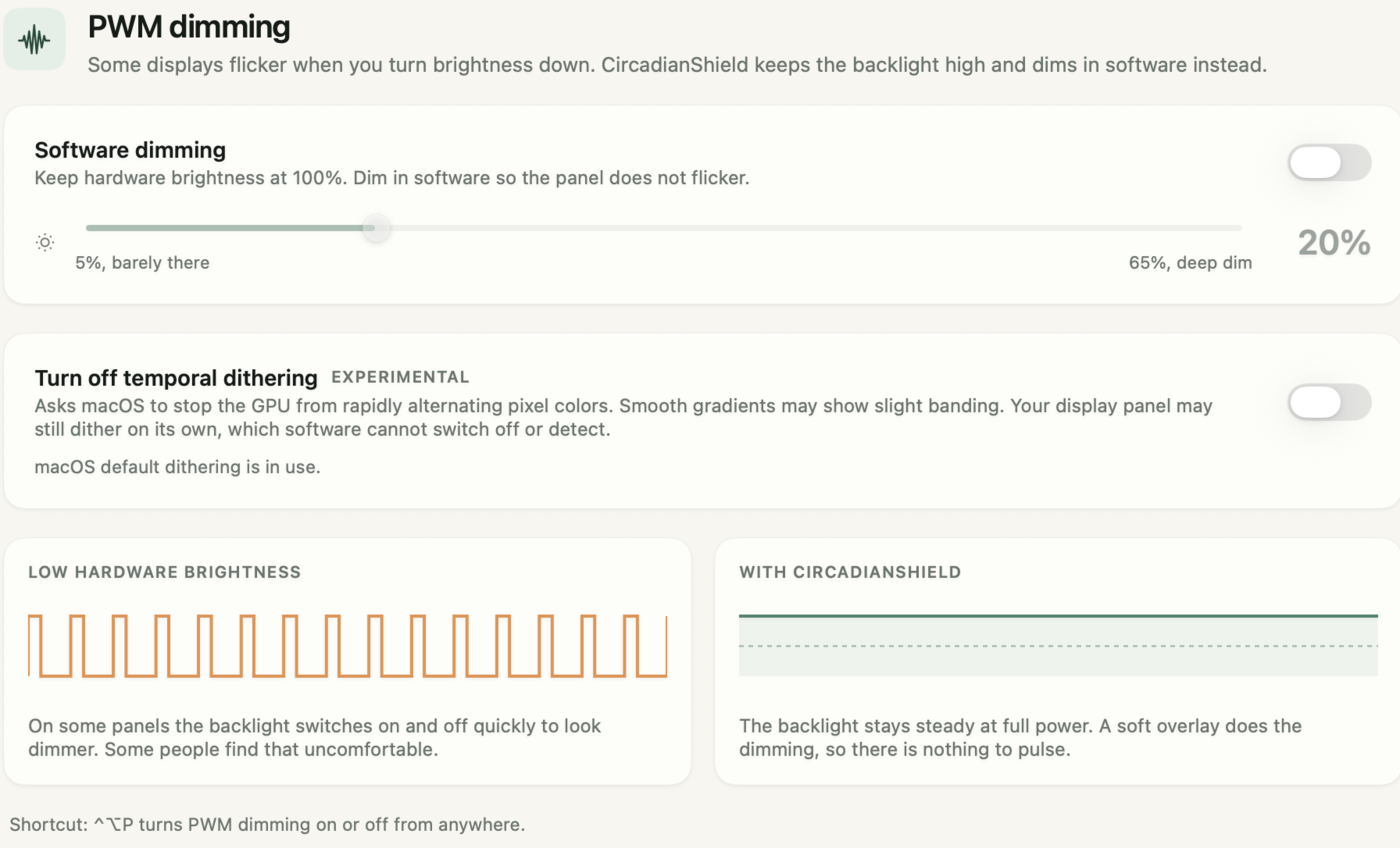
If that is you, the usual advice flips. You keep hardware brightness high, where most panels pulse little or not at all, and darken the picture in software instead. You give up some contrast, which is the cost the f.lux FAQ warns about, in exchange for a steadier backlight. f.lux's Alt+PgDn can do a version of this on Windows by hand. It cannot do anything about a panel that flickers even at 100% brightness, and neither can any other software. CircadianShield explains how to tell which kind of screen you have in its guide to monitor brightness and the PWM trap.
Is f.lux better than Windows Night Light for brightness?
For brightness specifically, f.lux wins on Windows, and CircadianShield would say so even though neither is its product. Microsoft describes Night Light as a color shift with a Strength slider and a schedule. It has no dimming control at all. f.lux adds the manual Alt+PgDn and Alt+PgUp dimming, warmer presets down to 1200K, and Darkroom mode. Night Light's advantage is that it is already installed and needs no permissions.
Run one or the other, not both. The f.lux FAQ's fix for "My Windows 10 computer flickers at sunset" is "Disable Windows Night Light," because the two fight over the same color settings. CircadianShield compares the two in full, including full screen games and work licences, in f.lux vs Windows Night Light.
f.lux brightness on Android and iPhone
f.lux is mainly a desktop app, and so is CircadianShield, which runs on Mac and Windows only. The f.lux FAQ says "f.lux on Android requires a rooted phone," and on iPhone it explains that "iOS does not allow developers to access the Private APIs we need to make f.lux work on iOS," so there is no App Store version. On phones, the built-in tools do both jobs. Android has Night Light or Eye comfort shield for color and Extra dim for brightness, and an iPhone has Night Shift plus the Reduce White Point setting. CircadianShield lists the options in its guides to the best screen dimmer app for Android and the screen dimmer for iPhone.
f.lux vs CircadianShield on brightness
f.lux is free and good at what it was built for, and if the hotkeys cover your needs you do not need anything else. CircadianShield is the paid option for people who want dimming to be a setting rather than a keystroke, on Mac as well as Windows. The comparison below covers brightness only. CircadianShield keeps a wider comparison of f.lux and six alternatives for everything else.
| Brightness question | f.lux | CircadianShield |
|---|---|---|
| Changes backlight brightness | No | No, it keeps hardware brightness at 100% and dims in software |
| Dimming control on Windows | Manual Alt+PgDn and Alt+PgUp hotkeys | Software dimming slider from 5% to 65% |
| Dimming control on Mac | None documented | Same software dimming slider, toggled with Control+Option+P |
| How it dims | Darkens the image through the color pipeline, not an overlay | A soft overlay on top of the image |
| Warmest color | Ember, 1200K | 1800K |
| Price | Free for personal use | Core $27 one-time, Pro $47 one-time, up to 2 computers, 7-day free trial, card required |
Software dimming and screen warmth are both in CircadianShield Core. CircadianShield Pro adds the 11-phase solar schedule, per-display profiles and the health dashboard. On privacy, CircadianShield's screen filtering and health scoring run entirely on your computer, and no screen content or personal data leaves it. The app does send optional anonymous usage and technical diagnostics, which you can switch off in Settings.
Still too bright with f.lux?
CircadianShield Core keeps your backlight at full power and dims the picture in software, from 5% to 65%, on Mac and Windows, with screen warmth built in. CircadianShield Core is $27 one-time for up to 2 computers, with a 7-day free trial, card required.
f.lux brightness: frequently asked questions
Does f.lux change screen brightness?
Mostly no. f.lux changes your screen's color temperature on a schedule, from daylight white down to presets as warm as Ember at 1200K, and leaves the backlight alone. Its developer has said f.lux makes some small brightness adjustments at the lowest color temperatures, but there is no automatic dimming setting. The only brightness control you can use yourself is manual and Windows only: Alt+PgDn darkens the image and Alt+PgUp brightens it again. A warm preset also looks darker because it removes blue and some green light, but your brightness setting does not move.
How do I make f.lux dim my screen?
On Windows, press Alt+PgDn to darken and Alt+PgUp to undo it. If nothing happens, open the f.lux Options menu and tick the box that turns on the f.lux hotkeys. f.lux recommends these keys mainly for desktop monitors. On a laptop, its FAQ says you should mostly dim the backlight with your brightness keys to keep contrast. f.lux has no setting that dims the screen automatically at night.
Does f.lux dim the screen on Mac?
No. f.lux on Mac warms the screen but has no documented dimming hotkey. The f.lux FAQ lists Alt+PgDn and Alt+PgUp for Windows f.lux only. On a Mac, use the brightness keys, Control Center or System Settings, then Displays. If the lowest step is still too bright, a separate screen dimmer such as CircadianShield can darken the picture further while the backlight stays at full power.
Why does my screen look darker with f.lux on?
Because warmer colors look darker. To reach a preset like Candle at 1900K or Ember at 1200K, f.lux cuts blue light and some green light, and green is the color your eye reads as most of a screen's brightness. Your brightness slider has not moved. Choose a milder preset such as Halogen at 3400K if the screen feels too dark to read.
Does f.lux actually reduce blue light?
Yes. f.lux lowers the blue part of your screen's light on a schedule, and the warmer the preset, the more it removes. How much blue light reaches your eyes also depends on how bright the screen is, because the circadian signal rises with both color and intensity. A warm screen at full brightness in a dark room can still deliver more than a cooler screen turned well down.
Does f.lux really work?
It does what it says: your screen visibly warms after sunset. Whether that improves sleep is less settled. Wikipedia's summary of the research notes that f.lux itself has not been scientifically tested for efficacy, and cites a 2018 study finding that changing screen color without changing brightness may be insufficient for preventing impacts on melatonin suppression. A warm screen combined with lower brightness and dimmer room lighting is the more complete approach.
Is f.lux better than Night Light?
For brightness and control, yes on Windows. Windows Night Light only shifts color with a Strength slider and a schedule, while f.lux adds manual Alt+PgDn dimming, presets down to 1200K and Darkroom mode. Night Light is already installed and needs no setup. Run one of them, not both, because the f.lux FAQ says Windows Night Light can make the screen flicker at sunset when f.lux is also running.
Is f.lux free?
Yes, for personal use on Windows, Mac and Linux, downloaded from justgetflux.com. Companies that recommend or manage f.lux for staff are asked to buy the Windows only Corporate Edition. CircadianShield is paid and has no free tier: Core is $27 one-time and Pro is $47 one-time for up to 2 computers, with a 7-day free trial, card required.
Sources used on this CircadianShield page
- f.lux FAQ, justgetflux.com/faq.html, checked October 8, 2026, for the color temperature answer, the ambient light sensor answer, the Kelvin presets, "How do I dim my desktop monitor?" and the Alt-PgDn and Alt-PgUp hotkeys, the laptop backlight advice, turning the hotkeys off, Expand Color Range and Darkroom, the El Capitan automatic brightness conflict, the Windows 10 sunset flicker fix, the LED dimming quote, and Android and iOS availability.
- What's new with f.lux, justgetflux.com/news/pages/v4/readme/, checked October 8, 2026, for version 4.141 (April 2026), the Darkroom hotkey Alt-Shift-End (January 2018), grayscale mode and Win+End in 4.84 (November 2018), the color hotkeys, and the Intel Iris Xe Darkroom warning in 4.124 (June 2023).
- f.lux forum, "Is there a way to change the screen brightness?", posts by herf dated June 26 and June 30, 2023, December 18, 2023 and March 8, 2024, for the desktop focus of the hotkeys, the brightness adjustment at the lowest color temperatures, the temporary nature of the hotkeys, and "it is not an overlay".
- f.lux forum, "Alt+F10 Hotkey / Nvidia Shadowplay", for the wording of the f.lux Options hotkey checkbox, and "Hotkeys for Brightness?", August 2, 2022, for the Mac user report.
- Wikipedia entry for f.lux, as summarised on the CircadianShield f.lux screen filter page, for the 2018 display study and the note that f.lux has not been scientifically tested for efficacy.
- Brown T.M. et al., "Recommendations for daytime, evening, and nighttime indoor light exposure to best support physiology, sleep, and wakefulness in healthy adults", PLOS Biology, 2022, for the 10 lux melanopic EDI evening ceiling.
- CircadianShield download page and app, checked October 8, 2026, for prices, the 7-day trial on Mac and Windows, and the software dimming range from 5% to 65% with hardware brightness at 100%.