Quick answer: DC dimming or PWM?
DC dimming is easier on flicker-sensitive eyes, because it lowers the light by reducing current instead of switching the light off and on. PWM dimming keeps the light at full output and changes how long it stays on in each cycle, which creates flicker. Many displays use a mix: DC dimming at higher brightness and PWM near the bottom of the slider. If your screen uses PWM, keeping hardware brightness high and dimming the picture in software gets you close to DC-style steady light.
How DC dimming works
DC (direct current) dimming lowers brightness by reducing the current that drives the LEDs or OLED pixels. Less current, less light. The output stays continuous, so there is nothing to flicker. Most LCD monitors marketed as "flicker-free" dim this way, or use PWM at a frequency high enough to fall outside the IEEE 1789 risk region.
How PWM dimming works
PWM (pulse-width modulation) keeps the light at the same intensity whenever it is on and changes the share of each cycle it spends on. At 50 percent brightness the light might be on half the time and off half the time, hundreds of times a second. Your eye averages this into a dimmer image, but some nervous systems still register the pulses. The lower the brightness, the longer the dark phase. Our PWM flicker guide explains the full mechanism and the symptoms people report.
| DC dimming | PWM dimming | |
|---|---|---|
| How it dims | Lowers the current, light stays continuous | Switches light on and off, changes the on time |
| Flicker | None from dimming | Yes, deepest at low brightness |
| Colour at low brightness | Can drift or look uneven on OLED | Stays accurate |
| Cost and complexity | Higher on OLED | Low, simple to drive |
| Common on | LCD monitors sold as flicker-free | OLED phones, OLED laptops, some LCD laptops |
Why OLED screens still use PWM
OLED pixels are hard to drive evenly at very low current. At the bottom of the brightness range, small differences between pixels become visible as colour tints, blotches or banding, especially in dark greys. PWM avoids that by keeping each pixel at a current where it behaves well and simply shortening its on time. That is why many OLED phones and laptops use PWM at low brightness even when they use DC-style dimming higher up.
Some Android phones have offered a "DC dimming" or "anti-flicker" toggle for exactly this trade-off: smoother light in exchange for some colour accuracy near minimum brightness. Notebookcheck's analysis of DC dimming on AMOLED phones is a good read if you want measurements. CircadianShield's guide to OLED PWM flicker and eye strain covers what OLED owners can change.
Hybrid dimming: DC up top, PWM below a threshold
Many current displays switch methods partway down the slider. Above a threshold, often somewhere in the upper half of the range, they dim with current. Below it, they switch to PWM. This is why your screen can feel fine during the day and harsh at night, when you turn it down. A camera test at a few different brightness levels shows where your panel switches. Our PWM flicker test explains how.
"Laptop is in DC mode": what it means
If a laptop setting or message says it is "in DC mode", it almost always refers to power, not dimming. Windows power settings and graphics control panels use "AC" for plugged in and "DC" for running on battery. Some laptops lower screen brightness or turn on content adaptive brightness on battery, which can push a PWM panel into its flickery range. If your eyes feel worse unplugged, check the battery-mode display settings first.
Can software turn a PWM screen into DC dimming?
No software can change how a panel drives its light. What software can do is keep the panel at the top of its brightness range, where PWM duty is at or near 100 percent and the dips shrink or vanish, then make the picture dimmer by changing the pixel values. The result looks like a dimmed screen and behaves much like DC dimming at the backlight.
That is the approach CircadianShield Core takes on Mac and Windows. You set hardware brightness to 100 percent yourself, and Core dims the image with a software slider (5 to 65 percent on Mac, 5 to 85 percent on Windows), and it warms the screen in the same app. It will not help a panel that still pulses at full brightness. For those, the fix is a display with DC dimming or PWM measured above 1250 Hz; see what PWM frequency is safe for how to read the numbers.
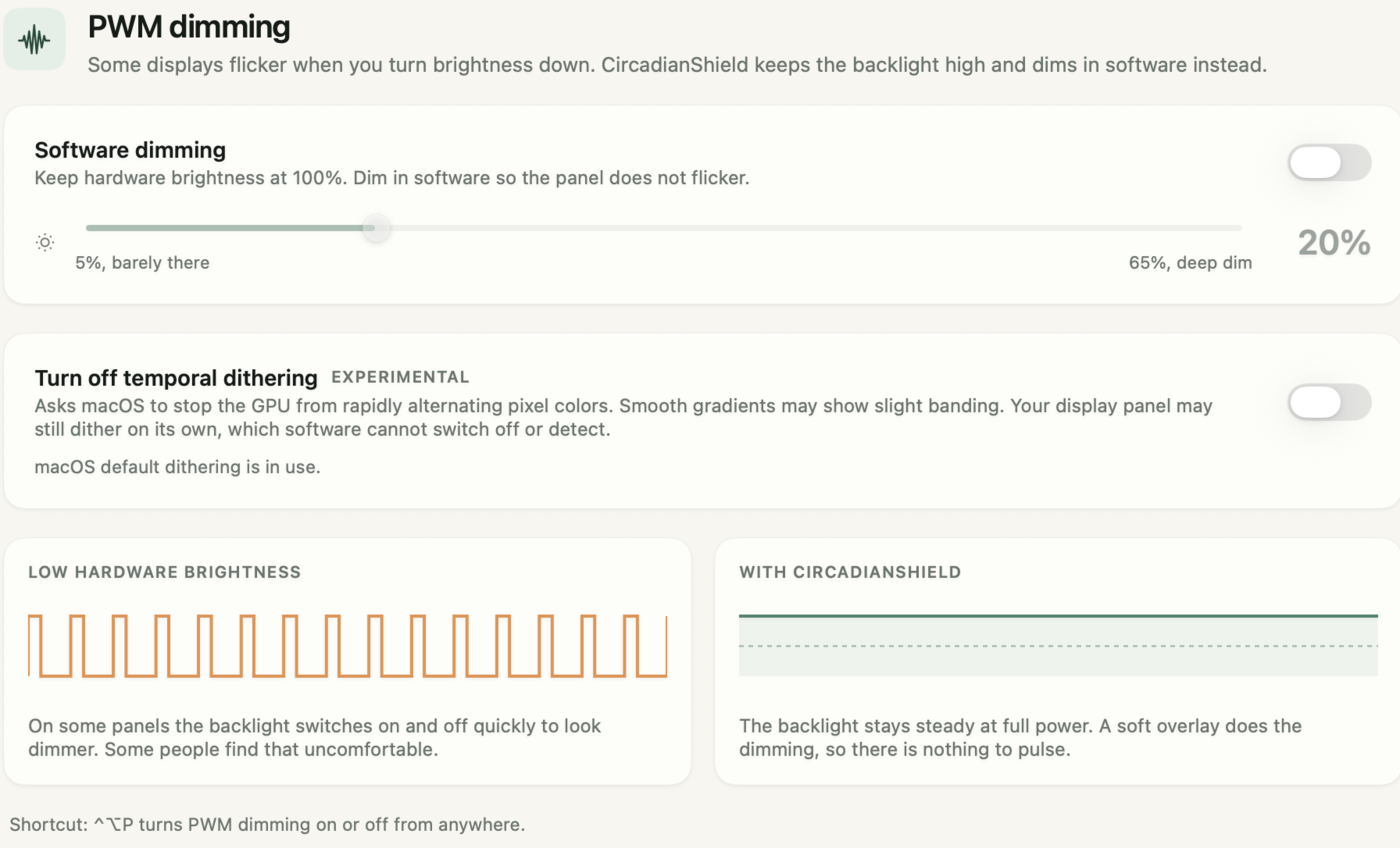
Example: getting DC-style steady light on a PWM laptop
- The laptop flickers on a phone camera test below 50 percent brightness and shows no bands at 100 percent.
- Set hardware brightness to 100 percent, where the panel is on continuously or close to it.
- Turn on a software dimmer and set it to 50 percent for a normal office, or 25 to 35 percent in a dim room.
- Repeat the camera test: no bands, because the backlight is no longer being pulsed to dim the picture.
Get steady light from the screen you already own
Set your hardware brightness to 100 percent and let CircadianShield Core dim in software, so a PWM panel stays out of its flicker range.
Buy CoreCore is $27 one-time, Pro is $47 one-time, up to 2 computers, 30-day money-back guarantee.
DC dimming vs PWM: frequently asked questions
Which is better, DC dimming or PWM dimming?
DC dimming is better for people sensitive to flicker, because the light stays continuous. PWM dimming keeps colours more accurate at low brightness and is cheaper to build, which is why OLED screens still use it. High-frequency PWM above 1250 Hz is a reasonable second choice.
Is DC dimming a monitor feature I can look for?
Yes. Monitors sold as flicker-free usually dim with current or with very high frequency PWM. Look for a measured review that reports no PWM at any brightness, rather than relying on the marketing label alone.
What does laptop in DC mode mean?
It usually means the laptop is running on battery. Windows and graphics control panels label battery power as DC and wall power as AC. Battery mode can lower brightness or enable content adaptive brightness, which can make a PWM panel flicker more.
Is there a DC dimming app?
No app can switch a panel to DC dimming, because that is decided by the display hardware. You can keep hardware brightness at 100 percent and let an app dim the picture in software instead, which avoids the low-brightness range where PWM flicker is deepest. CircadianShield Core does this on Mac and Windows.
Do iPhones have DC dimming?
Apple does not offer a DC dimming setting on iPhone. Reviews that measure OLED iPhones report PWM dimming. Turning on Reduce White Point lets you keep the brightness slider higher for the same perceived brightness, which some flicker-sensitive users find helps.