f.lux for Mac: Install, Settings and Night Shift on macOS (2026)
f.lux still runs on macOS in 2026, it is still free, and it still lives in your menu bar. This CircadianShield page covers the current f.lux Mac build, how to install and set it up, what every f.lux setting on a Mac does, how it compares with Night Shift, and how to fix or remove it.
Last updated: October 14, 2026
f.lux on macOS at a glance: version, requirements and Apple Silicon
f.lux for Mac has not changed since mid 2023, and the facts below come from the f.lux Mac update feed and from the app itself. On October 14, 2026, CircadianShield downloaded the Mac build from justgetflux.com and read the version, minimum macOS and processor support straight out of the app bundle.
| f.lux for Mac | What we found |
|---|---|
| Current version | 42.2, dated June 1, 2023 in the f.lux Mac update feed |
| Minimum macOS | OS X 10.9 Mavericks or later |
| Apple Silicon | Yes. The app is a universal binary with native arm64 and Intel x86_64 code |
| Download | A zip file of about 2.1 MB from justgetflux.com |
| Updates | Built in. f.lux checks for new versions on its own through the Sparkle updater |
| Where it lives | The menu bar, to the left of the clock. It has no Dock icon |
| Price | Free for personal use |
| Older Macs | Separate legacy builds for OS X 10.5, 10.6, 10.7 and PowerPC Macs |
The 2022 v41 and 42.1 updates brought native Apple Silicon support, Monterey and M1 fixes, dim on disable fixes, Darkroom fixes and DCI-P3 wide gamut support. The later 42.2 release lists a fix for full screen disable on macOS Ventura.
Does f.lux work on macOS Sonoma, Sequoia and newer versions?
f.lux 42.2 lists OS X 10.9 as its minimum requirement, but that alone does not confirm how it behaves on every newer macOS release. Ventura is the newest macOS named in the Mac release notes. The developer also published macOS Tahoe 26 notes in the f.lux forum: an automatic brightness issue affected some MacBook Pro displays during the beta, and the developer reported it fixed in public beta 2. Those notes do not establish compatibility on every Mac or macOS version.
If f.lux misbehaves on your Mac, check the f.lux forum for developer updates and reports from other Mac users. CircadianShield is built for macOS 14 and later and has been tested on Apple Silicon from M1 through M4 Max. It has not been tested on M5 yet.
How to install f.lux on a Mac
Installing f.lux on a Mac takes about a minute, and the official f.lux Mac quickstart describes the same five steps.
- Download it from justgetflux.com. The Mac download is a zip file and lands in your Downloads folder. Skip download portals, which repackage the same file. CircadianShield's page on getting the official f.lux installer for each platform explains why.
- Unzip it. Double click the zip file to expand it into the Flux app.
- Move it to Applications and open it. Drag Flux into your Applications folder, then double click it.
- Set your location. The f.lux Preferences window opens on first launch. f.lux can use macOS Location Services, or you can type a city name, a US postal code or map coordinates.
- Set your usual wake time. f.lux uses it to time Bedtime mode and the rest of your schedule.
f.lux then lives in the menu bar to the left of the clock, and you can reopen Preferences from there at any time. If its timing ever looks wrong after travel, f.lux's quickstart says to check that your Mac's own time zone is correct under Date and Time settings.
f.lux settings on Mac, explained
f.lux on a Mac splits the day into three periods, and almost every f.lux setting adjusts one of them. These descriptions follow the official f.lux Mac quickstart.
Daytime, Sunset and Bedtime in f.lux
- Daytime runs while the sun is up where you are. By default f.lux holds the screen at 6500K, which leaves it unchanged.
- Sunset covers the hours after sunset while you are still up, and it doubles as the early morning setting if you wake before sunrise. f.lux suggests 4500K or brighter if you are usually up before dawn.
- Bedtime is the warmest setting, timed from your wake time, and is meant for the stretch before sleep.
f.lux presets on Mac
- Recommended colors is the default. f.lux suggests it for your first week.
- Custom colors lets you pick a time of day and drag its color temperature.
- Classic f.lux fades to 3400K at sunset and turns off at sunrise. f.lux itself notes that this is probably not strong enough on large screens.
- Working late drops the solar timing and gives 14 hours of bright light, for night owls.
f.lux options, effects and disable modes on Mac
- Fast transitions switches the change at sunrise and sunset from a one hour fade to a 20 second fade.
- Sleep in on weekends and Extra hour of sleep shift the schedule for late weekends and for teenagers.
- Expanded daytime settings allows warmer daytime colors, down to 1900K.
- Backwards alarm clock counts the hours left until your wake time and reminds you every 30 minutes once it gets very late.
- Darkroom removes blue and green light entirely and inverts colors. Movie mode lasts 2.5 hours and keeps colors and shadow detail for films.
- Dark theme at sunset switches macOS to dark mode at sunset. Disabling f.lux also turns that dark theme off.
- Disable pauses f.lux for an hour, until sunrise, or whenever a chosen app is in front, which is the setting to use for photo and design work.
One f.lux setting a Mac does not have is a dimming hotkey. The Windows version dims with keyboard shortcuts, the Mac version does not, and CircadianShield's page on what f.lux can and cannot do with brightness goes through it hotkey by hotkey.
f.lux vs Night Shift on Mac: do you still need f.lux?
Night Shift has been built into macOS since Sierra 10.12.4, and the question Mac users keep asking is whether f.lux still earns its place next to it. Apple's own Night Shift support page and the f.lux quickstart give the answer: Night Shift is simpler, f.lux has more control, and CircadianShield sits beyond both for dimming and multiple displays.
| On a Mac | Night Shift | f.lux 42.2 |
|---|---|---|
| Install | Built in | Free download |
| Which Macs | Macs from 2012 or later, Mac Pro from 2013 or later, macOS 10.12.4 or later | Any Mac on OS X 10.9 or later, plus legacy builds for older ones |
| Warmth control | One slider from less warm to more warm | Separate Daytime, Sunset and Bedtime settings, plus presets |
| Schedule | Sunset to sunrise, or custom hours | Sunset, sunrise and your wake time |
| Pause | Manual switch in Control Center | For an hour, until sunrise, or for one app |
| Extras | Can drive Auto dark mode | Darkroom, Movie mode, Backwards alarm clock |
| External displays | Apple says performance depends on the display | No per-display setting documented for Mac |
Pick Night Shift if a mild warm shift on a schedule is all you want, or if you cannot install software on the Mac. Pick f.lux if you want a warmer Bedtime setting tied to your wake time, a per-app pause, Darkroom, or if your Mac is too old for Night Shift. Whichever you choose, run only one. Two warming filters on one screen stack, which makes the color harder to predict and harder to switch off. CircadianShield's Night Shift comparison and what it misses covers the built-in option in more depth.
f.lux not working on Mac? Common fixes
Most f.lux problems on a Mac come from another filter, a stale color profile or an old macOS bug, and the f.lux FAQ and Mac quickstart list the fixes below.
- The screen does not warm at night. Check that the f.lux icon is in the menu bar, that f.lux is not paused, and that the location is right. Then check that Night Shift is off under System Settings, then Displays.
- The tint stays after you quit f.lux. Restart the Mac first. If the tint is still there, open Activity Monitor and confirm no Flux process is running, then remove the f.lux color profile from your display's color settings and restart again.
- The screen flashes on an older MacBook Pro. On dual GPU Macs, f.lux writes a color profile so switching between graphics chips looks smoother, and on some older machines that does not work well. f.lux points to the gfx.io tool to lock the Mac to one graphics chip.
- Full screen video shows blue artifacts. f.lux describes this as a video driver bug on 2013 and later Intel graphics that it cannot fix directly.
- White turns cyan on a 2017 or later MacBook Pro. f.lux says Apple's fix shipped in macOS Mojave 10.14, so update past High Sierra.
- Darkroom text looks rough. On macOS 10.12.4, f.lux recommends turning off LCD font smoothing.
- Reminders pop up at odd times. Set the right wake time in Preferences, or turn off Backwards alarm clock in the Options menu.
- Dark mode keeps switching back. That is the Dark theme at sunset option. Turn it off in f.lux if you want macOS to stay in one appearance.
How to uninstall f.lux on a Mac
Uninstalling f.lux on a Mac is a drag to the Trash, with one rule from the developer: quit f.lux before you delete it.
- Click the f.lux icon in the menu bar and choose Quit f.lux.
- Find Flux in your Applications folder and drag it to the Trash.
- If macOS says the app is still in use, open Activity Monitor, select Flux, choose Force Quit, and try again.
- If the screen stays tinted, restart. If that does not clear it, remove the f.lux color profile from your display's color settings.
Switching to CircadianShield or back to Night Shift works the same way: uninstall f.lux first so only one app controls screen color.
Is f.lux free and safe on a Mac?
f.lux is free on a Mac for personal use, and the f.lux FAQ also allows it on a work Mac if you have the right to install software and your employer approves. The paid Corporate Edition that companies buy is Windows only, so there is no paid Mac version to upgrade to.
From justgetflux.com, f.lux has a long record. It was first released in February 2009 by Michael Herf and Lorna Herf. It is closed source, so you are trusting the developer rather than code you can read, and the Mac app checks for updates on its own through its Sparkle updater. Download portals such as MacUpdate also host f.lux for Mac, but each copy is one more party you have to trust, so the developer's site is the place to get it.
Does f.lux on Mac help with sleep or eye strain?
f.lux makes a Mac screen warmer, which shrinks its share of short wavelength blue light, and many people find a warmer screen more comfortable in a dark room. Whether that changes sleep is less settled, and its Wikipedia entry notes that f.lux itself has not been scientifically tested for efficacy.
The closest research looks at Apple's Night Shift, which works the same way. A study in Lighting Research and Technology (Nagare, Plitnick and Figueiro, 2019) tested Night Shift on iPads and concluded that changing a screen's color without changing its brightness may not be enough to prevent melatonin suppression. A 2021 study in Sleep Health (Duraccio and colleagues) found that iPhone Night Shift made no difference to sleep outcomes in 167 college students. That is why brightness matters as much as warmth, and why CircadianShield dims as well as warms. Neither f.lux nor CircadianShield is a medical treatment. CircadianShield's analysis of how much blue light each f.lux preset actually removes runs the numbers preset by preset.
f.lux vs CircadianShield on Mac
f.lux and CircadianShield both warm a Mac screen on a solar schedule, and CircadianShield is the paid app we make, so weigh this section with that in mind. The differences are concrete.
| On a Mac | f.lux 42.2 | CircadianShield |
|---|---|---|
| Price | Free | Core $27 or Pro $47 one-time, up to 2 computers, 30-day money-back guarantee |
| macOS | OS X 10.9 or later | macOS 14 or later, tested on M1 through M4 Max |
| Schedule | Sunset, sunrise and wake time | The sun's real elevation across 11 twilight phases, 6500K to 1800K (Pro) |
| Dimming | No dimming hotkey on Mac | Dims below the macOS brightness floor (Core) |
| Multiple displays | No per-display setting documented | Each display set separately, up to 8 (Pro) |
| Light measure | Color temperature in Kelvin | Calibrated to Melanopic EDI under CIE S 026 (Pro) |
| Also includes | Darkroom, Movie mode, Backwards alarm clock | PWM protection (Core), morning blue boost (Pro), break timer |
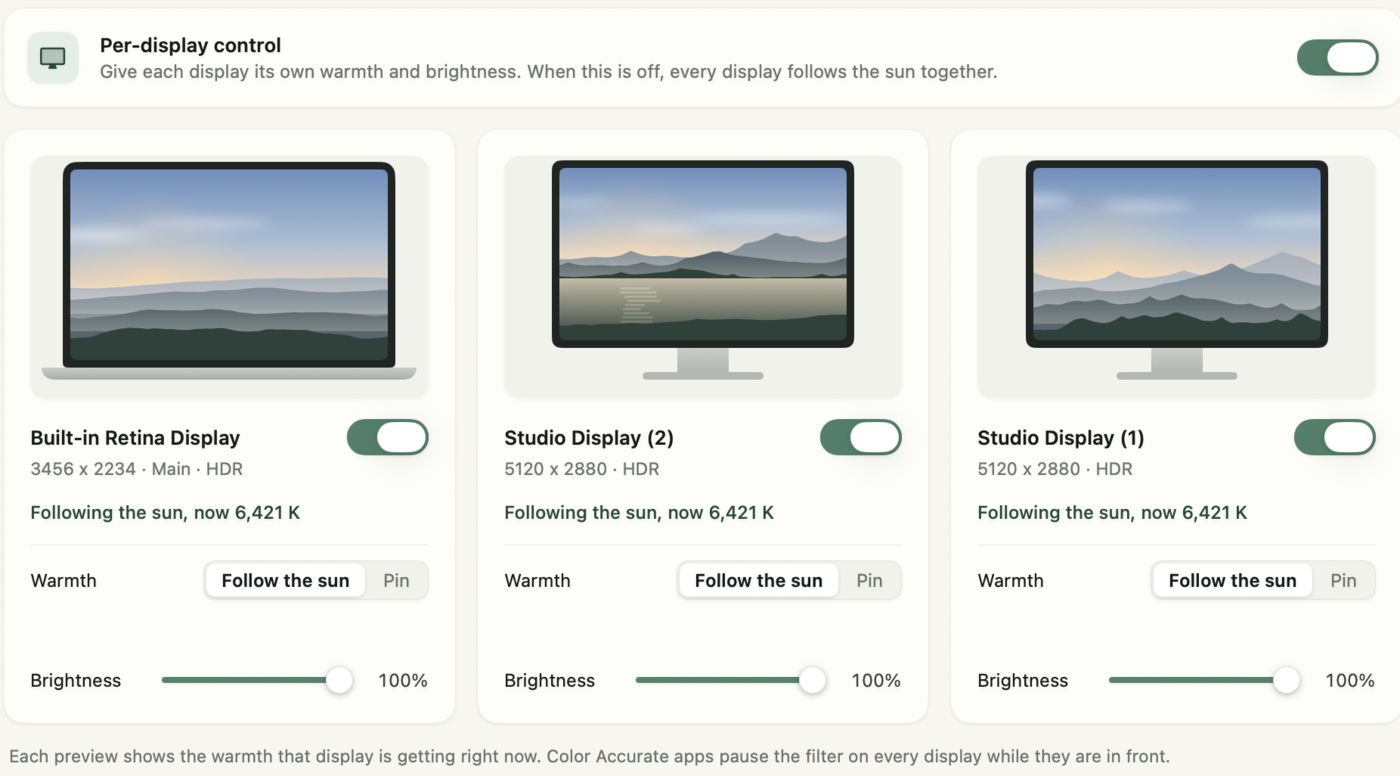
Best for an older Mac: f.lux, because it runs back to OS X 10.9 and CircadianShield needs macOS 14.
Best for zero install: Night Shift, already built into Macs from 2012 onward and Mac Pro models from 2013 onward.
Best for a MacBook plus external monitors, or a screen that is still too bright at night: CircadianShield, with dimming below the brightness slider in Core and per-display control in Pro.
CircadianShield runs its screen filtering and health scoring entirely on your Mac, and no screen content or personal data leaves it. The app sends optional anonymous usage and technical diagnostics, which you can switch off in Settings. For every other option, see CircadianShield's f.lux alternatives compared, with Night Light and Night Shift, or the ranked list of blue light filter apps for Mac in 2026. If you are on a laptop, the MacBook screen filter options page covers the built-in panel specifically.
Want more than f.lux on your Mac?
CircadianShield Core is $27 one-time and Pro is $47 one-time, each for up to 2 computers, on macOS 14 or later. Both come with a 30-day money-back guarantee.
f.lux for Mac: frequently asked questions
Is f.lux available for macOS?
Yes. f.lux for macOS is a free download from justgetflux.com. The current Mac version is 42.2, it needs OS X 10.9 or later, and it runs from the menu bar.
Does f.lux work on Apple Silicon Macs?
Yes. The 2022 v41 and 42.1 updates added native Apple Silicon support. The current 42.2 app is a universal binary that runs natively on M-series Macs and on Intel Macs. The developer does not list individual chips.
What is the latest version of f.lux for Mac?
Version 42.2, dated June 1, 2023 in the f.lux Mac update feed. Its release notes mention Ventura. The developer has also published macOS Tahoe 26 compatibility notes in the f.lux forum.
Is f.lux better than Night Shift on a Mac?
For control, yes. f.lux has separate Daytime, Sunset and Bedtime settings, presets, Darkroom and a per-app pause, while Night Shift has one warmth slider. Night Shift wins on effort because it is already built into macOS.
Can I run f.lux and Night Shift at the same time?
You should not. Both warm the same display, so they stack and make the color hard to predict. Turn Night Shift off under System Settings, then Displays, while f.lux is running.
How do I uninstall f.lux on a Mac?
Quit f.lux from its menu bar icon, then drag Flux from Applications to the Trash. If the screen stays tinted, restart, and if needed remove the f.lux color profile from your display settings.
Is f.lux free on Mac?
Yes, for personal use, and on a work Mac with your employer's approval. The paid Corporate Edition is Windows only.
Is there f.lux for iPhone or iPad?
Not in the App Store. Apple did not allow f.lux there, and the iOS version needs a jailbroken device. Use Night Shift, which is built into iOS.
Is f.lux for Mac worth it in 2026?
For a free warmer screen, yes, especially on an older Mac. If you want dimming below the brightness slider, a separate setting per display, or a schedule that follows the sun's real elevation, CircadianShield does more for a one-time price.
Sources used on this CircadianShield page
- f.lux Mac build, Flux.zip from justgetflux.com, downloaded October 14, 2026, for version 42.2, the OS X 10.9 minimum, the universal arm64 and x86_64 binary, the Sparkle updater and the 2.1 MB size.
- f.lux Mac update feed, justgetflux.com/mac/macflux.xml, checked October 14, 2026, for the June 1, 2023 date and the 42.2 release notes.
- f.lux for Mac update, justgetflux.com/news/pages/mac/, checked October 14, 2026, for the 2022 v41 and 42.1 Apple Silicon changes and the 2023 v42.2 Ventura fix.
- macOS Tahoe 26 notes, forum.justgetflux.com/topic/8652/macos-tahoe-26-notes, checked October 14, 2026, for the developer's Tahoe beta compatibility report.
- f.lux Mac download page, justgetflux.com/dlmac.html, checked October 14, 2026, for the legacy builds for OS X 10.5, 10.6, 10.7 and PowerPC.
- Welcome to f.lux for macOS quickstart, justgetflux.com/news/pages/macquickstart/, checked October 14, 2026, for installation, settings, presets, options, disable modes, uninstalling and troubleshooting.
- f.lux FAQ, justgetflux.com/faq.html, checked October 14, 2026, for the macOS fixes, work use and the Windows only Corporate Edition.
- Apple Support, Use Night Shift on your Mac (support.apple.com/en-us/102191), published February 10, 2026, for Night Shift requirements, schedules and external displays.
- Nagare R, Plitnick B, Figueiro MG. Does the iPad Night Shift mode reduce melatonin suppression? Lighting Research and Technology, 2019, 51(3):373 to 383. doi:10.1177/1477153517748189.
- Duraccio KM et al. Does iPhone night shift mitigate negative effects of smartphone use on sleep outcomes in emerging adults? Sleep Health, 2021, 7(4):478 to 484. doi:10.1016/j.sleh.2021.03.005.
- Wikipedia entry for f.lux, checked October 14, 2026, for the February 2009 release, the developers, the iOS history and the note that f.lux itself has not been tested for efficacy.