f.lux Review 2026: Is the Free Blue Light App Still Worth It?
The f.lux reviews you find first were written in 2013 and 2015. f.lux has changed since then, and so has the research on screen color and sleep. This CircadianShield f.lux review checks the app as it stands in October 2026: what it does well, what the last few years left behind, and who should still install it. One thing up front: CircadianShield makes a competing paid app, so every f.lux fact on this page comes from a source named at the bottom.
Last updated: October 14, 2026
The f.lux review verdict. f.lux is still a good free app for one job: warming your screen on a schedule after sunset. It is free on Mac and Linux, free on Windows for personal use, needs no subscription, and has been around since February 2009. On Windows it is still maintained, with version 4.141 released in April 2026. On a Mac it is aging, because the last Mac release, version 42.2, came out on June 1, 2023. It does not dim the screen automatically, it does nothing for backlight flicker, and no study has tested f.lux itself for sleep.
Best for: anyone on Windows who wants more control than Night Light for free.
Fine for: Mac users who want warmer presets than Night Shift and accept a frozen app.
Skip it if: your screen is too bright at night, your screen gives you flicker headaches, or you want a schedule that follows the sun's real elevation. CircadianShield Core ($27 one-time) covers brightness and flicker comfort, and CircadianShield Pro ($47 one-time) adds the solar schedule, both for up to 2 computers with a 30-day money-back guarantee.
f.lux review at a glance
Here is f.lux in one table, checked by CircadianShield against f.lux's own download page, FAQ and release notes on October 11, 2026.
| f.lux | What CircadianShield found |
|---|---|
| What it does | Changes your screen's color temperature to match the time of day, warm at night and like sunlight during the day |
| Price | Free on macOS and Linux, free on Windows for personal use. Windows Corporate Edition $24 per device for the first 10, $12 from the 11th |
| Latest Windows version | 4.141, April 2026 |
| Latest Mac version | 42.2, June 1, 2023, with native Apple Silicon support |
| Linux | GUI available alongside the xflux command line daemon; f.lux lists a September 2013 xflux build |
| iPhone and Android | Not on the App Store. Android needs a rooted phone |
| Warmest setting | Ember at 1200K, plus a red Darkroom mode |
| Automatic dimming | No. Manual Alt+PgDn and Alt+PgUp hotkeys on Windows only |
| Extras | Movie mode, one-hour disable, disable by app on Windows, Philips Hue control |
| Open source | No, closed source freeware under its own EULA |
What f.lux is and how it works
f.lux is a small program from F.lux Software LLC, created by Michael and Lorna Herf and first released in February 2009, and CircadianShield works at the same layer of your computer. f.lux describes its own job in one line: it "makes the color of your computer's display adapt to the time of day, warm at night and like sunlight during the day." It does that by changing the color values your computer sends to the screen, so the backlight and the monitor's own settings are left alone.
Setup takes a minute. f.lux asks where you live and, on the Mac, your usual wake time, then builds a schedule from your sunset and sunrise plus your bedtime. After that it runs in the menu bar or the Windows system tray. f.lux rounds your location to 0.1 degree on purpose, which its FAQ says protects your privacy and still puts sunset within about 30 seconds.
The night colors are named presets from the f.lux FAQ: Ember 1200K, Candle 1900K, Warm Incandescent 2300K, Incandescent 2700K, Halogen 3400K, Fluorescent 4200K and Sunlight 5500K. For comparison, the FAQ notes that most screens are calibrated to 6500K, which is bluer than noon sunlight at 5500K. CircadianShield explains what the f.lux filter does to your screen in more depth in its page on what the f.lux screen filter changes and whether it works.
f.lux pros: what f.lux still does well in 2026
The early f.lux reviews were enthusiastic, and CircadianShield agrees with most of what they praised. PCWorld's review, published October 31, 2013, gave f.lux 5 out of 5 and called it "a life-saver (or at least an eye-saver) for using your computer at night." Business Insider's October 30, 2015 review called it a "set it and forget it" app. Those strengths still hold:
- It is free. There is no subscription and no paid tier for home use. f.lux is supported by user contributions, and its download page lists it as free on macOS and Linux and free on Windows for personal use.
- Set it and forget it. After the first setup, f.lux changes color on its own every evening and returns to daylight in the morning.
- Very warm presets. Ember at 1200K is warmer than macOS Night Shift goes, and Darkroom mode turns the screen deep red for very late work.
- Easy to pause. f.lux can switch off for one hour for photo editing, Movie mode warms the screen less for 2.5 hours, and the Windows version can disable itself for chosen apps.
- Philips Hue control. f.lux can warm your Hue bulbs in step with the screen. CircadianShield does not do this.
- Still maintained on Windows. Version 4.141 in April 2026 fixed disable by app, external monitors on Qualcomm Snapdragon PCs and remote desktop.
f.lux cons: where f.lux falls short in 2026
The f.lux weaknesses below come from f.lux's own FAQ and release notes, not from CircadianShield testing, so you can check each one.
- No automatic dimming. f.lux changes color, not brightness. On Windows you can darken the image by hand with Alt+PgDn and Alt+PgUp. The Mac version has no documented dimming hotkey. CircadianShield covers this in its guide to f.lux brightness and the Windows dimming hotkeys.
- The Mac app is frozen. Version 42.2 from June 1, 2023 is still the newest Mac build on f.lux's update feed. Its notes mention fixes for macOS Monterey and Ventura, and nothing newer.
- Nothing for flicker. Many screens dim their backlight by pulsing it, called PWM. f.lux works on color, so it cannot touch that, and neither can any other color filter.
- Extra steps on Windows. The warmest colors and Darkroom need "Expand Color Range," which asks for Administrator access and a reboot. Release 4.124 also warns that Darkroom does not work with Intel Iris Xe graphics.
- Display quirks. The FAQ lists a red afterimage when scrolling text on screens with overdrive, and some older monitors flashing white then orange unless you turn off DDC/CI in the monitor menu.
- Not for color work. The FAQ says f.lux "is not designed for use during advanced color work, but it's fine for layout or HTML."
- No phone app. f.lux is not on the iPhone App Store, and the Android version needs a rooted phone.
Is f.lux still updated? f.lux by platform in 2026
Whether f.lux is worth installing in 2026 depends on your platform more than anything else, and CircadianShield took every date below from f.lux's own pages on October 11, 2026.
| f.lux platform | Latest version | Released | What it means for you |
|---|---|---|---|
| Windows | 4.141 | April 2026 | Actively maintained, with recent fixes for disable by app, Snapdragon external monitors, crashes and remote desktop |
| macOS | 42.2 | June 1, 2023 | Works on Apple Silicon, but no release since. The notes cover Monterey and Ventura, and f.lux says full-screen disable on Ventura works on single displays but not multiple ones |
| Linux | xflux daemon | September 2013 | f.lux also offers a Linux GUI. Most desktops now have Night Light built in |
The Mac row is the one to think about. macOS 14 Sonoma, macOS 15 Sequoia and macOS 26 Tahoe have all shipped since June 2023, and f.lux has not published Mac release notes for any of them. CircadianShield has not tested f.lux on each of those versions, so this page does not claim it breaks. It does mean bugs that appear on newer macOS versions have no fix on the way. The Windows release notes also mention that f.lux is working on per-monitor calibrations, so that part is still in progress.
Does f.lux help? Does f.lux really work?
f.lux works in the sense that matters first, and CircadianShield would say the same about its own color filter: your screen visibly turns warmer after sunset, and a warmer screen gives off less blue light. You can see it the first night. Whether f.lux helps you sleep is a different question, and the evidence there is thinner than the early reviews suggested.
Wikipedia's f.lux entry states that "the program itself has not been scientifically tested to determine its efficacy," even though f.lux links to related research on its website. The closest studies tested Apple's Night Shift, which does the same color shift:
- Nagare, Plitnick and Figueiro (Lighting Research & Technology, published online January 2018) found melatonin suppression did not differ between two Night Shift settings, and concluded that "changing the spectral composition of self-luminous displays without changing their brightness settings may be insufficient for preventing impacts on melatonin suppression."
- Duraccio and colleagues (Sleep Health, 2021) studied 167 college undergraduates and, as Wikipedia summarises it, found Night Shift had no effect on sleep latency, duration, efficiency or wake after sleep onset.
The pattern is that color alone, at full brightness, is a weak lever. Brightness counts too. The 2022 consensus by Brown et al. in PLOS Biology recommends no more than 10 lux melanopic EDI at the eye in the 3 hours before bed, and that measure rises with both how blue and how bright the light is. Even f.lux's own FAQ is modest here: "Our unofficial study indicates that f.lux makes your computer look nicer in a dark room." So f.lux may help as one part of a dimmer evening, and it is not a sleep treatment. Neither is CircadianShield, which is a wellness app, not a medical device. CircadianShield works through the numbers for each f.lux preset in how much blue light f.lux actually removes.
f.lux on Windows: review notes
f.lux is at its best on Windows in 2026, and that is the version CircadianShield would recommend first to anyone who wants a free filter. It gets updates, it has the dimming hotkeys, and the FAQ says the v4 build has "massively less impact on games," with Options, then Very Fast transitions, for gamers who want even less.
Three Windows details to know before you install f.lux:
- Turn off Night Light. The f.lux FAQ answer to "My Windows 10 computer flickers at sunset" is "Disable Windows Night Light." Run one or the other.
- Antivirus warnings happen. The FAQ says f.lux is sometimes flagged because of how its installer and updater work, and that a copy from justgetflux.com has no malware. CircadianShield lists the safe download sources in its page on where to download f.lux safely.
- Work computers. The free license allows use on a work machine with your employer's permission. A company that recommends f.lux to staff, manages installs or has regulatory needs should buy the Corporate Edition, which is Windows only and English only.
f.lux on Mac: review notes
f.lux on a Mac still warms the screen, still runs natively on M1 and later Apple Silicon Macs, and since version 42.2 handles DCI-P3 wide-gamut displays per display. CircadianShield's honest view is that it is now the weaker of the two f.lux versions. There is no dimming hotkey, no release since June 2023, and Night Shift is already built into macOS for free.
Why would a Mac user still pick f.lux over Night Shift? Warmth and scheduling. f.lux goes down to 1200K, has a bedtime schedule built around your wake time, and includes the Backwards Alarm Clock, which tells you how much sleep you will get if you go to bed now. If those matter, f.lux is still worth trying, and CircadianShield's f.lux on macOS install and troubleshooting guide covers setup, every Mac setting and the common fixes. Do not run it alongside Night Shift, because two filters stacked on one screen are hard to predict. CircadianShield compares the Mac options in f.lux vs Iris vs CircadianShield.
Is f.lux safe and private?
f.lux is safe when you download it from justgetflux.com, and CircadianShield found nothing in its documentation that should worry a normal user. It has been around since 2009, setup asks only for your location and wake time, and it rounds your location to 0.1 degree so it only knows roughly where you are. It is not open source, though, so you are trusting the developer rather than code you can read. CircadianShield sets out what the f.lux license covers in is f.lux open source.
CircadianShield is in the same position: closed source and paid. Its screen filtering and health scoring run entirely on your computer, and no screen content or personal data leaves it. The app does send optional anonymous usage and technical diagnostics, which you can switch off in Settings.
Is f.lux better than Windows Night Light or Night Shift?
For control, yes, and CircadianShield gives f.lux that win without hesitation. Windows Night Light and macOS Night Shift each give you one warmth slider and a schedule. f.lux adds named presets down to 1200K, Darkroom, Movie mode, a one-hour disable, Philips Hue control and, on Windows, manual dimming. The built-ins win on effort: they are already installed and work on computers where you cannot add software. If a mild warm shift is all you want, the built-in is enough. The full side-by-side, including games and work licenses, is in CircadianShield's f.lux vs Windows Night Light comparison.
f.lux vs CircadianShield
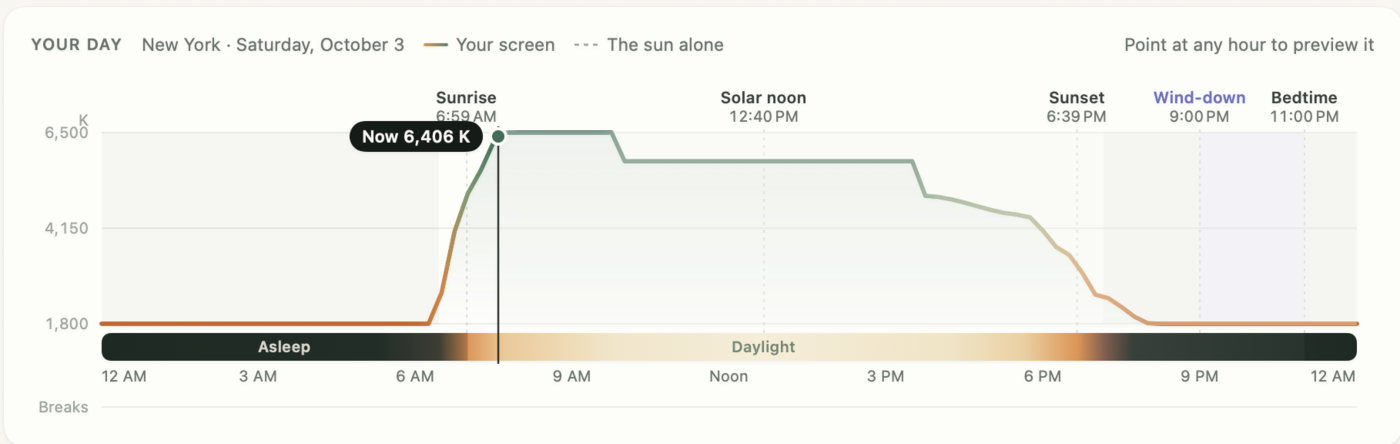
CircadianShield is the paid app this review keeps mentioning, so here is the direct comparison, with the rows where f.lux wins left in. This is CircadianShield's own comparison of its product against f.lux's documented features, not an independent test.
| Question | f.lux | CircadianShield |
|---|---|---|
| Price | Free for personal use | Core $27 one-time, Pro $47 one-time, up to 2 computers, 30-day money-back guarantee |
| Platforms | Windows, Mac, Linux | macOS 14 and later, Windows 10 and later |
| Schedule | Sunset, sunrise and your wake time | 11 twilight phases from the sun's real elevation (Pro) |
| Calibration | Color temperature in Kelvin | Melanopic EDI under CIE S 026 (Pro solar schedule) |
| Warmest setting | Ember, 1200K, warmer than CircadianShield | 1800K |
| Dimming | Manual hotkeys, Windows only | Software dimming slider on Mac and Windows (Core) |
| PWM flicker comfort | None | Keeps hardware brightness high and dims in software (Core) |
| Morning light | Returns to daylight | Morning blue boost at civil dawn (Pro solar schedule) |
| Smart bulbs | Philips Hue | None |
If f.lux's color shift is all you need, keep f.lux. CircadianShield is for the cases f.lux leaves open: a screen that is still too bright, flicker sensitivity, or wanting the schedule to follow the sun rather than a sunset ramp. On Apple Silicon, CircadianShield supports M1 through M4 Max, and M5 has not been tested yet. CircadianShield ranks every f.lux alternative, free ones included, in its f.lux alternatives comparison for 2026.
What is the best app for blocking blue light?
No screen app blocks blue light completely while the screen is on. f.lux, Night Light, Night Shift and CircadianShield all reduce it by warming the color. Which one is best depends on your problem, ranked here by CircadianShield's own circadian-effectiveness methodology:
- Best free option on Windows: f.lux, or Night Light if you cannot install software.
- Best free option on Mac: Night Shift for zero setup, f.lux if you want warmer presets.
- Best for a screen that is too bright or flickers: CircadianShield Core at $27 one-time.
- Best for a schedule that follows the sun: CircadianShield Pro at $47 one-time.
The wider field is in CircadianShield's best blue light filter software for 2026 and, for Mac users, the 8 Mac blue light filter apps compared.
Who should use f.lux, and who should skip it
The f.lux review in one list, from CircadianShield:
- Install f.lux if you are on Windows, want a warmer screen at night for free, and like more control than Night Light gives you.
- Install f.lux if you have Philips Hue bulbs and want the room to warm with the screen.
- Try f.lux with care on a Mac. It runs on Apple Silicon, but the app has not changed since June 2023.
- Skip f.lux if your company manages your PC and will not approve installs. Use Night Light.
- Look past f.lux if the screen still feels too bright at its warmest, or dimming the backlight gives you headaches. That is a brightness or flicker problem, and CircadianShield's guide to PWM flicker explains how to check.
Want more than a warmer screen?
CircadianShield Core, $27 one-time, adds screen warmth and software dimming that keeps the backlight at full power on Mac and Windows. CircadianShield Pro, $47 one-time, adds the solar schedule that follows the sun's real elevation across 11 twilight phases, calibrated to Melanopic EDI, plus the health dashboard. Each covers up to 2 computers, with a 30-day money-back guarantee.
f.lux review: frequently asked questions
Is f.lux worth it in 2026?
Yes, if you want a free way to warm your screen at night, especially on Windows, where version 4.141 came out in April 2026. On a Mac it still works on Apple Silicon, but the last release was version 42.2 on June 1, 2023. f.lux is less useful if your real problem is a screen that is too bright or one that flickers, because it changes color, not backlight brightness.
Does f.lux help?
It helps make your screen warmer and easier to look at in a dark room, which you can see the first evening. Whether it helps you sleep is less clear. f.lux itself has not been tested in a sleep study, and studies of Apple's Night Shift, which does the same color shift, found that changing color without lowering brightness may not be enough to protect melatonin. A warm screen plus lower brightness and dimmer room lighting is the more complete approach.
Does f.lux really work?
f.lux really does lower the blue light from your screen after sunset, and the warmer the preset, the more it removes. What is not proven is a sleep benefit from f.lux on its own. Brightness matters as much as color for the body clock, so a warm screen at full brightness in a dark bedroom can still send a strong signal.
Is f.lux free?
Yes. f.lux is free on macOS and Linux and free on Windows for personal use, with no subscription. Companies that recommend or manage f.lux for staff are asked to buy the Windows only Corporate Edition, at $24 per device for the first 10 devices and $12 per device after that. CircadianShield is paid: Core is $27 one-time and Pro is $47 one-time for up to 2 computers, with a 30-day money-back guarantee.
Is f.lux safe?
Yes, when you download it from justgetflux.com. f.lux has been available since 2009, asks only for your location during setup, and rounds your location to 0.1 degree for privacy. Some antivirus programs flag its installer and updater, and the f.lux FAQ says a copy from its own site has no malware. It is closed source freeware, not open source.
Is f.lux still updated?
On Windows, yes. Version 4.141 came out in April 2026 with fixes for disable by app, Qualcomm Snapdragon external monitors and remote desktop. On Mac, the newest release is still version 42.2 from June 1, 2023. On Linux, the xflux command line daemon dates from September 2013.
Does f.lux work on Apple Silicon Macs?
Yes. f.lux version 42.2 added native support for Apple Silicon and support for DCI-P3 wide-gamut displays. It has not had a Mac release since June 1, 2023, so its notes do not cover macOS 14 Sonoma or anything newer. f.lux on Mac has no dimming hotkey, so you dim with the Mac brightness keys.
Is f.lux better than Windows Night Light?
For control, yes. f.lux has presets down to 1200K, Darkroom, Movie mode, a one-hour disable, disable by app, Philips Hue control and manual dimming hotkeys. Night Light is one strength slider on a schedule, but it is already installed. Run one, not both, because the f.lux FAQ says Night Light can make the screen flicker at sunset when f.lux is also running.
What is the best app for blocking blue light?
No screen app blocks blue light completely. They reduce it by warming the color. For free, use f.lux or Night Light on Windows and Night Shift or f.lux on a Mac. If your screen is still too bright or gives you flicker headaches, CircadianShield adds software dimming and PWM comfort on Mac and Windows, and its Pro version schedules color from the sun's real elevation.
Sources used in this CircadianShield f.lux review
- f.lux download page, justgetflux.com, checked October 11, 2026, for the product description and the free licensing on macOS, Windows and Linux.
- f.lux FAQ, checked October 11, 2026, for the Kelvin presets, 6500K screen calibration, location rounding, Movie mode, the one-hour disable, the color work caution, games and Very Fast transitions, Expand Color Range, the dimming hotkeys, the Night Light flicker fix, overdrive afterimages, DDC/CI flashing, antivirus flags, the work-computer license, Backwards Alarm Clock, and iOS and Android availability.
- What's new with f.lux, the Windows release notes, checked October 11, 2026, for version 4.141 (April 2026) and the Intel Iris Xe Darkroom warning in 4.124.
- f.lux Mac update feed and f.lux Mac news page, checked October 11, 2026, for version 42.2 dated June 1, 2023, Apple Silicon, DCI-P3 and the Ventura notes.
- f.lux for Linux for the GUI and September 2013 xflux build, and f.lux Corporate Edition for the $24 and $12 per device prices.
- Erez Zukerman, "Review: f.lux makes your computer usable at night", PCWorld, October 31, 2013, and Melia Robinson, Business Insider f.lux review, October 30, 2015.
- Wikipedia, f.lux, checked October 11, 2026, for the February 2009 release, the developers and the efficacy section.
- Nagare R., Plitnick B., Figueiro M.G., "Does the iPad Night Shift mode reduce melatonin suppression?", Lighting Research & Technology, 2019, published online January 2018.
- Duraccio K.M. et al., "Does iPhone night shift mitigate negative effects of smartphone use on sleep outcomes in emerging adults?", Sleep Health, 2021.
- Brown T.M. et al., "Recommendations for daytime, evening, and nighttime indoor light exposure to best support physiology, sleep, and wakefulness in healthy adults", PLOS Biology, 2022.
- CircadianShield download page and brand facts, checked October 11, 2026, for prices, the 30-day money-back guarantee, platforms and Apple Silicon support.